TradingView Webhook AI Analysis
A TradingView alert fires. NinjaTrader does or does not produce the expected trade. When something is off, you need a clean way to find out where in the chain it broke. This page covers using a CrossTrade MCP agent to walk the chain end to end.
Why webhook signals need diagnosis
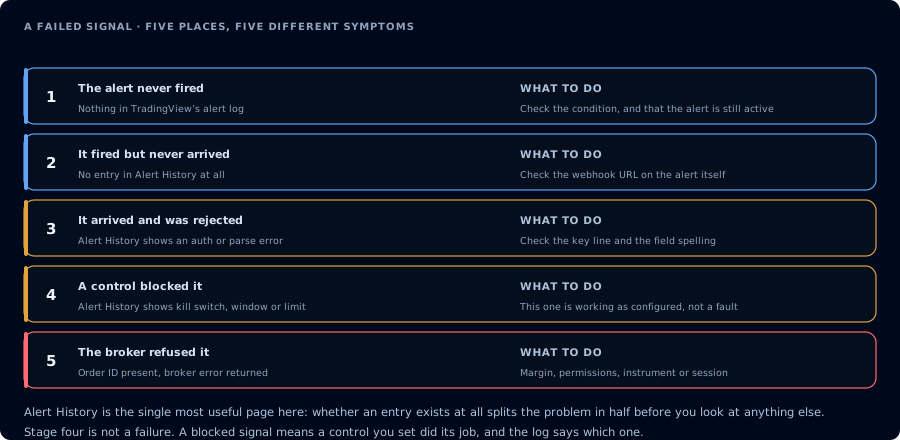
Five places a signal can die, each with the evidence that identifies which one it was.
A webhook signal travels through several systems:
TradingView alert  →  CrossTrade webhook receiver  →  CrossTrade routing
                  →  CrossTrade NT8 Add-On in NT8  →  NinjaTrader 8 order engine
                  →  Broker
Any of those steps can fail or behave unexpectedly. The common failure modes:
- Malformed payload (missing fields, wrong types).
- Wrong instrument mapping (
ESvsES 12-26). - Account mismatch (signal targets an account that is not connected).
- Position-state mismatch (signal expects flat; account holds a position).
- Order rejected by broker (max contracts, daily loss).
- Duplicate signal.
- Latency between alert and add-on routing.
- Copier mismatch on a follower account.
Each one produces a different shape in the data. The agent's job is to pull the right tools and identify which shape it is.
Signal lifecycle
The agent can correlate four data sources:
| Tool | Role |
|---|---|
GetSignalHistory | The webhook signal as CrossTrade received and interpreted it. |
GetActivityLog | The add-on's account of what it did with the signal. |
ListOrders / ListExecutions | The orders and fills NT8 actually produced. |
ListPositions / GetAccountSummary | The current state after the signal. |
A clean diagnosis matches the signal to an order, the order to a fill, and the fill to the new position state. When any link is missing, the agent points at the gap.
Debug workflow
For a single suspected miss:
Pull TradingView webhook signals on Sim101 between 14:30 and 14:35 today. For each signal, find the corresponding entry in GetActivityLog, the matching order in ListOrders, and the fill in ListExecutions. Reconstruct the timeline and tell me which step failed. Do not redact for me, but if I ask you to share the summary, redact account identifiers.
For a full-day audit:
Pull TradingView webhook signals for the last 24 hours on Sim101. Group by outcome: filled, rejected, no order created, no fill. For each non-filled group, list signals and the likely cause based on activity log entries. Do not place anything.
Prompt examples
"Alert fired but no order"
Signal at 14:32 today, action buy MES, quantity 1, account Sim101. Find that signal in GetSignalHistory. Look for matching entries in GetActivityLog at the same timestamp. Tell me what the add-on did and why no order was created.
"Order rejected, signal looked fine"
Order ID abc-321 was rejected. Pull GetOrder for that ID. Pull the webhook signal that originated it. Tell me the rejection reason and whether the signal was malformed.
"Strategy reversed instead of flattening"
A TradingView strategy was supposed to flatten at 14:45 but ended up reversing. Pull the webhook signal and any related order. Compare the payload to the position state at 14:44. Tell me whether the payload requested flat or reverse.
"Duplicate signal suspected"
Pull TradingView signals between 13:00 and 13:05 today. List any duplicates within 5 seconds of each other on the same instrument and account. Show the resulting orders.
Common errors
| Symptom | Likely cause | What to inspect |
|---|---|---|
| No order after signal | Payload missing required field, account not connected, or symbol mapping failed. | Payload contents, ListAccounts, instrument mapping. |
| Order placed but rejected | Max contracts, daily loss lockout, instrument expired. | GetOrder rejection reason. |
| Strategy reversed when expected to flat | Payload used action: reverse instead of flat. | The webhook payload. |
| Follower missed but leader filled | Copier-side issue. | GetActivityLog for the follower account. |
| Late fill | Latency between alert and fill, possibly broker side. | Compare signal timestamp to fill timestamp. |
How to use the public analyzer
The TradingView Webhook Signal Analyzer lets you paste a payload and see how CrossTrade would parse it. Use it for offline debugging before you grant an agent MCP access. The MCP path is for diagnosing real history; the analyzer is for sanity-checking a payload shape.
FAQ
Does the agent replay signals?
No. The agent reads the signal history. It cannot re-fire a signal.
Can the agent fix a malformed alert?
The agent can tell you what the payload should look like. You fix it in TradingView.
What if the signal targets an account that is not connected?
The agent will see the signal in history but no add-on activity for it. It will explain why.
Does this work for non-TradingView webhooks?
CrossTrade's webhook receiver accepts any source. The agent can analyze any signal in GetSignalHistory regardless of origin.