How to Troubleshoot CrossTrade MCP 401, 403, and 408 Errors
Three errors account for almost every CrossTrade MCP failure: 401 (auth), 403 (Elite or scope), and 408 (NinjaTrader not reachable). This tutorial gives you a quick error table and a step-by-step fix for each.
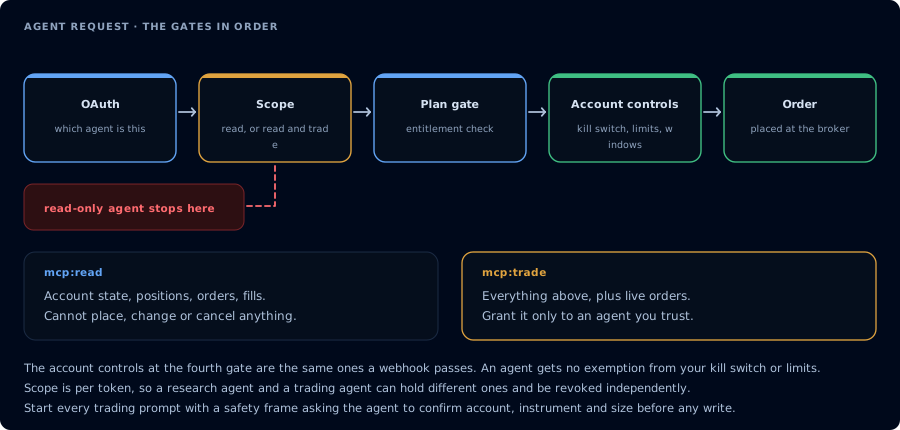
Four gates before an order. A read-only agent never reaches the third.
Direct answer
| Code | Meaning | Most common cause | Quick fix |
|---|---|---|---|
| 401 | Unauthorized | Token expired, revoked, or never issued | Reauthorize from CrossTrade AI Clients |
| 403 | Forbidden — MCP requires an Elite subscription | Account below Elite | Upgrade |
| 403 | Forbidden — insufficient_scope | Token is mcp:read; tool needs mcp:trade | Reauthorize at mcp:trade if the workflow needs writes |
| 408 | Request timeout | NinjaTrader closed or CrossTrade NT8 Add-On disconnected | Open NT8, confirm the add-on panel |
Quick error table
Use the table above first. If the symptom does not fit cleanly, read the sections below.
401 errors
Symptom: 401 Unauthorized from /v1/api/mcp or any tool call.
Causes:
- Token expired and the client did not refresh
- Token was revoked from the AI Clients page
- The client never completed OAuth (you closed the consent tab)
- The browser was signed in to a different CrossTrade account during consent
Fix:
- Open the AI Clients page.
- If the client appears there, click Revoke.
- In the MCP client, remove and re-add the CrossTrade server.
- Reauthorize. Approve the scope you need.
If 401 persists after a clean reauthorization, your system clock may be far off enough that PKCE timestamps fail. Confirm system time.
403 errors
There are two distinct 403s.
403 MCP requires an Elite subscription
The account is on Standard or Pro. OAuth works on all tiers (so the discovery flow does not fail), but tools/call is gated behind Elite.
Fix: upgrade at Subscriptions. REST and WebSocket remain available on Pro; only the MCP transport requires Elite.
403 insufficient_scope
The token is mcp:read, but the tool the agent tried to call needs mcp:trade. Examples: PlaceOrder, Cancel*, Flatten*, CompileNinjaScript, WriteNinjaScriptFile, RunStrategyBacktest, DeployStrategy.
Fix:
- If the workflow legitimately needs write access, revoke the current token and reauthorize at
mcp:trade. - If the workflow should be read-only, rewrite the prompt to prevent the agent from attempting the write.
Treat insufficient_scope as the safety system working, not a bug.
408 errors
Symptom: tool calls that need NT8 state time out with 408 Request Timeout or addon_disconnected.
Causes:
- NT8 is closed
- The CrossTrade NT8 Add-On panel inside NT8 shows disconnected
- A broker connection is down and the add-on is waiting on reconnect
- A modal dialog inside NT8 is blocking the main thread
Fix:
- Open NT8.
- Open the CrossTrade NT8 Add-On panel. Confirm status shows connected.
- Verify the version is
v1.13.0or higher. If not, update. - If the broker side is down, reconnect from NT8's Connections menu.
- Dismiss any modal dialogs inside NT8.
- Retry the MCP tool call.
Tools not listing
Symptom: the client connects, OAuth completes, but no CrossTrade tools appear.
Causes:
- Token was issued at
mcp:readbut the client expectedmcp:tradeand silently filtered the read tools - Add-on is below
v1.13.0 - NT8 is not running, so add-on-backed tools are hidden
- Client cached an older tool metadata snapshot
Fix:
- Call
GetMcpCapabilities. Look at thefeatureslist andnt8_version. - If the add-on side is empty, NT8 is not connected.
- If you need write tools, reauthorize at
mcp:trade. - Restart the client.
OAuth consent opens but tool calls fail
Symptom: OAuth completes; the token appears on AI Clients; tool calls return 401.
Causes:
- Token refresh failed silently
- Client cached an old client_id after a server-side reset
- The browser cookie used during consent expired before the redirect completed
Fix:
- Revoke from AI Clients.
- Remove the server from the client.
- Re-add the server.
- Complete consent in a fresh browser tab.
Client metadata stale
Symptom: client-side error mentioning "metadata", "discovery", or "registration".
Causes:
- The MCP discovery cache is stale
- The client was configured with the wrong URL
Fix:
- Confirm the URL is exactly
https://app.crosstrade.io/v1/api/mcp. - Restart the client.
- If the client supports forcing a metadata refresh, use it.
NT8 running but add-on disconnected
This is the most common 408. The user sees NinjaTrader 8 open and assumes everything is fine, but the CrossTrade NT8 Add-On is disconnected.
Fix:
- Open the CrossTrade NT8 Add-On panel inside NT8.
- Click reconnect if available.
- If the version is below
v1.13.0, update. - If the panel reports a deeper issue, contact CrossTrade support with the version string.
How to collect safe diagnostic information
When opening a support ticket, include:
- Client name and version (Claude Desktop, Claude Code, Cursor, ChatGPT plan, etc.)
- Approximate time of failure in UTC
- The tool name that failed
- The verbatim error string
- The result of
GetMcpCapabilitiesif it works
What to send:
- The error code and message
- The tool name
- The add-on version
What not to send:
- OAuth tokens or any header containing them
- Account numbers
- Email addresses
- Live balances or PnL
- Funded account identifiers
- Webhook secrets
If a screenshot includes any of these, redact before sending.