How to Choose Between mcp:read and mcp:trade
CrossTrade MCP issues tokens at one of two scopes: mcp:read for inspection and mcp:trade for writes. The OAuth scope is the floor — a mcp:read token cannot place an order, no matter what the prompt says. This tutorial helps you pick the smallest scope that works.
Direct answer
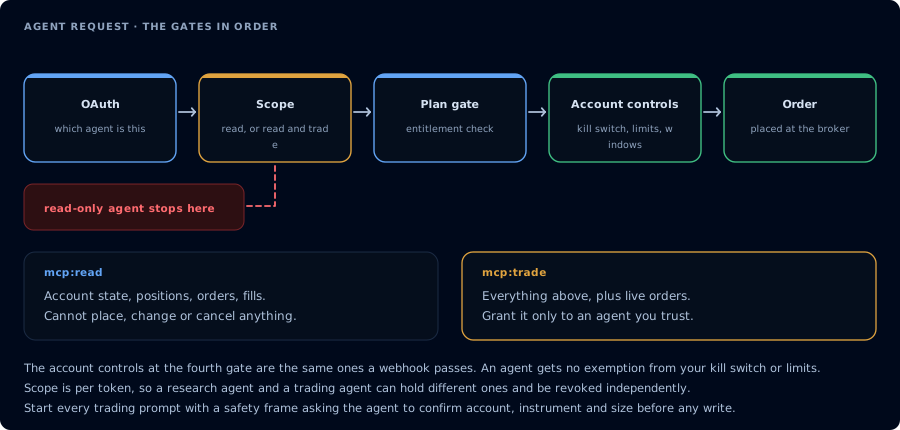
Four gates before an order. A read-only agent never reaches the third.
| Use this scope | If your workflow is |
|---|---|
mcp:read | Journal review, pre-session brief, webhook audit, copier diagnostics, daily report, strategy decay review, account inspection |
mcp:trade | NinjaScript compile/write, new backtest jobs, parameter sweeps, order placement with confirmation, strategy deployment, alert emission |
Default to mcp:read. Upgrade only when a specific workflow needs writes.
What each scope allows
mcp:read
ListAccounts,GetAccount,GetAccountSummary,GetWatermarksGetConnectionsListPositions,GetPosition,GetAllPositionsListOrders,GetOrder,GetOrderStatus,GetAllOrdersListExecutions,GetExecution,GetExecutionsByOrderIdGetQuote,GetBars,MarketInfo,GetVolumeProfile,GetOrderFlow,GetIndicatorValueGetSignalHistory,GetActivityLog,GetJournalTradesGetNinjaScriptHelp,SearchNinjaScriptSymbols,LookupNinjaScriptSymbolListNinjaScriptFiles,ReadNinjaScriptFile,ListCompiledSnippetsGetBacktestResult,GetCompileResult,GetMcpJob,ListMcpJobsListAllStrategies,ListStrategies,GetStrategy,GetStrategyStateListDeployedStrategies,GetDeployedStrategyStateListWorkspaces,ListDrawings,ListAlerts
mcp:trade (in addition to read)
PlaceOrder,Change,CancelReplace,Cancel,CancelOrders,CancelAllOrders,CancelAndBracket,FlatPlaceClosePosition,Reverse,ReversePosition,Flatten,FlattenEverythingCompileNinjaScript,WriteNinjaScriptFile,DeleteCompiledSnippetRunStrategyBacktest,RunBacktest,CancelMcpJobDeployStrategy,StartStrategy,StopStrategy,CloseStrategy,EnableStrategy,DisableStrategySaveWorkspace,LoadWorkspace,OpenChartAddDrawing,RemoveDrawingEmitMcpAlert,CreateAlert,RemoveAlertConnect,Disconnect,EnsureReplayConnectionUpdateConfiguration
Which workflows need which scope
| Workflow | Scope |
|---|---|
| Daily journal review | mcp:read |
| Pre-session risk brief | mcp:read |
| TradingView webhook audit | mcp:read |
| Trade copier diagnostics | mcp:read |
| Weekly strategy decay review | mcp:read |
| Account inspection on a funded account | mcp:read |
| NinjaScript compile loop | mcp:trade |
| Strategy Analyzer backtest jobs | mcp:trade |
| Parameter sweep | mcp:trade |
| Order placement with confirmation | mcp:trade |
| Cancel or flatten | mcp:trade |
| Strategy deployment | mcp:trade |
| Alert emission | mcp:trade |
How to think about the upgrade decision
Before upgrading from mcp:read to mcp:trade:
- Identify the specific workflow that needs the write.
- Write the prompt that gates the write with state checks and explicit confirmation.
- Decide which account you will run on (Sim101 first).
- For funded accounts, verify the firm's automation policy.
- Plan how you will revoke the token when the session is over.
The OAuth scope is binary. The prompt is what makes a mcp:trade token actually safe.
How to upgrade
Scope upgrade is not supported in place. Revoke the existing token and reauthorize at the new scope.
- Open the CrossTrade AI Clients page.
- Revoke the current client.
- In your MCP client, remove and re-add the CrossTrade server.
- Complete OAuth; choose
mcp:tradeon the consent screen.
How to downgrade
Same procedure. Revoke and reauthorize at mcp:read.
What if I need both?
Run two clients. Authorize one at mcp:read for daily review and inspection. Authorize a second at mcp:trade only for the sessions that need writes. Revoke the trade-scoped client when you are done.
Related
- Docs: MCP Scopes
- Learn: Authenticate CrossTrade MCP
- Learn: Revoke AI Client Access
- Learn: First Read-Only AI Trading Agent
- Learn: Trade-Enabled AI Agent Workflows