How to Vibe Code a NinjaScript Strategy in NinjaTrader 8
Vibe coding can get an idea into code quickly. CrossTrade MCP turns the idea into a verified compile, backtest, and review loop. This tutorial walks the full path from natural-language spec to a Sim101-tested strategy in a single conversation.
What vibe coding means for a futures trader
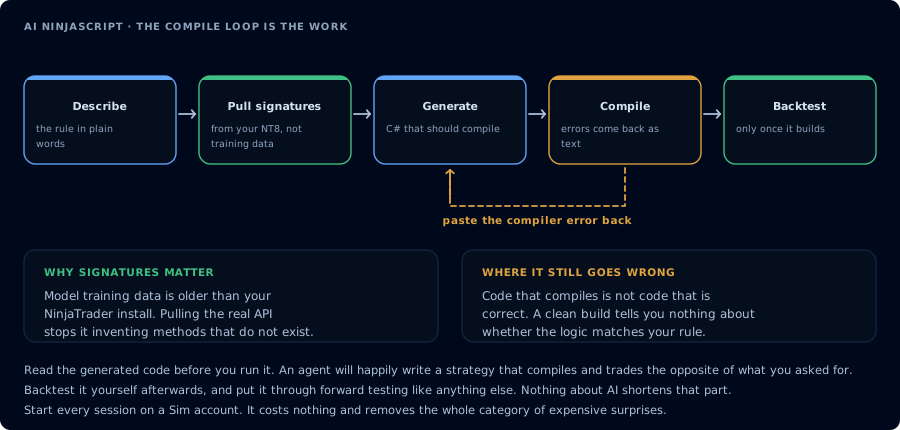
The first attempt rarely compiles. Feeding the error back is the loop that does the work.
In this context, vibe coding means describing a trading strategy in plain English and letting an AI agent draft the NinjaScript, then using compile and backtest feedback to refine it. The model is good at the draft. The draft is not the strategy. The draft is the starting point that needs verification.
Why trading strategies need more than generated code
- Compile correctness. The model may invent NT8 methods or pick removed overloads.
- Platform compatibility. Session templates, instrument symbols, and bar treatment differ between drafts and your install.
- Backtest sanity. A backtest in a generic engine is not a backtest in NT8 Strategy Analyzer.
- Risk constraints. Strategy code does not enforce daily loss limits.
- Prop-firm constraints. The strategy code does not enforce firm rules. The firm's risk system does.
Prerequisites
| Requirement | Detail |
|---|---|
| CrossTrade subscription | Elite |
| CrossTrade NT8 Add-On | v1.13.0 or higher |
| NinjaTrader 8 | Running, broker connected |
| MCP client | Claude Desktop, Claude Code, or Cursor |
| Scope | mcp:trade for compile, write, and backtest |
| Account | Sim101 |
Run the entire workflow on Sim101 first. Do not deploy generated strategies to a live or funded account until you have validated behavior over several sessions.
Example strategy idea
A conservative educational example: an MES 5-minute EMA crossover with an ATR-based trailing stop, limited to two trades per session during the regular session open. This is not a profitable strategy claim. It is a familiar shape for the tutorial.
Step 1: Write the natural-language strategy spec
Write the spec yourself before the agent gets involved. Use trader language, not C#.
Strategy: SampleEmaCross
Instrument: MES 06-26
Bars: 5-minute
Entry: Long when 9-EMA crosses above 21-EMA.
Exit: ATR-based trailing stop, multiplier 2.0.
Risk: One contract. Max two trades per session. No averaging down.
Time: 09:30 to 11:00 ET only.
Account: Sim101.
Step 2: Ask the AI to inspect NinjaScript signatures first
Use this prompt:
I want to prototype an educational NinjaScript strategy for Sim101 only. Before
drafting, call GetNinjaScriptHelp on EMA, ATR, CrossAbove, and SetTrailStop.
Restate the chosen overloads. Then summarize the implementation plan. Do not
write code yet.
The agent calls the tools, lists the overloads, and restates the plan. Read it. Push back if anything looks wrong.
Step 3: Generate the strategy
Draft SampleEmaCross from the plan above. Show me the source. Do not compile yet.
Read the source. Compare it to your spec. If the agent invented session logic or used a different time filter than you specified, ask for a rewrite before compile.
Step 4: Compile in NT8 through CrossTrade MCP
CompileNinjaScript(in_memory: true). Do not WriteNinjaScriptFile yet.
In-memory compile runs inside NT8's AppDomain without touching disk. If it fails, you have not corrupted anything.
Step 5: Repair compile errors
For each error, explain it in plain English. For every unresolved identifier,
LookupNinjaScriptSymbol and tell me the correct shape. Rewrite the offending
lines. Recompile until green.
Typical iterations: two to four. Persistent failure usually means the spec is ambiguous, not that the model cannot code.
Step 6: Run a bounded backtest
After a green compile, ask for the file write with explicit confirmation:
WriteNinjaScriptFile only after I confirm. After confirm, RunStrategyBacktest on
Sim101 over the last 30 trading days, 5-minute bars, commission $1.27 per
round-trip, slippage 1 tick. Show the metrics block.
Realistic commission and slippage matter. A zero-cost backtest is a lie.
Step 7: Review metrics
Read the metrics block. Apply gates:
- Profit factor above your minimum
- Max drawdown below a hard dollar cap
- Trade count meaningful (not 8)
Ask the agent to also report the trade list, not just the metrics. The trade list reveals whether entries and exits match the spec.
Step 8: Identify overfitting risks
List five reasons this generated strategy could be overfit to the sample period.
Be specific. Tell me what to test to falsify the result.
If the agent cannot produce five reasons, you have not given it enough context.
Optional: sweep parameters within bounds
After the single-shot backtest, a bounded parameter sweep can tell you whether the result was a one-cell fluke or part of a region of stable profitability. Bound the sweep tightly. A wide sweep on a small data window almost always overfits.
Sweep the ATR multiplier from 1.5 to 3.0 in 0.25 steps. Show the top three. Re-run
a full single backtest on the winner. Flag any combination that looks like a noise
fit (very narrow profitability cluster, tiny trade count, or extreme parameter
values).
If the winner sits in a one-cell island while everything around it is unprofitable, treat it as noise and re-run on a fresh out-of-sample window.
Step 9: Add guardrails before deployment
If you plan to keep iterating, document:
- The exact session hours
- Max contracts per the account
- News-window prohibitions (firm-specific)
- EOD-flatten requirements
- Drawdown buffer for the agent to refuse trades inside
These belong in the system prompt for any future trade-enabled run.
Step 10: Keep it in Sim101 unless explicitly approved
Do not move a vibe coded strategy to a funded account in this tutorial. Run it on Sim101 for several sessions. Confirm the trade list matches the spec live. Only then consider a separate decision about funded-account suitability, with the firm's rules verified.
Prompt library
Save these to your library:
[Spec to plan]
Turn this strategy spec into a NinjaScript implementation plan: <spec>. List the
NT8 types and methods you intend to use. Confirm each with GetNinjaScriptHelp
before drafting.

[Compile and repair]
CompileNinjaScript(in_memory: true). Explain every error. LookupNinjaScriptSymbol
on each unresolved identifier and rewrite. Recompile until green.

[Backtest with gates]
RunStrategyBacktest on Sim101, <range>, <bars>, commission $<x>, slippage <ticks>.
Apply gates: profit factor > <pf>, max drawdown < $<dd>, trade count > <n>.
Report pass or fail.

[Devil's advocate]
List five reasons this generated strategy should not go to a live or funded
account. Be specific.
Common mistakes
- Optimizing to the sample period. Wide sweeps on small windows. Re-run on a fresh out-of-sample window before believing any number.
- Ignoring fees and slippage. A zero-cost backtest is a lie about live conditions. Use realistic commission and at least one tick of slippage.
- Ignoring news windows. A strategy that looks great across an FOMC day usually does not survive the next one. Encode news prohibitions explicitly.
- Ignoring prop firm max contracts. The strategy may generate orders that breach the per-account cap. The firm's risk system enforces it; your backtest does not.
- Assuming backtest fills match live fills. They sometimes do not, especially in fast markets. Confirm a sample of fills against the live trade list on Sim101 before scaling.
Troubleshooting
| Symptom | Likely cause | Fix |
|---|---|---|
| Compile loops on the same error | Agent skipping LookupNinjaScriptSymbol | Force the lookup explicitly |
| Backtest returns no trades | Wrong time filter or instrument | Read the agent's draft for the offending block |
| Metrics look great but trade count is 8 | Insufficient data window | Widen the range or pick a more active period |
| Sweep winner sits in a one-cell island | Noise fit | Re-run on a fresh out-of-sample window |
Related
- Main site: Vibe Coding NinjaScript
- Learn: Connect Claude Code
- Learn: Connect Cursor
- Learn: Backtest AI-Generated NinjaScript
- Learn: Debug NinjaScript Compile Errors with AI
- Docs: NinjaScript AI Workflow