How to Write a NinjaScript Strategy with ChatGPT
ChatGPT plus CrossTrade MCP turns a plain-English strategy spec into NinjaScript that compiles in your NT8 install and backtests through Strategy Analyzer. This tutorial uses ChatGPT specifically; for Claude, see How to Write a NinjaScript Strategy with Claude.
What ChatGPT brings, and what MCP adds
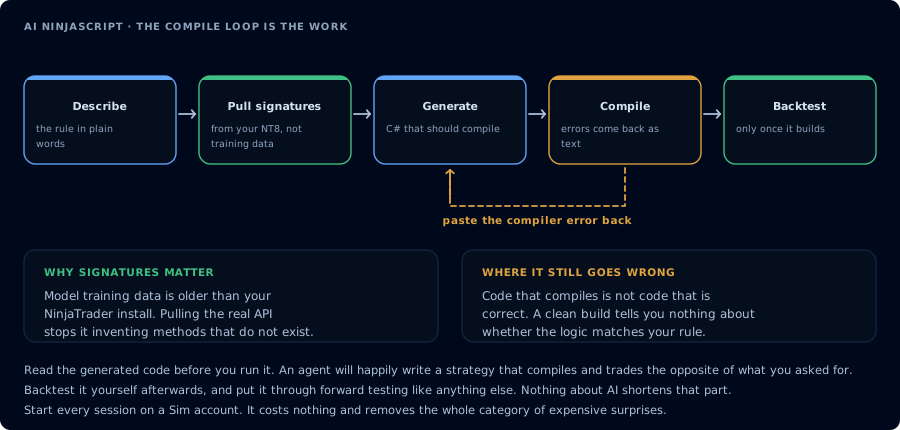
The first attempt rarely compiles. Feeding the error back is the loop that does the work.
ChatGPT alone is excellent at translation. It can take a plain-English strategy description and produce a credible first draft of NinjaScript. It is fluent in C# patterns and competent at refactoring after you point out errors.
What ChatGPT does not have, by default, is access to your install. It cannot know:
- The exact set of NinjaScript indicators, methods, and overloads available in your NT8 install.
- The behavior of NT8's Strategy Analyzer engine on your specific instrument and time range.
- Your account state, position, working orders, and daily loss room.
- Your TradingView webhook history, CrossTrade NT8 Add-On activity log, or matched-trade journal.
Without tools, the model has to guess. CrossTrade MCP closes the gap with typed tools that validate against your install:
GetNinjaScriptHelp,SearchNinjaScriptSymbols,LookupNinjaScriptSymbolground the draft in real symbols.CompileNinjaScript(in_memory: true)validates without disk writes.WriteNinjaScriptFilewrites only after a green compile and your confirmation.RunStrategyBacktestdrives Strategy Analyzer; metrics are bit-identical to the UI for the documented reference.DeployStrategyandGetDeployedStrategyStatelet you deploy and verify.
The steps below run those tools in sequence.
Prerequisites
| Requirement | Detail |
|---|---|
| CrossTrade subscription | Elite |
| CrossTrade NT8 Add-On | v1.13.0 or higher |
| NinjaTrader 8 | Running |
| ChatGPT | A plan that supports remote MCP connectors |
| Scope | mcp:trade |
| Account | Sim101 |
If you have not set up ChatGPT with CrossTrade MCP yet, see How to Connect ChatGPT to NinjaTrader 8 first.
Run the entire workflow on Sim101. Do not move generated strategies to a live or funded account during this tutorial.
Step 1: Write the strategy spec
In trader language, not C#.
Strategy: SampleEmaCross
Instrument: MES 06-26
Bars: 5-minute
Entry: Long when 9-EMA crosses above 21-EMA.
Exit: ATR-based trailing stop, multiplier 2.0.
Risk: One contract. Max two trades per session. No averaging down.
Time: 09:30 to 11:00 ET only.
Account: Sim101.
Step 2: Ask ChatGPT to ground the draft in real symbols
I want to prototype an educational NinjaScript strategy for Sim101 only.
Before drafting, call GetNinjaScriptHelp on EMA, ATR, CrossAbove, and
SetTrailStop. Restate the overloads you intend to use.
ChatGPT calls the help tools and reports the overloads. Read the result. Push back on anything wrong.
Step 3: Generate the strategy
Draft SampleEmaCross from the spec above. Show me the source. Do not compile
yet.
ChatGPT writes the source. Compare against the spec.
Step 4: Compile and repair
CompileNinjaScript(in_memory: true). For each error, explain it in plain English.
For every unresolved identifier, LookupNinjaScriptSymbol and rewrite the offending
line. Recompile until green. Do not write the file yet.
Compile errors arrive as structured diagnostics. The agent reads them, identifies the unresolved or mistyped names, calls LookupNinjaScriptSymbol for each, and rewrites the offending lines. Two or three iterations are usually enough. If the loop stalls on the same error, paste the full diagnostic back to ChatGPT and force a SearchNinjaScriptSymbols on a different keyword. The fix is almost always one symbol away.
Step 5: Write the file with confirmation
After I confirm, WriteNinjaScriptFile to Strategies/SampleEmaCross.cs. Then run
one more CompileNinjaScript without in_memory to confirm the disk version
compiles.
Step 6: Backtest on Sim101
RunStrategyBacktest on Sim101, last 30 trading days, 5-minute bars, commission
$1.27 per round-trip, slippage 1 tick. Apply gates: profit factor > 1.25, max
drawdown < $500, trade count > 40. Report pass or fail per gate.
Use realistic commission and slippage. A zero-cost backtest is a lie about live conditions. Read the metrics, then read the trade list. The metrics can pass while the trades happen at the wrong time or on the wrong instrument; the trade list is the truth source. If gates fail, iterate the prompt, not just the parameters.
Step 7: Devil's advocate review
List five reasons this generated strategy should not go to a live or funded
account. Be specific.
If the agent cannot produce five reasons, you have not given it enough context.
Final checklist
Before considering anything beyond Sim101:
- Green compile written to disk.
- Backtest metrics pass your gates with realistic commission and slippage.
- Trade list matches the spec, not just the metrics block.
- Parameter sweep winner (if you ran one) is not a noise fit.
- Risk review is candid, not hopeful.
- Sim101 session ran for several days without surprises.
- If a funded account is the target, the firm permits the strategy.
If any item fails, you are not ready. Iterate.
Troubleshooting
| Symptom | Fix |
|---|---|
403 insufficient_scope | Reauthorize at mcp:trade |
| Compile keeps failing | Force LookupNinjaScriptSymbol on each unresolved identifier |
| Backtest returns no trades | Check the time filter and instrument symbol |