How to Write a NinjaScript Strategy with Claude
Claude (Desktop or Code) is MCP-native and a natural fit for vibe coding NinjaScript. CrossTrade MCP gives Claude typed access to your NT8 symbol surface, the in-memory compile, and Strategy Analyzer. This tutorial walks the full path.
Prerequisites
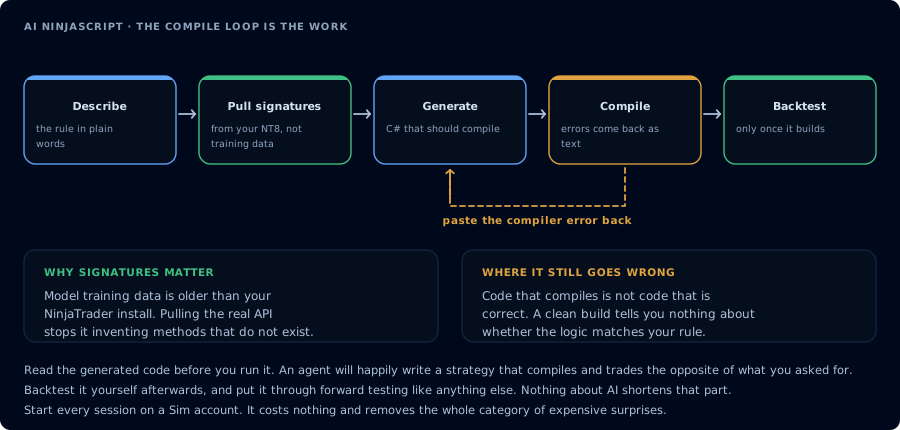
The first attempt rarely compiles. Feeding the error back is the loop that does the work.
| Requirement | Detail |
|---|---|
| CrossTrade subscription | Elite |
| CrossTrade NT8 Add-On | v1.13.0 or higher |
| NinjaTrader 8 | Running |
| Claude | Claude Desktop or Claude Code |
| Scope | mcp:trade |
| Account | Sim101 |
If you have not set up Claude with CrossTrade MCP, see How to Connect Claude to NinjaTrader 8 or How to Use Claude Code with NinjaTrader 8.
Sim101 only
Run on Sim101 first. Do not move generated strategies to live or funded accounts during this tutorial.
Step 1: Write the strategy spec
Strategy: SampleEmaCross
Instrument: MES 06-26
Bars: 5-minute
Entry: Long when 9-EMA crosses above 21-EMA.
Exit: ATR-based trailing stop, multiplier 2.0.
Risk: One contract. Max two trades per session. No averaging down.
Time: 09:30 to 11:00 ET only.
Account: Sim101.
Step 2: Ground the model in real symbols
Before drafting, call GetNinjaScriptHelp on EMA, ATR, CrossAbove, and
SetTrailStop. Restate the chosen overloads.
Claude calls the help tools. Read the result.
Step 3: Draft the strategy
Draft SampleEmaCross from the spec. Do not compile yet. Show the source.
Step 4: Compile and repair
CompileNinjaScript(in_memory: true). For every unresolved identifier,
LookupNinjaScriptSymbol and rewrite. Recompile until green.
Two or three iterations usually enough.
Step 5: Write the file with confirmation
After I confirm, WriteNinjaScriptFile to Strategies/SampleEmaCross.cs.
Step 6: Backtest
RunStrategyBacktest on Sim101, last 30 trading days, 5-minute bars, commission
$1.27 per round-trip, slippage 1 tick. Apply gates: profit factor > 1.25, max
drawdown < $500, trade count > 40. Report pass or fail per gate.
Step 7: Risk review
List five reasons this generated strategy should not go to a live or funded
account. Be specific.
Claude Desktop vs Claude Code
- Claude Desktop: chat-driven; good for one-off drafts and discussions about the strategy.
- Claude Code: workspace-driven; better for multi-file iteration, version control of the strategy, and back-to-back compile cycles.
Both run the same MCP loop. See How to Use Claude Code with NinjaTrader 8 for the CLI workflow.
Troubleshooting
| Symptom | Fix |
|---|---|
403 insufficient_scope | Reauthorize at mcp:trade |
| Compile keeps failing | Force LookupNinjaScriptSymbol |
| Backtest returns no trades | Check time filter and instrument symbol |