BluSky Trading Company: How to Pass the Evaluation and Manage Your Funded Accounts
BluSky offers a fast path to futures funding with an 8-day evaluation. Here's how the program works and how CrossTrade helps you pass and manage funded accounts on NinjaTrader 8.


Excerpt: BluSky offers a fast path to futures funding with an 8-day evaluation. Here's how the program works and how CrossTrade helps you pass and manage funded accounts on NinjaTrader 8.
BluSky Trading Company is a U.S.-based futures prop firm with a straightforward funding path and a reputation for responsive support. Their evaluation structure rewards consistency over home runs, and the timeline from first trade to real withdrawals can be as short as nine days.
This post covers how BluSky's program works, what the rules are, and how to use CrossTrade to enforce those rules automatically so you don't blow an evaluation on a moment of poor discipline.
How BluSky's Funding Path Works
BluSky uses a four-stage progression from evaluation to live funded trading.
Stage 1: Evaluation. You trade a simulated account (sizes from $25K to $300K) and need to hit a profit target while staying within drawdown limits. BluSky's defining rule is the 30% consistency requirement: no single trading day can account for more than 30% of your profit target. There's no minimum number of trading days, so with the consistency rule in play, you can pass in as few as four days. If you need more time, your progress carries over when you renew after 30 days.
Stage 2: BluLive (Buffer Stage). After passing evaluation, you enter a transitional phase. Daily loss limits are removed but the 30% consistency rule stays. The profit you earn here becomes your drawdown buffer for the next stage. This buffer isn't withdrawable, but it protects your downside once you're trading for real money.
Stage 3: Sim Funded Account. Once you hit BluLive's profit target, BluSky transitions you to a Sim Funded Account where you can withdraw real profits up to $10,000 per account. Your BluLive buffer carries over as your safety net.
Stage 4: Live Brokerage Account. The final stage. You trade real capital, keep up to 90% of profits, and withdraw anytime as long as you maintain your minimum balance. Payouts requested before 11:00 AM ET process the same day.
Pricing
BluSky offers Launch Plans starting at $49 for a $50K Premium account and $69 for a $200K Static Growth account. Standard evaluations start around $105 for a $25K account and scale with size. Most plans don't charge activation or setup fees after evaluation.
Verify current pricing on the BluSky website — prop firms adjust plans frequently.
Find the CrossTrade workflow that fits
Explore webhook automation, trade copying, account controls and trade review for NinjaTrader 8 and Tradovate.
The Rules That Matter
The rules you need to care about during evaluation and BluLive:
30% Consistency Rule. If your profit target is $3,000, no single day can exceed $900 in profit. If you do hit a big day, the target adjusts upward. This is the rule most traders trip on because it punishes the exact behavior that feels like winning.
Trailing or Static Drawdown. Your maximum loss threshold during evaluation. Breach it and the evaluation is over.
Daily Loss Limits. Active during evaluation (removed in BluLive). Exceed the daily limit and your account is paused or terminated depending on the plan.
Flat at Session Close. Most prop firms require no overnight positions. BluSky is no exception during evaluation.
Every one of these rules is something you can enforce automatically with CrossTrade. Let's get into how.
Using CrossTrade with Your BluSky Accounts
BluSky provides a free NinjaTrader 8 license and connects via Rithmic. Once your BluSky account is connected to NT8, CrossTrade's Add-On gives you tools that are specifically built for the challenges prop firm traders face.
Enforce Your Daily Loss Limit Automatically
The NinjaTrader Account Manager (NAM) monitors your account's P/L every 2.5 seconds. Set your loss threshold to match BluSky's daily loss limit, and NAM will flatten your account and disable further trading the moment you hit it. No discipline required — the system handles it.
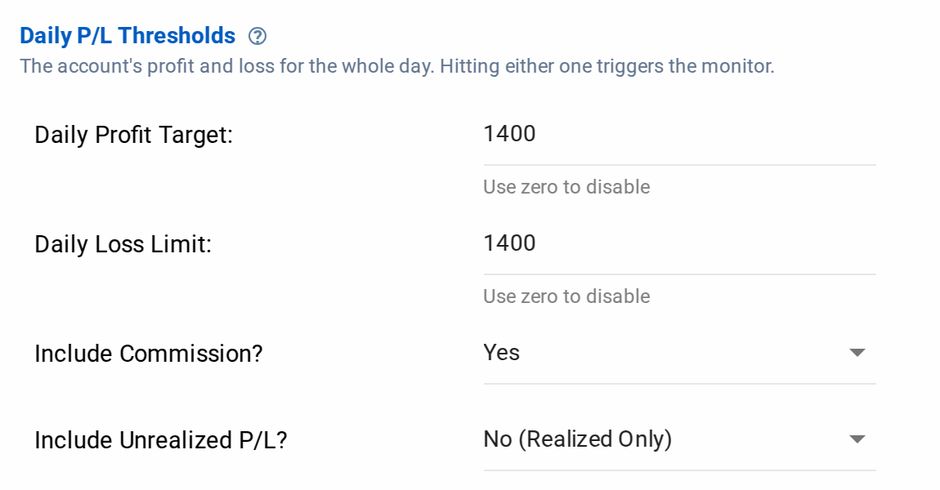
A daily profit target and loss limit, enforced by the Account Manager
During evaluation, this is your safety net. One bad trade spiraling into a blown account is the most common reason traders fail evaluations. NAM prevents it mechanically.
You can also set a profit threshold to lock in gains and stop trading when you're ahead. If your consistency rule means you can't exceed $900 in a single day, set NAM's profit target to $850 and walk away clean.
For a full walkthrough, see the NAM Setup Guide.
Restrict Your Trading Hours
Trading Windows let you define exactly when alerts and orders are allowed through to NT8. If you know your best trading hours are 9:30 AM to 11:00 AM ET, set a window for that range. Outside of it, CrossTrade blocks all signals. This prevents the 2:30 PM revenge trade that undoes a good morning.
Auto-Flatten Before the Close
NAM's End-of-Day Auto-Flattening closes all positions and cancels all orders at a time you specify. Set it for 15 minutes before market close and you'll never accidentally carry a position overnight and violate a prop firm rule.
Automate Your Strategy from TradingView
If you're running a strategy on TradingView, CrossTrade bridges your alerts to NT8 in an average of 34 milliseconds. Your TradingView strategy generates signals, CrossTrade delivers them to NinjaTrader, and orders execute in your BluSky account. One webhook payload, fully automated.
For strategies that generate both entries and exits, Strategy Sync compares TradingView's expected position against NT8's actual position before every order. If something gets out of sync (missed signal, connection drop, manual intervention), the system can block the order or flatten your account to prevent cascading errors. During a prop evaluation, a state drift that goes undetected can end your account. Strategy Sync prevents it.
See How to Automate TradingView Strategies with CrossTrade for the full setup.
Run Multiple BluSky Accounts at Once
If you're running multiple evaluations or funded accounts simultaneously, CrossTrade scales with you. Multi-Account Placement sends a single webhook to multiple NT8 accounts at once — one alert, one payload, every account gets the same order. No duplicating alerts, no manual copying.
For more sophisticated setups, the Trade Copier replicates orders from a leader account to any number of followers with independent position sizing, instrument filtering, and Auto-Sync to keep everything aligned. Leader trades ES on a funded account, followers trade MES on evaluation accounts at 0.5x ratio. The copier handles it.
See the Trade Copier for features and setup.
Monitor Lock for Discipline
Once NAM flattens your account after hitting a threshold, Monitor Lock prevents you from restarting the monitor during the session. You're locked out until after market close. This exists specifically for the moment when you're tempted to override your risk rules and "just take one more trade." The system makes the disciplined choice for you.
Connecting Your BluSky Account to NinjaTrader
BluSky uses Rithmic for data and execution. The connection steps:
- Download Rithmic RTrader Pro and login with your BluSky credentials
- Keep RTrader Pro running (minimize it)
- In NinjaTrader, go to Connections → Configure → select "Rithmic for NinjaTrader Brokerage"
- Enter your BluSky credentials, set System to "Rithmic Paper Trading (Chicago)," Account Type to Simulation
- Connect and verify the green status indicator
For detailed steps and troubleshooting, see the NinjaTrader 8 Prop Firm Connection Guide.
Once connected, install the CrossTrade Add-On and follow the Set Up Guide to link your webhook URL and start sending orders.
FAQ
How fast can I complete the BluSky evaluation? With the 30% consistency rule, the minimum is about four trading days for the evaluation itself. Add BluLive and your first Sim Funded day, and you could be withdrawing real profits by Day 9. That timeline assumes consistent profitability every day, so most traders take longer.
Can I use CrossTrade's Account Manager during evaluation? Yes. NAM works on any NT8 account including sim and prop firm accounts. Set your thresholds to match BluSky's rules and let NAM enforce them automatically.
Can I automate my BluSky account with TradingView? Yes. Any TradingView strategy or indicator that generates alerts can be automated through CrossTrade into your BluSky account on NT8. See the automation guide.
Does CrossTrade work with multiple BluSky accounts? Yes. Use Multi-Account Placement for identical orders across accounts, or the Trade Copier for more advanced setups with independent sizing and filtering per account.
For a comparison of prop firms and which ones work best with CrossTrade, see Topstep vs Tradeify vs My Funded Futures. For more on prop farming multiple accounts, see Unlock Prop Farming.
New to CrossTrade? Start your free 7-day trial and connect TradingView to NinjaTrader in minutes.