NinjaTrader 8 Trade Copier Comparison: CrossTrade vs Replikanto vs Apex vs Affordable Indicators
A full breakdown of our NT8 Trade Copier's functionality and comparison against the other options on the market.

The NinjaTrader trade copier market is crowded with solutions promising seamless multi-account management. But when you dig into the technical architecture and real-world functionality, the differences become stark. We put CrossTrade head-to-head against three popular competitors—Replikanto, Apex, and Affordable Indicators—to show you why CrossTrade isn't just better, it's fundamentally different.
The Architecture Problem: Why Traditional Copiers Break Down
Most trade copiers operate on a rigid leader-follower model. One account leads, others follow. Simple enough until you need flexibility. Want Account A to copy from B while B copies from C? Want to create hedging relationships or circular copying networks? Traditional copiers force you into their predetermined structure.
CrossTrade eliminates this limitation entirely with multi-directional copying. Any NinjaTrader 8 account can simultaneously copy from and send trades to any other account in your network. This isn't a minor feature upgrade, it's a complete reimagining of how copying architecture should work.
Competitor Reality Check:
- Replikanto: Locked into leader-follower hierarchy. One leader, multiple followers. Period.
- Apex: Single-direction copying only. Cannot create circular or bidirectional relationships.
- Affordable Indicators: Traditional leader-follower structure with no multi-directional support.
CrossTrade lets you build sophisticated trading networks where your main account copies to prop challenges while those same prop accounts feed specific setups back to a master hedging account. This level of architectural flexibility doesn't exist anywhere else.
The Synchronization Crisis: Edge Cases Kill Profitability
Here's where things get brutal. Traditional copiers operate on reactive logic: when X happens, do Y. Sounds fine until real-world scenarios hit:
- Partial fills on leader but full fills on follower
- Connection drops mid-trade
- You accidentally close a position on the follower
- NinjaTrader crashes and restarts
- Missed copy signals due to timing
Most copiers handle these with configuration checkboxes. Enable this. Disable that. Set threshold here. Hope it works. The problem? You're still manually managing edge cases, and gaps always slip through.
CrossTrade's Solution: Auto-Sync
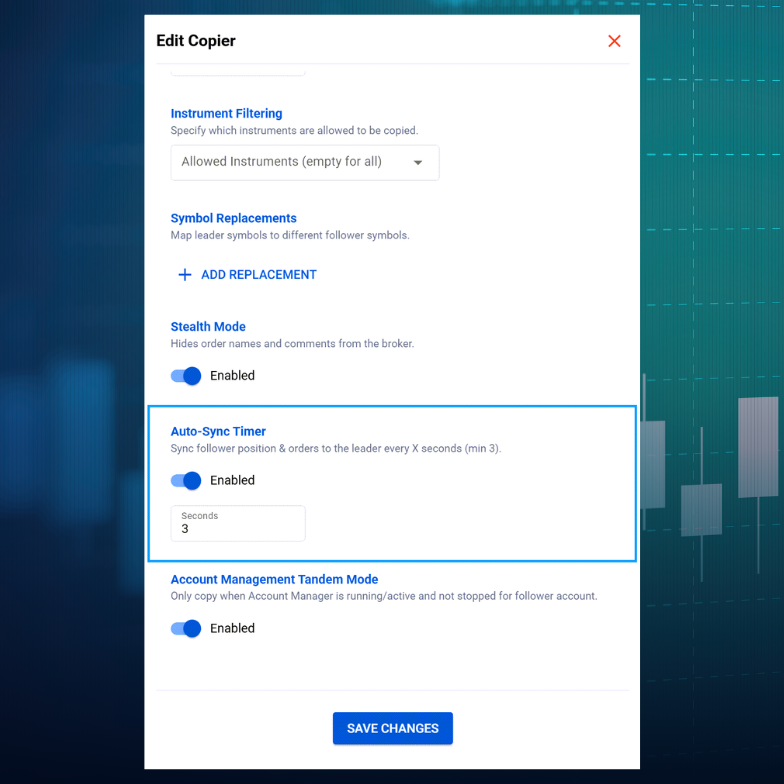
Auto-Sync represents a paradigm shift. Instead of trying to predict and configure every edge case, CrossTrade continuously monitors and realigns your accounts every 3 seconds. It acts as an insurance policy that fixes discrepancies automatically based on your copier configuration.
Accidentally close a position? Auto-Sync reopens it to match your leader account. Connection disruption? Upon reconnection, Auto-Sync immediately resumes synchronization. NinjaTrader restart? Your copying relationships survive and resume without manual intervention.
How Competitors Handle This:
- Replikanto: Requires manual configuration for edge cases. Has a "Follower Guard" feature that closes positions and disarms copying in certain situations, requiring manual intervention.
- Apex: No automatic synchronization. Relies on proper setup and hopes nothing breaks.
- Affordable Indicators: Uses "Executions Mode" to simplify copying, but still lacks continuous synchronization monitoring.
The difference is fundamental: competitors make you configure for known problems. CrossTrade solves the entire category of synchronization issues with one intelligent system.
Prop Firm Compliance: Stealth Mode That Actually Works
Prop firms are increasingly sophisticated at detecting automation. Order timing, naming conventions, fill patterns—they analyze it all. Getting flagged for automation can end your trading relationship instantly.
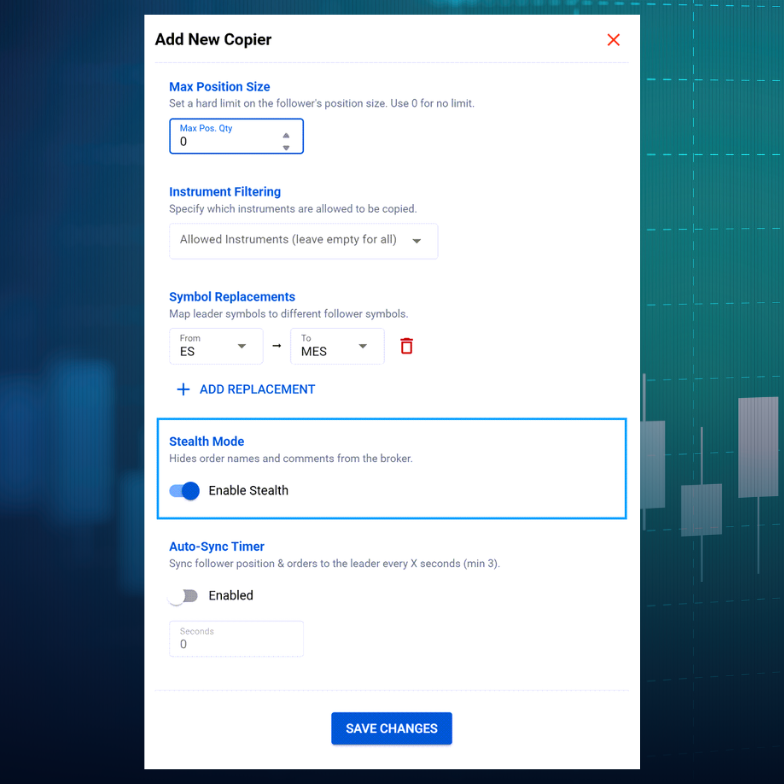
CrossTrade's Stealth Mode eliminates all traces of automation from your copied trades. Orders appear identical to manual entries with natural timing characteristics and authentic order flow patterns. But here's what makes it bulletproof: Stealth Mode can recover its order mapping relationships even after catastrophic failures like connection losses or complete NinjaTrader restarts.
Competitor Approaches:
- Replikanto: Added Stealth Mode in recent updates (version 1.6+), relatively new feature with less proven track record
- Apex: No stealth mode. Your copied trades look like copied trades.
- Affordable Indicators: Focuses on risk management compliance, but no stealth functionality for hiding automation signatures
For serious prop traders managing multiple challenges, only CrossTrade was built from the ground up with prop firm compliance as a core architectural requirement.
The Symbol Replacement Gap
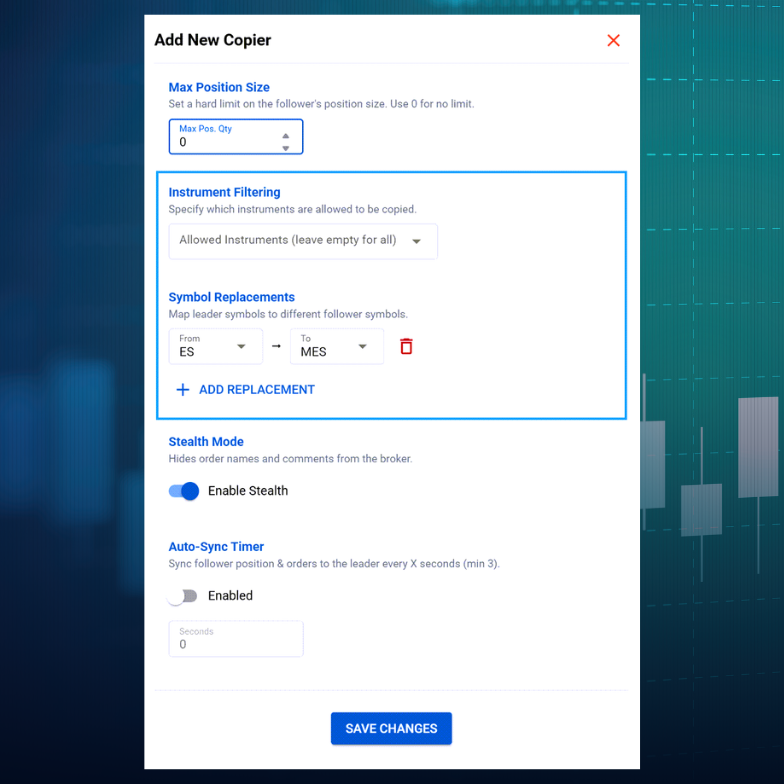
Trading ES on your main account but need to copy to a smaller account using MES? This seems like a basic feature, but implementation varies wildly.
CrossTrade handles symbol replacement with full contract mathematics automatically. When your source account trades ES, the follower executes the same strategy using MES, maintaining identical trade logic while adjusting for appropriate contract sizing. All timing and risk management relationships are preserved.
Competitor Comparison:
- Replikanto: Offers "Cross Order" with pre-defined instrument pairs (ES↔MES, NQ↔MNQ, etc.). Customizable but requires manual configuration.
- Apex: Supports mini-to-micro crossovers with manual ratio setup
- Affordable Indicators: Contract type selection (Mini/Micro) with size multipliers, but less automated than CrossTrade
CrossTrade's implementation is cleaner and more intelligent, handling the contract mathematics behind the scenes without requiring traders to calculate ratios manually.
TradingView Integration: The Game-Changer
Here's where CrossTrade pulls away entirely. CrossTrade is the first and only solution that enables direct manual trading from TradingView to NinjaTrader 8 desktop.
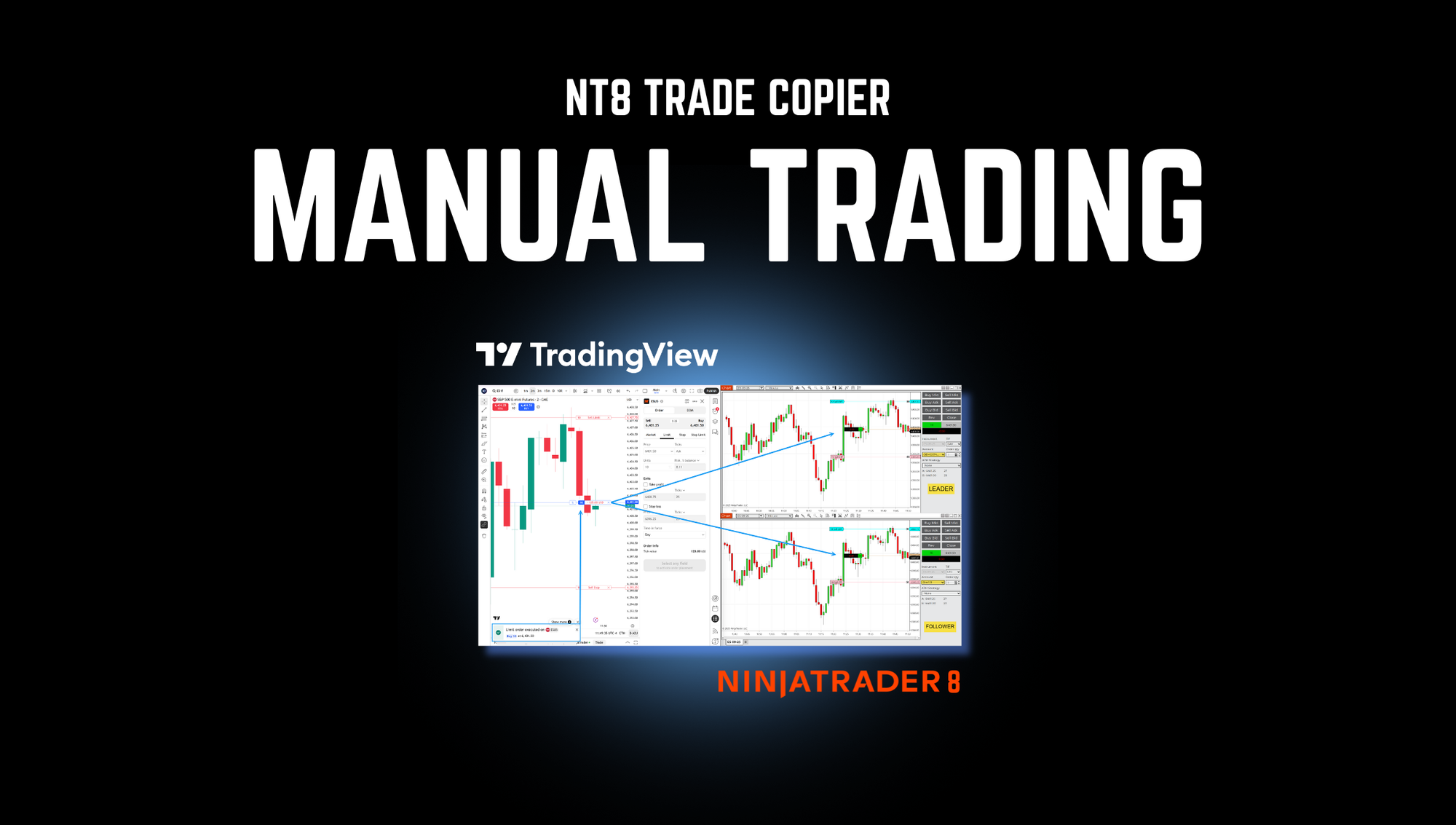
Every other solution forces you to use web-based platforms or doesn't support TradingView manual trading at all. CrossTrade connects directly to the full NinjaTrader 8 desktop platform, giving you the robust execution engine and advanced order management of NT8 while maintaining TradingView's superior charting.
Execute market orders, set pending limits, create bracket orders, adjust stops, all from TradingView's interface. The copier translates these into proper NT8 order types automatically. Modify a limit order on TradingView? NT8 updates instantly.
Competitor Status:
- Replikanto: Can copy trades from TradingView-connected NT accounts but doesn't enable manual TradingView trading
- Apex: Works with TradingView through Tradovate connections, but limited compared to CrossTrade's integration
- Affordable Indicators: Supports TradingView connections through NT, but no direct manual trading capability
For traders who want TradingView's analysis with NT8's professional execution environment, CrossTrade is the only real solution.
Execution Modes: Precision vs Speed
CrossTrade offers two distinct copying modes, each optimized for different trading styles:
Order Mode delivers ultra-precise synchronization by replicating every aspect of your trade management. Limit orders, stops, brackets, modifications, and cancellations are mirrored exactly in real-time.
Execution Mode focuses on speed and simplicity, triggering immediate market orders on follower accounts whenever the source account gets filled, bypassing the complexity of pending order replication.
You can mix and match these modes across different copy relationships to optimize each account pair for its specific purpose.
How This Compares:
- Replikanto: Has similar modes with "Market Only" execution and standard order copying
- Apex: Supports both entry/exit copying and ATM strategy copying
- Affordable Indicators: Offers "Executions Mode" (market orders only) and "Orders Mode" (full order synchronization)
All four copiers have execution mode flexibility. CrossTrade's implementation is cleaner with the ability to assign different modes per copying relationship, not just per account.
Trade Inversion for Automatic Hedging
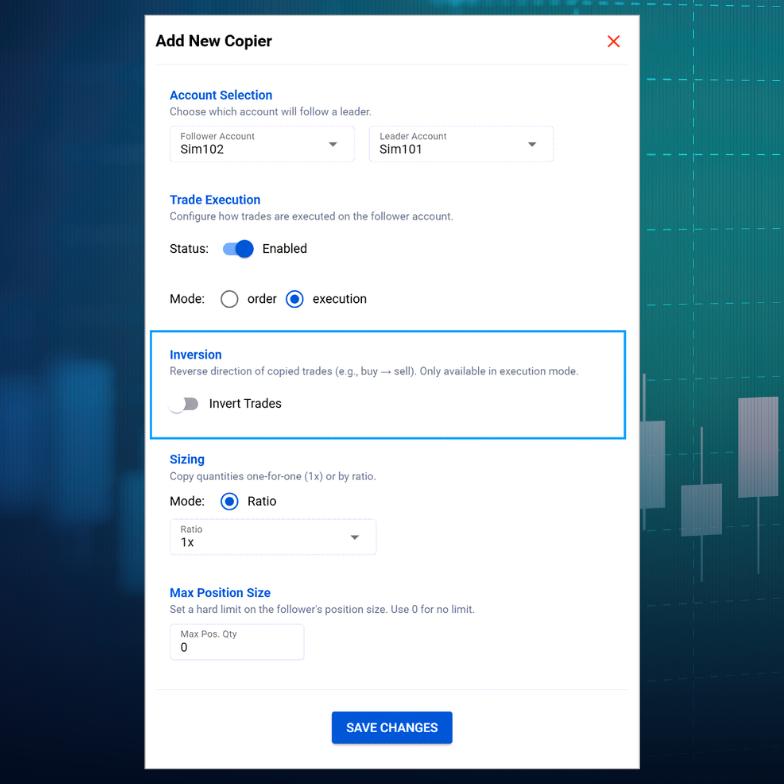
CrossTrade's trade inversion functionality transforms any follower account into an automatic hedge. When enabled, the follower executes trades in the opposite direction of the leader, creating instant, hands-free hedging relationships.
This is powerful for testing strategy robustness, managing overall portfolio risk, or creating market-neutral positions across your account network.
Competitor Capabilities:
- Replikanto: Supports negative ratio for trade inversion (-100 to 100 range)
- Apex: Offers "Fade" option to take opposite positions
- Affordable Indicators: Has "Fade" column to fade the master account
All four support trade inversion. The feature parity here shows it's become table stakes. However, CrossTrade's implementation within its multi-directional architecture allows for more complex hedging networks than competitors' linear structures.
Risk Management and Account Monitoring
Position sizing is critical when copying between accounts of different sizes. CrossTrade offers flexible ratio-based scaling with maximum position limits as a safety layer. Set followers to trade at 0.5x, 2x, or any custom ratio. Maximum position limits ensure follower accounts never breach individual risk thresholds.
Competitor Risk Management:
- Replikanto: Multiple copy methods (Exact Quantity, Equal Quantity, Ratio, Net Liquidation, Available Money, Percentage Change, Pre Allocation)
- Apex: Ratio-based sizing with multiplier support
- Affordable Indicators: Most comprehensive risk management with Account Risk Manager add-on. Includes daily goal/loss limits, prop firm tracking, auto-liquidation monitoring, and Exit Shield to prevent risky order modifications.
Verdict: Affordable Indicators has the edge in risk management features with their dedicated Account Risk Manager. However, CrossTrade's Auto-Sync provides a different kind of risk management and the ability to recover from any synchronization issue automatically.
Tandem Mode: Risk Management Integration
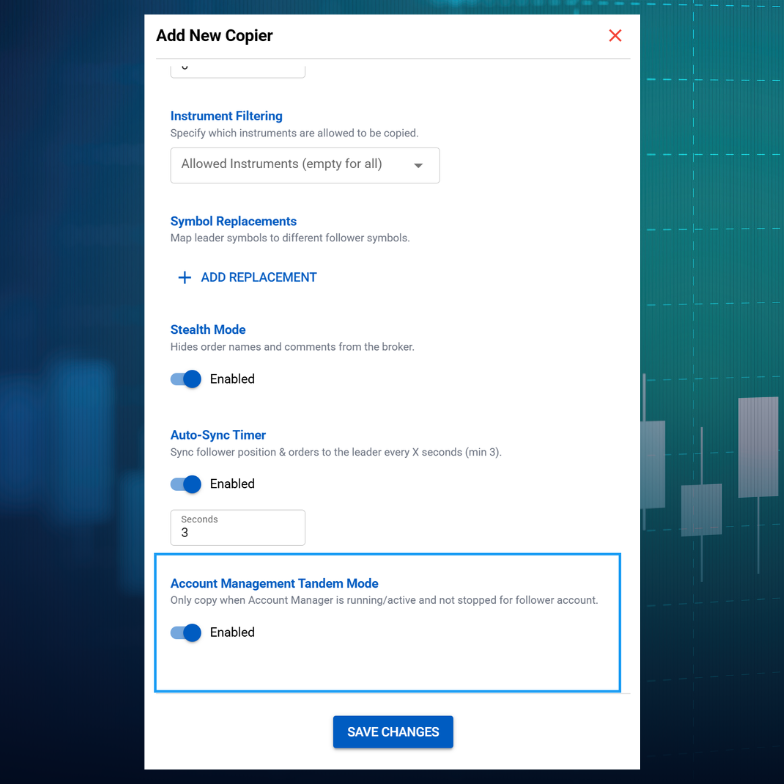
CrossTrade's Tandem Mode binds copying behavior to your NinjaTrader Account Manager monitors. Copying only runs while the corresponding Account Manager monitor is active and within your defined risk parameters. Hit a daily loss limit? Copying stops instantly. Breach a drawdown threshold? All relationships halt.
This prevents the nightmare scenario where copying continues after your main account gets flattened by risk management.
Competitor Approach:
- Replikanto: No native Account Manager integration. Relies on "Follower Guard" to close and disarm positions in certain scenarios.
- Apex: No native Account Manager integration
- Affordable Indicators: Account Risk Manager provides similar functionality with daily goal/loss automatic flattening, but not specifically tied.
CrossTrade's integration is seamless and ensures copying never operates outside your risk boundaries.
Pricing Reality
Let's talk numbers:
- CrossTrade: Included with Pro plan subscription for only $49 per month which also includes access to our other tools
- Replikanto: $249 for 2 machines (lifetime), additional machines $49-99, remote mode requires credits ($10-90)
- Apex: $150 for 2 computers (lifetime, currently 75% off from $597)
- Affordable Indicators: $295 (Duplicate Account Actions only) or $495 (Accounts Dashboard Suite with Risk Manager), lifetime license
Traditional copiers use one-time pricing models. CrossTrade includes the trade copier with your Pro subscription along with all other CrossTrade features like automated trading, advanced alert management, and continuous updates.
Why CrossTrade's Architecture Is Fundamentally Different
Every other trade copier on this list runs entirely inside NinjaTrader 8. The configuration, synchronization logic, edge case handling, and state management all live within NT8's process. That means when NinjaTrader is under load — processing market data, running indicators, handling multiple connections — the copier is competing for the same resources. When NT8 bogs down, the copier bogs down with it. When NT8 crashes, the copier config is gone until you restart and reconfigure.
CrossTrade takes a fundamentally different approach. The copier configuration lives on CrossTrade's web application, not inside NT8. The XT Add-On handles execution locally (which is where speed matters), but the state management, sync logic, and configuration persistence all live server-side. This separation means several things in practice:
Your copier config survives NT8 crashes and restarts without manual intervention. The sync logic doesn't compete with NinjaTrader for CPU and memory during heavy market activity. Configuration changes propagate instantly from the web dashboard to the Add-On without restarting NT8. And you can monitor and adjust your copier settings from any browser, not just from the machine running NinjaTrader.
This isn't a minor implementation detail. It's the reason Auto-Sync can run every 3 seconds without degrading NT8 performance, why Stealth Mode can recover order mappings after a full NT8 restart, and why Tandem Mode can react to Account Manager state changes in real time. The copier's brain lives outside the platform it's executing on, and that changes everything about reliability under real trading conditions.
The Full Feature Set
Here's what CrossTrade's Trade Copier includes today:
Multi-Directional Architecture. Any NT8 account can copy from any other account. Build leader-follower chains, circular networks, or many-to-one consolidation setups. No rigid hierarchy.
Auto-Sync. Continuous synchronization every 3 seconds. Fixes discrepancies automatically — missed copies, accidental closes, partial fills, connection drops, NT8 restarts. One system replaces an entire category of edge case configuration.
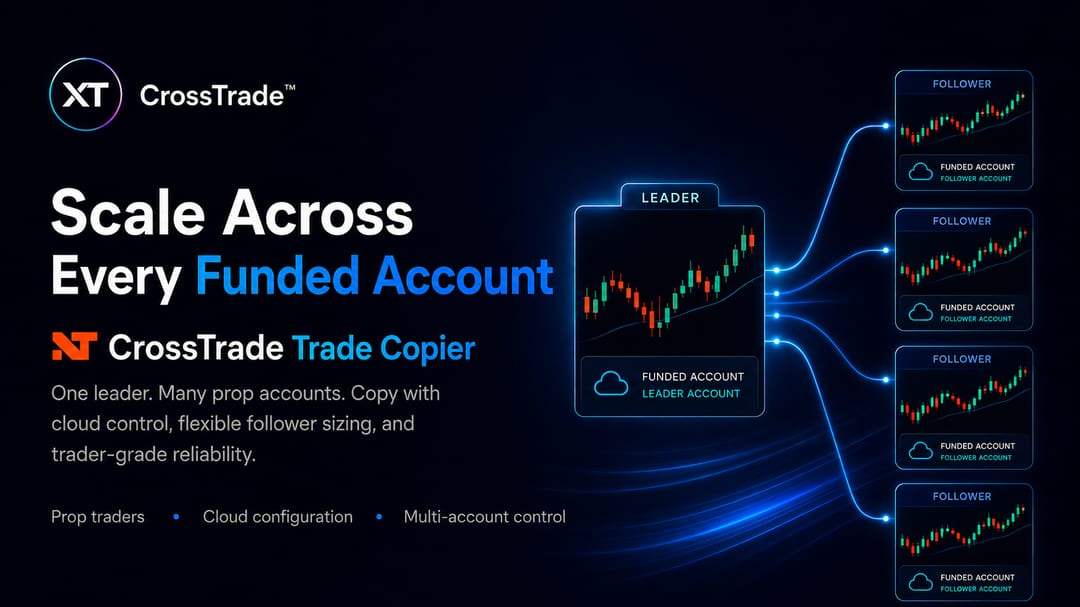
Copier Groups. Manage multiple follower accounts as a single unit. Start, stop, or adjust settings for an entire group of copying relationships with one click instead of configuring each one individually. Essential when you're running five or ten prop accounts from one leader.
Tandem Mode. Binds copying behavior to your Account Manager monitors. When a NAM threshold is breached and the monitor stops, all linked copiers halt immediately. Prevents the scenario where copying continues after your leader account has been flattened by risk management.
Reconnect Delay. When a leader account's broker connection drops and reconnects, NT8 fires a burst of order events as it re-syncs its internal state. Without protection, the copier would interpret these as real trades. Reconnect Delay suppresses all copier activity for a configurable cooldown window after reconnection, preventing duplicate entries and phantom positions.
Stealth Mode. Removes automation metadata from copied orders. Copied trades use standard NT8 order naming conventions and are indistinguishable from any other ATI-generated order. Survives connection failures and full NT8 restarts.
TradingView Manual Trading. The only copier that enables direct manual trading from TradingView's interface into NT8 desktop. Execute market orders, set limits, create brackets, adjust stops — all from TradingView's charts with real-time sync to NT8.
Order Mode and Execution Mode. Order Mode replicates every pending order, modification, and cancellation. Execution Mode triggers market orders on fills only. Assign different modes per copying relationship.
Symbol Replacement. Trade ES on the leader, copy as MES on the follower. Contract mathematics handled automatically.
Trade Inversion. Follower trades the opposite direction of the leader for automatic hedging.
Flexible Position Sizing. Ratio-based scaling (0.5x, 2x, any custom ratio) with maximum position limits as a safety cap.
Instrument Filtering. Copy only specific instruments from the leader. Ignore everything else.
Where Competitors Have Advantages
Affordable Indicators offers a dedicated Account Risk Manager add-on with granular daily goal/loss tracking and auto-liquidation monitoring. CrossTrade's Account Manager covers similar ground but through a separate tool rather than built into the copier itself.
Replikanto offers seven different copy method algorithms (Exact Quantity, Equal Quantity, Ratio, Net Liquidation, Available Money, Percentage Change, Pre Allocation), giving more granularity in how position sizes are calculated.
Apex has the lowest entry price at $150 lifetime if one-time cost is the primary consideration.
None of them offer server-side configuration, Auto-Sync, Copier Groups, Tandem Mode, Reconnect Delay, or TradingView manual trading. The architectural gap is not something a feature update can close — it requires a fundamentally different approach to where the copier's logic lives.
The Bottom Line
Traditional copiers run inside NinjaTrader and inherit all of its limitations. CrossTrade runs alongside NinjaTrader, using it for what it's best at (local execution speed) while keeping the intelligence, configuration, and synchronization on infrastructure that doesn't compete with your trading platform for resources.
For a detailed head-to-head on each competitor, see CrossTrade vs Replikanto, CrossTrade vs Apex Trade Copier, and CrossTrade vs Affordable Indicators.
Ready to scale your trading operation without compromise?