CrossTrade vs Affordable Indicators: NinjaTrader 8 Trade Copier Comparison
A detailed comparison of CrossTrade and Affordable Indicators trade copiers for NinjaTrader 8, covering architecture, risk management, synchronization, TradingView integration, and pricing.


Affordable Indicators has built the most comprehensive risk management dashboard in the NinjaTrader 8 trade copier market. Their Accounts Dashboard Suite combines trade copying with granular prop firm compliance tools, daily goal/loss tracking, and features like Exit Shield that no other copier offers. If risk management is your primary concern, Affordable Indicators takes it more seriously than anyone else in the space.
That said, risk management features and copying architecture are two different things. This post compares where each platform leads, where each falls short, and which one fits your trading setup.
The Fundamental Architecture Difference
Same distinction as every CrossTrade copier comparison, and it matters here too.
Affordable Indicators runs entirely inside NinjaTrader 8. The copy logic, risk management, dashboard monitoring, and state management all live within NT8's process. When NT8 is under load, the copier and risk manager compete for the same resources. When NT8 crashes, the state is gone until you restart and reconfigure.
CrossTrade separates concerns. The copier configuration and state management live on CrossTrade's web application. The XT Add-On handles local execution where speed matters, but the sync logic, configuration persistence, and monitoring live server-side. Your copier config survives NT8 crashes. The sync logic doesn't compete with NinjaTrader for resources. You can monitor and adjust settings from any browser. Configuration changes propagate instantly without restarting NT8.
This is the reason Auto-Sync can run every 3 seconds without degrading NT8 performance, why Stealth Mode recovers order mappings after a full NT8 restart, and why Tandem Mode reacts to Account Manager state changes in real time.
Risk Management: Where Affordable Indicators Leads
This is Affordable Indicators' strongest differentiator, and it's worth giving credit where it's due. Their Account Risk Manager is the most feature-rich prop firm compliance toolkit in any NT8 copier:
Daily Goal and Loss Management automatically flattens accounts when configured thresholds are hit. Similar in concept to CrossTrade's Account Manager, but built directly into the copier interface rather than as a separate tool.
Prop Firm Tracking monitors auto-liquidation thresholds specific to your prop firm's rules and exits positions when limits are approached. This is purpose-built for traders managing multiple evaluations who need to track different rule sets across accounts.
Exit Shield prevents risky modifications to stop losses and profit targets while trades are active. This stops you (or your automation) from widening a stop loss in the heat of the moment. No other copier offers this.
One Trade Feature lets you quickly fulfill minimum daily trading requirements for prop firm evaluations without taking meaningful risk.
Visual Dashboard shows all account statistics, P/L progress, goal tracking, and prop firm compliance status in a single view. It's the most comprehensive monitoring interface of any NT8 copier.
CrossTrade's risk management comes through the NinjaTrader Account Manager (NAM), which is a separate tool from the copier. NAM provides profit/loss thresholds, Minimum Profit Drawdown, Trailing Drawdown, Unrealized Mode, Outlier Protection, Trading Windows, EOD auto-flattening, and Monitor Lock. It's comprehensive, but it's architecturally separate from the copier rather than integrated into the same interface.
Tandem Mode bridges the gap by binding copier behavior to NAM monitors. When a NAM threshold is breached and the monitor stops, all linked copiers halt immediately. This gives you the same "risk event kills copying" behavior, just through two integrated tools rather than one unified dashboard.
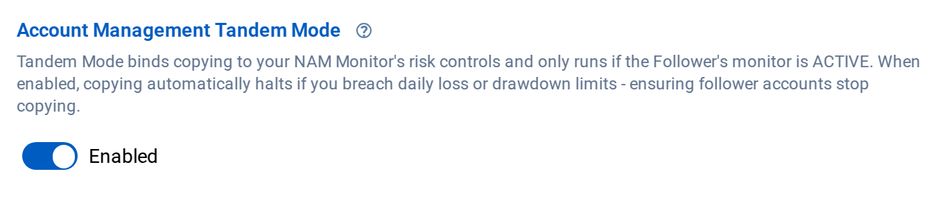
Tandem Mode stops copying to a follower whose monitor has stopped
Affordable Indicators wins on risk management depth and visual monitoring. CrossTrade's NAM covers the same functional ground but through a different architectural approach.
Synchronization: Reactive vs Continuous
Affordable Indicators offers two copy modes: Executions Mode (market orders triggered on leader fills) and Orders Mode (full order synchronization including placement, modification, and cancellation). Both work well, but if synchronization drifts due to partial fills, connection drops, or accidental closes, recovery is manual.
CrossTrade's Auto-Sync continuously monitors and realigns accounts every 3 seconds. Accidentally close a position on a follower? Auto-Sync reopens it. Connection drops mid-trade? Auto-Sync resumes on reconnection. NT8 crashes and restarts? Auto-Sync picks up where it left off. Because the sync logic runs server-side rather than inside NT8, it doesn't lose state when NinjaTrader goes down.
This is the practical consequence of the architectural difference. An NT8-native copier can only recover from failures that NT8 itself survives. A server-side copier recovers from failures that take NT8 down entirely.
Copy Relationship Structure
Affordable Indicators uses the traditional leader-follower model. One master account copies to multiple followers. Proven, straightforward, and sufficient for most prop farm setups.
CrossTrade uses multi-directional copying. Any NT8 account can copy from any other account. Leader-follower chains, many-to-one consolidation, bidirectional hedging, circular networks. No restrictions on the topology.
For standard prop farming (one leader, several followers), both handle it fine. The difference shows up when your architecture gets more complex.
Copier Groups
CrossTrade's Copier Groups let you manage multiple follower relationships as a single unit. Start, stop, or adjust settings for an entire group with one click instead of configuring each copier instance individually. When you're running ten prop accounts, this is the difference between a 30-second operation and a 5-minute one.
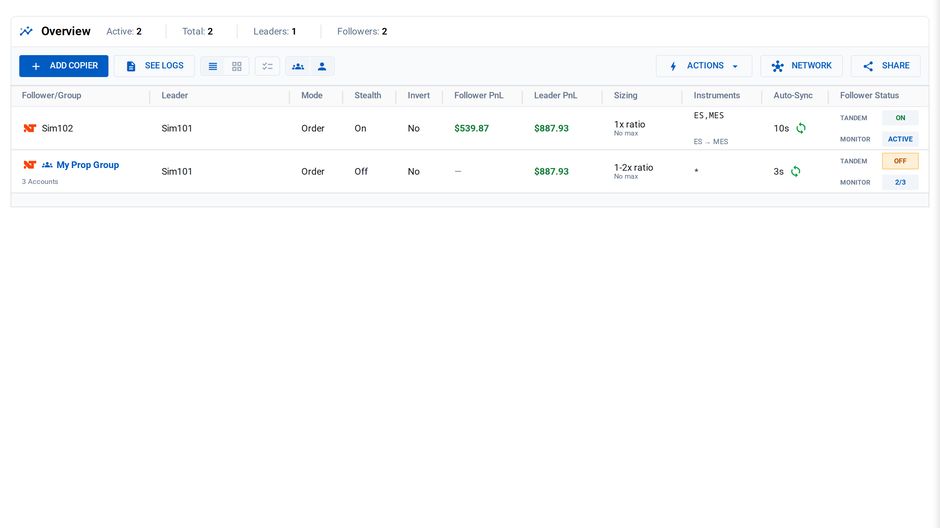
A one-to-one copier and a group copier on one page
Affordable Indicators manages each follower independently. Their dashboard makes this more visual than competitors, but there's no group-level control.
Reconnect Delay
When a leader account's broker connection drops and reconnects, NT8 fires a burst of order events as it re-syncs. Without protection, the copier interprets these as real trades and replicates them to followers.
CrossTrade's Reconnect Delay suppresses all copier activity for a configurable cooldown window after reconnection, preventing duplicate entries and phantom positions from reconnect artifacts.
Affordable Indicators has no equivalent.
Stealth Mode
Affordable Indicators has no stealth functionality. Copied orders carry standard automation identifiers.
CrossTrade's Stealth Mode removes automation metadata from order entries so copied trades use standard NT8 order naming conventions, making them indistinguishable from any other ATI-generated order. Because state lives server-side, Stealth Mode recovers its order mappings even after a full NT8 crash and restart.
TradingView Integration
CrossTrade is the only NT8 trade copier that enables direct manual trading from TradingView to NinjaTrader 8 desktop. Execute market orders, set limits, create brackets, adjust stops from TradingView's charts with real-time sync to NT8. The copier translates TradingView's order types into NT8 formats automatically.
Beyond manual trading, CrossTrade's webhook automation bridges TradingView strategy alerts to NT8. Strategy Sync prevents state drift. Continuous contracts auto-convert. 20+ advanced command options are available in every payload.
Affordable Indicators can copy trades from TradingView-connected NT accounts, but doesn't enable direct TradingView manual trading or webhook automation.

ATM Strategy Management
Affordable Indicators allows assigning different ATM strategies to different follower accounts. Each follower can have unique entry and exit parameters based on its risk profile. This is genuinely useful when managing accounts of different sizes or with different prop firm rules.
CrossTrade copies ATM orders through Order Mode and supports full bracket management from TradingView, but doesn't offer per-follower ATM assignment. Affordable Indicators has the edge here.
Symbol Replacement
Both handle mini-to-micro conversion (ES on leader copies as MES on follower).
Affordable Indicators uses explicit contract type selection (Mini/Micro) with size multipliers per account. CrossTrade handles symbol replacement with automatic contract mathematics. Both work. CrossTrade requires less manual configuration.
Trade Inversion
Both support trade inversion. Affordable Indicators calls it "Fade." CrossTrade has a dedicated inversion toggle per relationship. Comparable implementations.
Execution Modes
Affordable Indicators: Executions Mode (market orders on fills) and Orders Mode (full order sync). CrossTrade: Execution Mode and Order Mode with per-relationship assignment. Comparable capabilities.
Pricing
Affordable Indicators: $295 lifetime for the copier only (Duplicate Account Actions), or $495 lifetime for the full Accounts Dashboard Suite with Account Risk Manager. Promotional pricing with FLOWBOTS coupon may reduce these. One-time purchase, free updates.
CrossTrade: Included with the Pro plan at $49/month, which also includes webhook automation, the NinjaTrader Account Manager, Strategy Sync, the REST API, and all future updates.
If you only need a copier with risk management and nothing else, Affordable Indicators' one-time pricing is compelling. If you use any other CrossTrade features (webhooks, NAM, Strategy Sync, TradingView automation), the copier is effectively included at no additional cost.
Summary
| Feature | CrossTrade | Affordable Indicators |
|---|---|---|
| Architecture | Server-side config + local execution | Runs entirely inside NT8 |
| Synchronization | Auto-Sync every 3 seconds | Manual recovery on drift |
| Risk management dashboard | NAM (separate tool) + Tandem Mode | Integrated dashboard (best in class) |
| Exit Shield | No | Yes (unique feature) |
| Prop firm tracking | Via NAM thresholds | Dedicated tracking per firm |
| Multi-directional copying | Yes | No (leader-follower only) |
| Copier Groups | Yes | No |
| Tandem Mode (NAM integration) | Yes | No |
| Reconnect Delay | Yes | No |
| Stealth Mode | Yes (survives NT8 restart) | No |
| TradingView manual trading | Yes | No |
| Webhook automation | Yes | No |
| Per-follower ATM assignment | No | Yes |
| Symbol replacement | Yes (automatic) | Yes (manual multipliers) |
| Trade inversion | Yes | Yes (Fade) |
| Pricing | $49/month (full platform) | $295-$495 lifetime (copier + risk mgmt) |
The Bottom Line
Affordable Indicators built the best risk management and monitoring dashboard in the NT8 trade copier market. Exit Shield, prop firm tracking, and the visual account dashboard are genuinely useful features that CrossTrade's copier doesn't replicate in the same integrated way. For traders whose primary concern is granular, visual prop firm compliance monitoring with copying as the delivery mechanism, Affordable Indicators is a strong product.
CrossTrade's advantages are architectural. Server-side configuration that survives NT8 failures. Auto-Sync that fixes synchronization problems automatically instead of requiring manual recovery. Multi-directional copying for complex account topologies. Copier Groups for managing accounts at scale. Reconnect Delay for protecting against reconnection artifacts. Stealth Mode that persists across NT8 restarts. And TradingView integration that no other NT8 copier can match.
The choice comes down to what you value more: the deepest risk management dashboard in the market, or the most architecturally advanced copying infrastructure with a broader automation platform. Both are legitimate priorities, and both products deliver on their core strengths.
For a detailed comparison with other competitors, see CrossTrade vs Replikanto and CrossTrade vs Apex Trade Copier. For the full comparison, see NinjaTrader 8 Trade Copier Comparison. For the complete copier feature set, see the Trade Copier docs.
New to CrossTrade? Start your free 7-day trial and connect TradingView to NinjaTrader in minutes.