How to Build a Python Trading Bot for NinjaTrader 8
Build a fully functional Python trading bot that places orders, streams quotes, and manages positions on NinjaTrader 8 using the CrossTrade API.


NinjaTrader 8 is built on .NET 4.8. If you want to automate it, the official path is writing a NinjaScript strategy in C# — inside NT8's own editor, with NT8's own lifecycle, using NT8's own framework. For a lot of traders, especially those coming from the Python ecosystem where every quant library, machine learning model, and backtesting framework already lives, that's a dealbreaker.
The CrossTrade API changes this. It gives you a REST and WebSocket interface to your running NinjaTrader instance, which means you can write your trading logic in Python (or any language), run it anywhere, and still execute through your NT8 broker connection. You get the broker infrastructure and market data feed of NinjaTrader without being locked into its development environment.
This tutorial walks you through building a complete Python trading bot from scratch. By the end, you'll have a working script that connects to NinjaTrader, fetches live quotes, places orders, monitors positions, and cleans up after itself. Everything here runs on NinjaTrader's Sim101 account so you can test without risking capital.
What You Need Before Starting
You need three things set up before writing any code.
First, NinjaTrader 8 must be running on your machine (or a VPS) with the CrossTrade add-on installed and connected. The API doesn't talk to your broker directly — it forwards every request through the add-on running inside NT8. If NT8 isn't open or the add-on isn't connected, API calls return an error.
Second, grab your Bearer token from the My Account page on the CrossTrade web dashboard. Click "Reveal" next to your secret key. This token authenticates every API request.
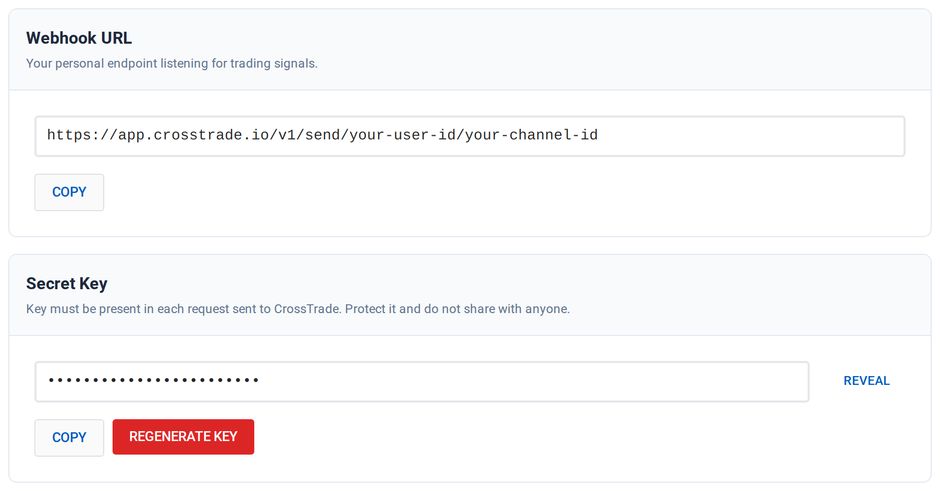
Your secret key is the Bearer token the bot sends
Third, install the Python dependencies. You only need two packages:
pip install requests websockets
requests handles the REST API calls. websockets handles the persistent WebSocket connection for streaming data.
Your First API Call — Listing Accounts
Start by verifying that your connection works. This script fetches all connected accounts from NinjaTrader:
import requests

BASE_URL = "https://app.crosstrade.io/v1/api"
TOKEN = "your-secret-key-here"

headers = {
    "Content-Type": "application/json",
    "Authorization": f"Bearer {TOKEN}"
}

response = requests.get(f"{BASE_URL}/accounts", headers=headers)
print(response.json())
If everything is wired up correctly, you'll get back a JSON array of your connected accounts — Sim101, any live accounts, prop firm accounts, whatever is loaded in NT8. If you see an error about the add-on not being connected, check that NinjaTrader is running and the CrossTrade add-on shows a green connection status.
Getting a Live Quote
Before placing any orders, your bot needs to know the current price. The REST API has a quote endpoint that returns the latest bid, ask, and last price for any instrument:
def get_quote(instrument):
    response = requests.get(
        f"{BASE_URL}/market/quote",
        headers=headers,
        params={"instrument": instrument}
    )
    return response.json()

quote = get_quote("ES 09-26")
print(f"ES Last: {quote['last']}  Bid: {quote['bid']}  Ask: {quote['ask']}")
A few things to note about instrument naming. CrossTrade uses NinjaTrader's instrument format, which means futures contracts include the month and year: ES 09-26 for the September 2026 E-mini S&P contract, NQ 09-26 for the Nasdaq equivalent. You can also use continuous contract symbols like ES 12-26 depending on which contract is active. Check NinjaTrader's instrument list to confirm the exact string for whatever you're trading.
Placing an Order
Here's where things get interesting. This function places a market order on your Sim101 account:
def place_order(account, instrument, action, quantity, order_type="MARKET", tif="GTC"):
    payload = {
        "instrument": instrument,
        "action": action,
        "orderType": order_type,
        "quantity": quantity,
        "timeInForce": tif
    }
    response = requests.post(
        f"{BASE_URL}/accounts/{account}/orders/place",
        headers=headers,
        json=payload
    )
    return response.json()

# Buy 1 ES contract at market
result = place_order("Sim101", "ES 09-26", "BUY", 1)
print(result)
The action field takes BUY or SELL. The orderType accepts MARKET, LIMIT, STOPMARKET, and STOPLIMIT. For limit and stop orders, you'd add a limitPrice field (and stopPrice for stop-limits) to the payload. Note that the account name goes in the URL path, not the request body.
Here's a limit order example:
def place_limit_order(account, instrument, action, quantity, price):
    payload = {
        "instrument": instrument,
        "action": action,
        "orderType": "LIMIT",
        "quantity": quantity,
        "limitPrice": price,
        "timeInForce": "GTC"
    }
    response = requests.post(
        f"{BASE_URL}/accounts/{account}/orders/place",
        headers=headers,
        json=payload
    )
    return response.json()

# Place a limit buy 10 points below current price
quote = get_quote("ES 09-26")
limit_price = quote["last"] - 10
result = place_limit_order("Sim101", "ES 09-26", "BUY", 1, limit_price)
print(f"Limit order placed at {limit_price}: {result}")
Checking Positions
After placing orders, you need to know what positions you're holding. This function returns all open positions for a specific account:
def get_positions(account):
    response = requests.get(
        f"{BASE_URL}/accounts/{account}/positions",
        headers=headers
    )
    return response.json()

data = get_positions("Sim101")
for pos in data["positions"]:
    print(f"{pos['instrument']}: {pos['marketPosition']} {pos['quantity']} @ {pos['averagePrice']}")
The marketPosition field tells you direction — Long or Short. The quantity is the number of contracts. averagePrice is your entry.
Flattening a Position
When your bot decides to exit, the cleanest approach is to flatten:
def flatten(account, instrument):
    payload = {
        "instrument": instrument
    }
    response = requests.post(
        f"{BASE_URL}/accounts/{account}/positions/close",
        headers=headers,
        json=payload
    )
    return response.json()

# Close the ES position
result = flatten("Sim101", "ES 09-26")
print(f"Position closed: {result}")
This cancels all pending orders on the instrument and closes the position at market. If you need to flatten everything across all instruments and accounts, the API also has a POST /v1/api/positions/flatten endpoint — useful as a kill switch.
Pulling Historical Bars
Most trading strategies need historical data for calculation. The API can pull bars directly from NinjaTrader's data feed:
def get_bars(instrument, period_type="minute", period=5, days_back=1, limit=50):
    payload = {
        "instrument": instrument,
        "periodType": period_type,
        "period": period,
        "daysBack": days_back,
        "limit": limit
    }
    response = requests.post(
        f"{BASE_URL}/market/bars",
        headers=headers,
        json=payload
    )
    return response.json()

data = get_bars("ES 09-26", period_type="minute", period=5, limit=20)
for bar in data["bars"]:
    print(f"{bar['time']} | O:{bar['open']} H:{bar['high']} L:{bar['low']} C:{bar['close']} V:{bar['volume']}")
You get standard OHLCV data. The periodType accepts minute, day, week, month, and year. The daysBack parameter controls how many days of history to load, and limit caps how many bars are returned. This data comes from whatever data feed is connected to your NinjaTrader instance, so the quality and depth depends on your provider.
Putting It Together — A Simple Moving Average Crossover Bot
Now let's combine everything into a working strategy. This bot implements a simple moving average crossover: when the 5-period SMA crosses above the 20-period SMA, it buys. When it crosses below, it sells. It runs on a loop, checking every 60 seconds.
This is intentionally simple. The point isn't to make money with a dual-MA crossover (you won't), but to demonstrate the structure of a complete trading bot that you can modify with your own logic.
import requests
import time

BASE_URL = "https://app.crosstrade.io/v1/api"
TOKEN = "your-secret-key-here"
ACCOUNT = "Sim101"
INSTRUMENT = "ES 09-26"
FAST_PERIOD = 5
SLOW_PERIOD = 20

headers = {
    "Content-Type": "application/json",
    "Authorization": f"Bearer {TOKEN}"
}


def get_bars(limit=25):
    payload = {
        "instrument": INSTRUMENT,
        "periodType": "minute",
        "period": 5,
        "daysBack": 1,
        "limit": limit
    }
    resp = requests.post(f"{BASE_URL}/market/bars", headers=headers, json=payload)
    return resp.json()


def sma(prices, period):
    if len(prices) < period:
        return None
    return sum(prices[-period:]) / period


def get_position():
    resp = requests.get(
        f"{BASE_URL}/accounts/{ACCOUNT}/position",
        headers=headers,
        params={"instrument": INSTRUMENT}
    )
    data = resp.json()
    if data.get("marketPosition") and data["marketPosition"] != "Flat":
        return data
    return None


def place_order(action, quantity=1):
    payload = {
        "instrument": INSTRUMENT,
        "action": action,
        "orderType": "MARKET",
        "quantity": quantity,
        "timeInForce": "GTC"
    }
    resp = requests.post(f"{BASE_URL}/accounts/{ACCOUNT}/orders/place", headers=headers, json=payload)
    return resp.json()


def flatten():
    payload = {"instrument": INSTRUMENT}
    resp = requests.post(f"{BASE_URL}/accounts/{ACCOUNT}/positions/close", headers=headers, json=payload)
    return resp.json()


def run():
    print(f"Starting MA crossover bot on {INSTRUMENT}")
    print(f"Fast SMA: {FAST_PERIOD} | Slow SMA: {SLOW_PERIOD}")
    print(f"Account: {ACCOUNT}")
    print("-" * 50)

    prev_signal = None

    while True:
        try:
            data = get_bars(limit=SLOW_PERIOD + 5)
            closes = [bar["close"] for bar in data["bars"]]

            fast = sma(closes, FAST_PERIOD)
            slow = sma(closes, SLOW_PERIOD)

            if fast is None or slow is None:
                print("Not enough bars yet, waiting...")
                time.sleep(60)
                continue

            current_signal = "long" if fast > slow else "short"
            position = get_position()

            print(f"Fast SMA: {fast:.2f} | Slow SMA: {slow:.2f} | Signal: {current_signal}")

            if current_signal != prev_signal and prev_signal is not None:
                # Signal changed — act on it
                if position:
                    print(f"Flattening existing {position['marketPosition']} position...")
                    flatten()
                    time.sleep(1)  # Brief pause for order processing

                if current_signal == "long":
                    print("Crossover detected — going LONG")
                    place_order("BUY")
                else:
                    print("Crossover detected — going SHORT")
                    place_order("SELL")

            prev_signal = current_signal

        except Exception as e:
            print(f"Error: {e}")

        time.sleep(60)


if __name__ == "__main__":
    run()
The bot fetches the last 25 five-minute bars, calculates both moving averages, and compares them. When the crossover flips, it flattens any existing position and enters in the new direction. The time.sleep(60) at the bottom of the loop means it checks once per minute, which is plenty for a 5-minute bar strategy and keeps you well within the API's rate limits of 180 requests per minute.
Upgrading to WebSocket for Real-Time Data
The REST API works well for strategies that check conditions on a timer. But if you need tick-by-tick responsiveness — reacting to price moves as they happen rather than polling every 60 seconds — the WebSocket API is the better tool.
Here's the same bot concept, but using a persistent WebSocket connection for live quote streaming:
import asyncio
import websockets
import json

TOKEN = "your-secret-key-here"
WS_URL = "wss://app.crosstrade.io/ws/stream"
INSTRUMENT = "ES 09-26"
ACCOUNT = "Sim101"

prices = []
FAST = 5
SLOW = 20


async def place_order_ws(ws, action):
    msg = {
        "action": "rpc",
        "id": f"order-{action.lower()}",
        "api": "PlaceOrder",
        "args": {
            "account": ACCOUNT,
            "instrument": INSTRUMENT,
            "action": action,
            "orderType": "Market",
            "quantity": 1,
            "timeInForce": "Gtc"
        }
    }
    await ws.send(json.dumps(msg))


async def flatten_ws(ws):
    msg = {
        "action": "rpc",
        "id": "flatten",
        "api": "ClosePosition",
        "args": {
            "account": ACCOUNT,
            "instrument": INSTRUMENT
        }
    }
    await ws.send(json.dumps(msg))


async def run():
    headers = {"Authorization": f"Bearer {TOKEN}"}

    async with websockets.connect(WS_URL, extra_headers=headers) as ws:
        # Subscribe to ES quotes
        await ws.send(json.dumps({
            "action": "subscribe",
            "instruments": [INSTRUMENT]
        }))

        print(f"Connected. Streaming {INSTRUMENT} quotes...")

        prev_signal = None

        async for message in ws:
            data = json.loads(message)

            if data.get("type") == "marketData":
                for quote in data["quotes"]:
                    if quote["instrument"] == INSTRUMENT:
                        last = quote["last"]
                        prices.append(last)

                        # Keep a rolling window
                        if len(prices) > 100:
                            prices.pop(0)

                        if len(prices) < SLOW:
                            continue

                        fast_sma = sum(prices[-FAST:]) / FAST
                        slow_sma = sum(prices[-SLOW:]) / SLOW
                        signal = "long" if fast_sma > slow_sma else "short"

                        if signal != prev_signal and prev_signal is not None:
                            await flatten_ws(ws)
                            await asyncio.sleep(0.5)

                            if signal == "long":
                                print(f"LONG @ {last:.2f} | Fast: {fast_sma:.2f} > Slow: {slow_sma:.2f}")
                                await place_order_ws(ws, "Buy")
                            else:
                                print(f"SHORT @ {last:.2f} | Fast: {fast_sma:.2f} < Slow: {slow_sma:.2f}")
                                await place_order_ws(ws, "Sell")

                        prev_signal = signal

            elif "error" in data:
                print(f"Error: {data['error']}")

            elif "id" in data:
                # RPC response
                print(f"RPC response [{data['id']}]: {data.get('data', data)}")


if __name__ == "__main__":
    asyncio.run(run())
The key difference: instead of polling for quotes every 60 seconds, the WebSocket pushes price updates to you approximately every second. Your strategy logic reacts in near real-time. Order placement also happens over the same WebSocket connection using RPC calls, eliminating the HTTP overhead of the REST API.
Note that WebSocket quotes arrive at a 1-second conflation interval, so you're not building a high-frequency system here. You're building a responsive one. For most futures strategies, that cadence is more than sufficient.
Error Handling and Robustness
A production bot needs to handle failures gracefully. The three most common issues you'll hit:
Connection drops. The WebSocket connection can close for several reasons — NT8 restart, network hiccup, or if you accidentally open a second WebSocket connection (only one is allowed per account). Always implement reconnection logic with exponential backoff. Wait 1 second after the first disconnect, 2 seconds after the second, 4 after the third, and cap at 30 seconds. After reconnecting, you need to resubscribe to market data since the server doesn't remember your previous subscriptions.
Rate limits. The API allows 180 requests per minute (3 per second) with a burst of 20. For a bot checking conditions once per minute and placing a few orders per day, you'll never come close. But if you're running multiple strategies or polling aggressively, add a simple throttle to your request functions. The API returns a 429 status code when you're rate-limited, so check for that and back off briefly.
Add-on disconnections. If NinjaTrader crashes or the CrossTrade add-on disconnects, API calls return an error. Your bot should detect this and pause trading until the connection is restored. Continuing to retry against a dead connection just burns rate-limit tokens for no reason.
Where to Go from Here
The moving average crossover is a teaching example. The real value of this setup is that you can replace the strategy logic with anything the Python ecosystem offers. Feed price data into a scikit-learn model. Run a reinforcement learning agent. Calculate custom indicators that NinjaScript doesn't support natively. Connect to external data sources — news feeds, sentiment APIs, economic calendars — and incorporate them into your trading decisions. The API doesn't care what logic drives your orders. It just executes them.
If you want to take this further, here are three practical next steps. First, add proper logging — write every signal, order, and fill to a file so you can review your bot's decisions after the session. Second, implement a daily P&L limit using the WebSocket's streamPnl feature to stop trading when you hit your max loss. Third, move your bot to a CrossTrade VPS so it runs 24/5 without depending on your local machine being online.
The full API reference is at docs.crosstrade.io. If you get stuck, the Discord community is the fastest way to get help.
New to CrossTrade? Start your free 7-day trial →