Take Profit Trader: How to Pass the Evaluation and Manage Your Funded Accounts
Take Profit Trader offers a one-step futures evaluation with day-one withdrawals. Here's how the program works and how CrossTrade helps you pass and manage your accounts on NinjaTrader 8.


Take Profit Trader (TPT) is a futures prop firm built around a simple pitch: pass a one-step evaluation, get funded, and withdraw profits from day one. Their evaluation has no time limit, the consistency rule is more lenient than most competitors (50% vs the typical 30%), and PRO account payouts process within 24 hours.
This post covers how TPT's program works, what the rules are at each stage, and how to use CrossTrade to enforce those rules automatically so a momentary lapse in discipline doesn't cost you a funded account.
How TPT's Funding Path Works
Take Profit Trader uses a three-stage progression: evaluation, simulated funded (PRO), and live funded (PRO+).
Stage 1: Evaluation (Test Phase). You trade a simulated account (sizes from $25K to $150K) and need to hit a profit target while following six core rules. A $50K account requires $3,000 in profits. A $150K account requires $9,000. You must trade a minimum of five days, stay within your EOD trailing drawdown, respect maximum position sizes, trade only approved products during approved hours, and keep your best single day below 50% of total net profits (the consistency rule).
There's no time limit on the evaluation. Take as long as you need, though the monthly subscription continues until you pass or cancel.
Stage 2: PRO Account (Sim Funded). Once you pass, you pay a one-time $130 activation fee and receive a funded simulated account. This is where real money starts: you can withdraw profits from day one, with an 80/20 profit split in your favor. The catch is the buffer zone — your account balance must exceed the buffer threshold before standard withdrawals are allowed. For a $50K account, you need to reach $52,000. The buffer amount equals your maximum trailing drawdown from the evaluation.
The trailing drawdown carries over from your test. It's calculated intraday, meaning unrealized gains push the drawdown up in real time. If your peak balance reaches $51,000, your minimum balance rises accordingly — and it never comes back down.
PRO accounts also have news trading restrictions. You must be flat with no open orders one minute before, during, and one minute after prohibited news events (FOMC announcements, Non-Farm Payroll, and instrument-specific events like Crude Oil Inventories).
Stage 3: PRO+ Account (Live). After generating $5,000 in profits on your PRO account, you can upgrade to PRO+. This is a live brokerage account through Tradovate with a 90/10 profit split, no buffer requirement, and end-of-day drawdown instead of intraday trailing. The $5,000 from your PRO profits is frozen as working capital during the upgrade.
Pricing
Account sizes and monthly evaluation fees:
$25K account: ~$150/month. $50K account: ~$175/month. $100K account: ~$350/month. $150K account: ~$375/month.
PRO activation is a one-time $130 fee. Verify current pricing on the Take Profit Trader website — plans and promotions change frequently.
The Rules That Matter
These are the rules that determine whether you pass or fail, and more importantly, whether you keep your funded account:
50% Consistency Rule. No single trading day can exceed 50% of your total net profits. If your target is $3,000 and your best day was $2,000, you need at least $4,000 in total profits before the math works ($2,000 / $4,000 = 50%). Your dashboard updates the adjusted target automatically.
EOD Trailing Drawdown. Your maximum trailing drawdown is calculated from your peak balance, including unrealized gains. For a $50K account, the drawdown is $2,000 — meaning if your balance peaks at $51,500, your minimum balance is $49,500. The trailing drawdown locks once it reaches your starting balance and stops moving. Breach it at any point and the account is terminated.
Maximum Position Size. Each account tier has a maximum number of contracts you can hold at once. Exceeding it violates the rules even if the trade is profitable.
News Trading Restrictions (PRO/PRO+). Must be flat with no open orders around FOMC and NFP announcements. Specific instruments have additional restricted events.
5-Day Minimum. You can't pass the evaluation in fewer than five trading days regardless of how quickly you hit the profit target.
Every one of these rules is something CrossTrade can help you enforce. Here's how.
Find the CrossTrade workflow that fits
Explore webhook automation, trade copying, account controls and trade review for NinjaTrader 8 and Tradovate.
Using CrossTrade with Your TPT Accounts
Take Profit Trader supports both NinjaTrader 8 (via CQG or Rithmic) and Tradovate. Once your TPT account is connected to NT8, CrossTrade's Add-On gives you automated risk controls that go beyond anything TPT's platform provides natively.
Enforce the Trailing Drawdown
The NinjaTrader Account Manager (NAM) monitors your account's P/L every 2.5 seconds. Set your loss threshold to match TPT's drawdown limit and NAM will flatten your account the moment you approach the breach point. No hesitation, no "I'll just hold a little longer."
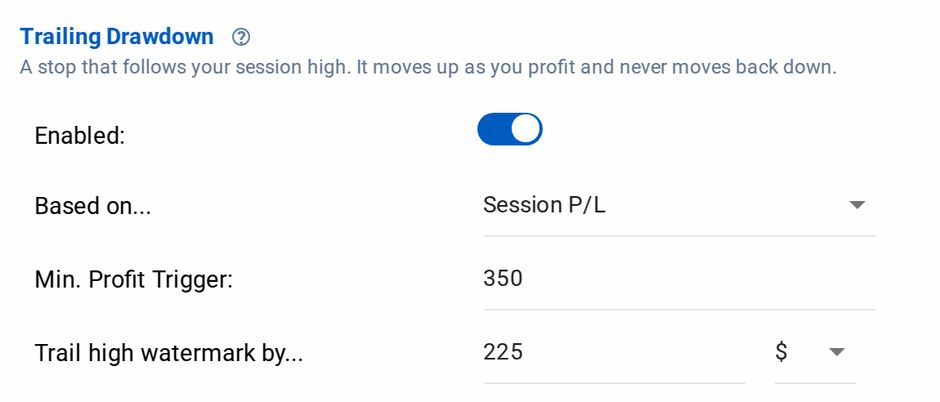
Trailing Drawdown in the Account Manager editor
For TPT specifically, the intraday trailing drawdown means unrealized gains push your floor up in real time. NAM's Unrealized Mode tracks floating P/L continuously and acts when thresholds are breached, matching TPT's intraday calculation method.
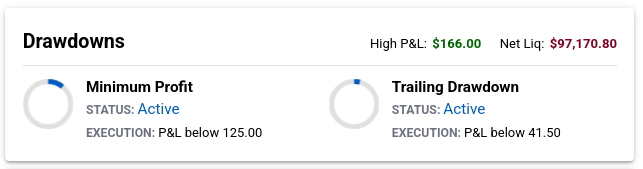
Both drawdowns armed, with the level each executes at
Stay Under the Consistency Threshold
If your consistency math says you can't exceed $1,400 today without triggering the 50% rule, set NAM's profit threshold to $1,350 and let the system flatten you when you hit it. This is the single most effective way to protect yourself from the consistency rule — remove the decision from your hands entirely.
Block Trading Around News Events
Trading Windows let you define exactly when orders are allowed through to NT8. If FOMC is at 2:00 PM ET on Wednesday, set your trading window to end at 1:58 PM and resume at 2:02 PM. CrossTrade blocks all signals outside the window. No accidental positions during a prohibited event.
You can configure up to five trading windows per account, so your regular session hours and news blackout periods can all be defined at once.
Auto-Flatten Before the Close
NAM's End-of-Day Auto-Flattening closes all positions and cancels all orders at a time you set. Configure it for a few minutes before market close to ensure you're never carrying an unintended overnight position.
Automate Your Strategy from TradingView
If you're running a TradingView strategy, CrossTrade bridges your alerts to NT8 in an average of 34 milliseconds. Your strategy generates signals, CrossTrade delivers them, and orders execute in your TPT account automatically.
Strategy Sync compares TradingView's expected position against NT8's actual position before every order. If a signal gets lost due to a connection drop or partial fill, Strategy Sync detects the mismatch and can block the order or flatten your account to prevent cascading errors. During a prop evaluation where one bad order can end the attempt, this is critical protection.
See How to Automate TradingView Strategies with CrossTrade for the full setup.
Run Multiple TPT Accounts
Running multiple evaluations or funded accounts simultaneously is common. Multi-Account Placement sends a single webhook to all of them at once — one TradingView alert, one payload, every account receives the same order.
For more control, the Trade Copier lets you set up leader/follower relationships with independent position sizing per account. Trade 2 contracts on your largest account and 1 on the smaller ones, all from a single leader. Auto-Sync keeps every follower aligned with the leader even if something goes wrong mid-session.
See the Trade Copier for the full feature set.
Monitor Lock for Discipline
Once NAM flattens your account after hitting a threshold, Monitor Lock prevents you from restarting the monitor during the session. You're done for the day. This exists for the exact moment when you're up $1,300, NAM kills the session, and you think "I could get to $1,500 if I just take one more trade." Monitor Lock makes that decision for you.
Connecting Your TPT Account to NinjaTrader
Take Profit Trader offers both CQG and Rithmic data feeds depending on your account type.
CQG Setup: In NinjaTrader, select the "NinjaTrader" connection. Set Account Type to Simulation. Enter your TPT CQG credentials.
Rithmic Setup: Download Rithmic RTrader Pro and login with your TPT credentials first. In NinjaTrader, select "Rithmic for NinjaTrader Brokerage." System: "Rithmic Paper Trading (Chicago)."
For detailed steps and troubleshooting, see the NinjaTrader 8 Prop Firm Connection Guide.
Once connected, install the CrossTrade Add-On and follow the Set Up Guide to link your webhook URL.
FAQ
How fast can I pass the TPT evaluation? The minimum is five trading days. If you hit the profit target and satisfy the consistency rule in that time, you can activate your PRO account on day six.
Can I use CrossTrade's Account Manager during the evaluation? Yes. NAM works on any NT8 account including sim and prop firm accounts. Set your loss threshold to match TPT's trailing drawdown and your profit threshold to stay under the consistency limit.
Does CrossTrade work with TPT's news trading restrictions? Yes. Configure Trading Windows around prohibited news events and CrossTrade will block all orders during those periods.
Can I run multiple TPT accounts through CrossTrade? Yes. Use Multi-Account Placement for identical orders across accounts, or the Trade Copier for independent sizing and filtering per account.
What's the difference between TPT's intraday and EOD drawdown? Evaluation and PRO accounts use intraday trailing drawdown — unrealized gains push the floor up in real time. PRO+ accounts use end-of-day drawdown, which only adjusts at session close. NAM's Unrealized Mode matches the intraday behavior for evaluation and PRO accounts.
For a comparison of prop firms including TPT, see Topstep vs Tradeify vs My Funded Futures. For more on running multiple prop accounts, see Unlock Prop Farming.
New to CrossTrade? Start your free 7-day trial and connect TradingView to NinjaTrader in minutes.