Tradovate Prop Firm Trade Copier: Which Firms Allow It and How to Stay Inside the Rules
A firm-by-firm table of copier and automation policy on Tradovate, checked September 2026, and how to copy across evaluations and funded accounts with per-follower sizing and account limits.

Most traders who search for a Tradovate prop firm trade copier already have the accounts. Two evaluations at one firm, a funded account at another, maybe a personal Tradovate account on the side, and one strategy that should trade all of them. The question is not whether copying is possible. It is whether the firm allows it, and how to copy in a way that does not break a rule you agreed to at signup.
This guide answers both. The first half is a firm-by-firm table of copier and automation policy, checked against each firm's own help center in September 2026. The second half is how the Tradovate Copier in CrossTrade is built to stay inside those rules: which copy mode to use, how to size each follower, and which limits to put on the accounts themselves.
Copy Tradovate trades from the cloud
Compare Signal, Execution and Order modes, follower sizing and account controls. No NinjaTrader installation or VPS is required for the direct Tradovate route.
First, the rules
Prop firms on Tradovate fall into three groups. Some allow third-party copiers and automation outright. Some allow copying only between your own accounts, with a manually traded source. Some prohibit copiers, or only recognize a short list of vendors, or do not run on Tradovate at all.
The table below is what each firm's published policy said when we read it. Firms change these rules often, sometimes without announcement, so treat this as a starting point and confirm with the firm's support before you connect a funded account.
| Firm | Copier and automation policy (per the firm's help center, September 2026) |
|---|---|
| Lucid Trading | Automated systems and trade copiers permitted on evaluation and funded accounts. Bans HFT, microscalping (more than half of profit from trades held five seconds or less), and hedging across accounts. Flat by 4:45 PM ET. |
| Tradeify | Bots allowed if you are the sole owner and the system is not shared or HFT. Copy your own accounts only. Up to five funded accounts. Flat by 4:45 PM ET. |
| MyFundedFutures | Automation allowed if it does not exploit simulated fills. Copy trading allowed across account types. Traders may not copy one another. Auto-close 4:10 PM ET. |
| FundedNext Futures | EAs and bots allowed on challenge and funded accounts. Copy your own trades only. VPS allowed. HFT and latency abuse banned. |
| TradeDay | Automation only on supported platforms, which include Tradovate and TradingView. Third-party purchased bots forbidden. Up to ten accounts. No copying between funded live and evaluation or funded sim. Auto-liquidates 3:50 PM CT. |
| BluSky | Copiers listed as allowed on every plan, but the conduct policy separately bans copying from "another account". Ask BluSky which applies to you before relying on either. |
| Apex Trader Funding | Manual order entry required. Copying allowed from one manually traded account, and copies must mirror it exactly. Signal-driven orders need written consent. Flat by 4:59 PM ET. |
| Take Profit Trader | Automated systems, bots, and algorithmic execution tools not permitted. Copiers only from the firm's approved vendor list. |
| Earn2Trade | Trade copiers not allowed on any program. |
| Topstep | TopstepX is the only platform. No third-party route. |
Two things stand out. First, the most common rule is not "no copiers" but "copy your own accounts only": Tradeify, FundedNext, MyFundedFutures, and Lucid's hedging ban all point the same direction. A copier that replays your trades to your accounts is fine. A service that lets one person's trades land in another person's account is not. Second, every firm that allows copying still enforces its own daily loss, drawdown, and end-of-day rules per account. The copier does not change that. Each follower is judged on its own.
If your firm is in the last four rows, the rest of this article does not apply to that account. Bulenox is not in the table because it runs on Rithmic, not Tradovate.
What "copy your own accounts" looks like in practice
Every account you copy between must be linked to the same CrossTrade account, authorized through Tradovate's own sign-in screen. Firm-issued logins link through Link Demo, because every prop firm account, including a funded one, lives on Tradovate's Demo environment. A personal brokerage account links through Link Live. You can link several identities at once, one per firm login, and the copier works across all of them.
Nothing runs on your computer. The leader's fills and orders are read from Tradovate's API by CrossTrade's servers, and the copies are placed the same way. Your laptop can be closed. That also means there is no desktop app that could crash mid-session and leave followers holding a position the leader already closed, which is the failure prop traders describe most often when a copier goes wrong.
Which copy mode fits a prop setup
The Tradovate Copier has three modes, and the right one depends on what places the leader's trades.
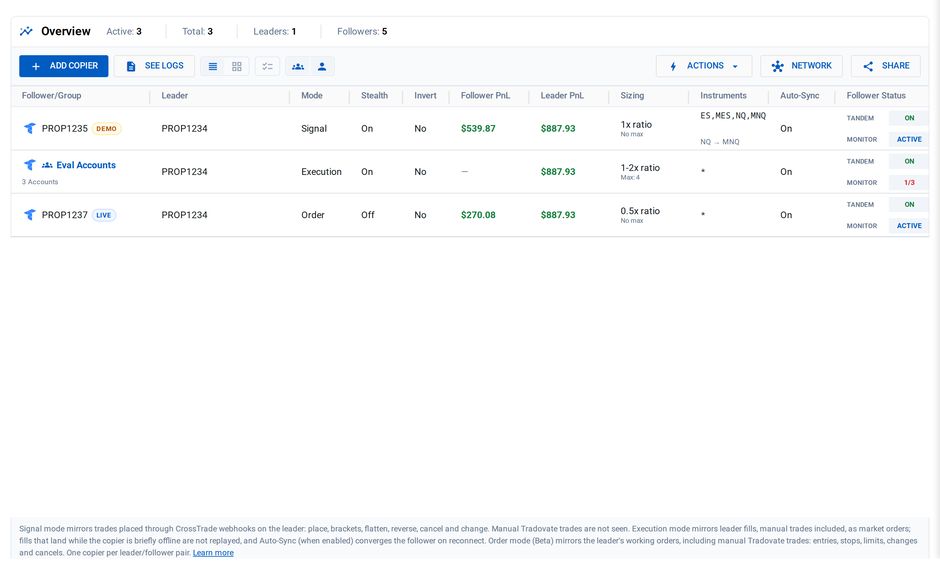
Signal mode is for strategies that arrive as CrossTrade webhooks, typically a TradingView alert with destination=tradovate; in the message. The alert targets one leader account, and CrossTrade replays the same command to each follower with that follower's sizing. Order structure is preserved: a limit entry copies as a limit, and a take profit and stop loss ride along as the same broker-hosted bracket. Cancels and changes that arrive through CrossTrade mirror too. Signal mode does not see trades you click inside Tradovate.
Execution mode watches the leader at the broker level and copies every fill as a market order, whatever produced it. Manual trades, webhook trades, and bracket legs all count. Because it copies fills rather than orders, followers do not receive a resting stop or target of their own. They enter at market when you enter and exit at market when your exit fills. That is acceptable for some traders and unacceptable for a prop account with a hard daily loss rule, so pair execution-mode followers with an Account Manager monitor, covered below.
Order mode (labeled Beta in the app) also watches the leader at the broker level, but it mirrors working orders rather than fills. Followers carry the same resting entries, stops, and targets, with brackets placed as linked orders. Manual Tradovate trades are included. Orders already resting when you enable the copier are not adopted, so copying starts with what the leader does from that point on.
For most prop setups the choice is simple. If the strategy is automated through webhooks, use signal mode and get bracket fidelity for free. If you trade the leader by hand and want each follower to hold its own stop, use order mode. If you only need followers to be in the same direction at the same time and you will manage risk at the account level, execution mode is the lightest option.
Sizing each follower for its own rules
A copier that sends one contract to every account is a copier that treats a $50K evaluation and a $150K funded account as the same thing. They are not, and the per-follower settings exist so you do not have to pretend they are.
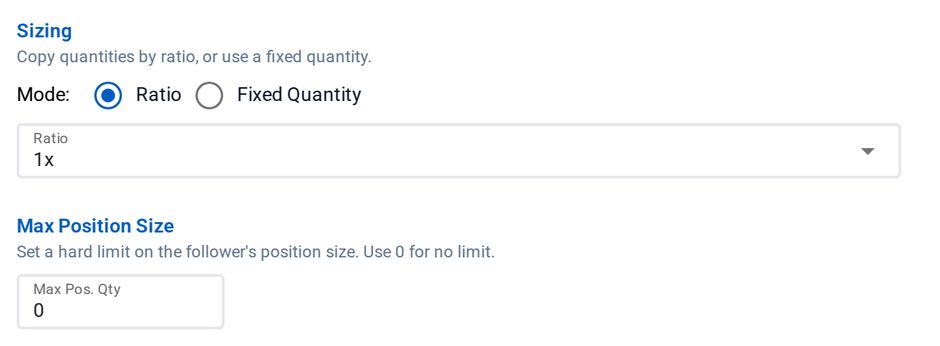
Quantity ratio scales the leader's size per follower: 1x on the account that matches the leader, 0.5x on a smaller evaluation, 2x on a larger funded account. Fixed quantity pins a follower to a constant number of contracts regardless of what the leader sends. Max Position Size caps the follower's total net position. An entry that would push past the cap is trimmed down or skipped, and the copy log records which. Fills that reduce the position always pass, so the cap can never trap you in a trade.
Symbol replacement is the setting prop traders use most. Set ES=MES on a follower and it trades micros when the leader trades minis, with the contract month carried over. One rule to know: replacements apply to plain market entries only. If the leader sends a limit, stop, or bracketed order on a replaced symbol, that copy is skipped rather than placed with prices computed for a different contract. If you rely on replacements, keep leader entries at market.
Instrument filter limits which leader trades a follower copies at all. A follower with ES,MES ignores the leader's NQ trades. That is useful when one firm's rules are stricter on a product, or when you want a funded account to copy only the strategy you trust most.
Every one of these settings lives in CrossTrade. Changing a follower's size never means editing a TradingView alert.
The rules the copier cannot enforce for you
A copier moves orders. It does not know your firm's daily loss limit, and it should not guess. Two things close that gap.
The firm's own risk engine is the first. Daily loss, trailing drawdown, and end-of-day flatten are enforced by the firm on every account regardless of what any copier does. If a follower breaches, the firm acts on that follower.
The Tradovate Account Manager is the second, and it is where you set your own line above the firm's. Each managed account gets a monitor with a daily profit target, a daily loss limit, an optional trailing drawdown, and a scheduled flatten time in Eastern time. When a rule trips, that account stops accepting CrossTrade signals, and if you enabled auto-close, its position is closed through the Tradovate API. Because the monitor is per account, a follower can be stopped for the day while the leader and the other followers keep trading. Set the loss limit with a buffer below the firm's number: in a fast market there is slippage between detection and flatten, and the firm's line is the one that ends the account.
Two account-level switches sit outside the monitor rules. Block Signals stops all inbound automation on an account. Closing Only lets exits through and blocks new entries. Both apply immediately, monitor or not, which makes them the right tool when a firm changes a rule mid-week and you need one account out of rotation now.
For firms with a news rule, Economic-Event Lockout blocks signals for five minutes either side of a high-impact USD release and can flatten a monitored account as the window opens. The monitor stays armed afterward, because a news window is a bounded pause rather than the end of a session.
One limit to be clear about. CrossTrade sits in the path of a webhook and can stop it before it reaches the broker. It is not in the path when you click inside Tradovate, so a manual trade cannot be blocked ahead of time. Auto-close still applies after the fill.
A worked setup
Say you have two Lucid evaluations, one Tradeify funded account, and a strategy that fires TradingView alerts for ES. A setup that respects each firm's rules looks like this.
Link the Lucid login and the Tradeify login, both through Link Demo. Point the alert at one Lucid evaluation as the leader with destination=tradovate;. Create a signal-mode copier from that leader to a group containing the second Lucid evaluation and the Tradeify account. Give the second evaluation a 1x ratio. Give the Tradeify account ES=MES if it should trade micros, or 1x if it should not. Turn stealth on if you prefer follower orders not to carry descriptive copy text.
Then add an Account Manager monitor to each of the three accounts with a daily loss limit a comfortable margin inside the firm's, a flatten time at least ten minutes before each firm's cutoff (4:45 PM ET at both of these firms), and auto-close enabled. Enable news lockout with flatten on whichever accounts carry a news rule.
Run it on Demo first with the same structure. The pipeline is identical, and the copy log will show you every submitted order, rejection, and skip decision with order IDs before real money is involved.
Before you point it at funded accounts
Read the copy log after every session for the first week. Confirm that follower quantities match what you expect after symbol replacement. Confirm that a bracket on the leader appears as a bracket on signal-mode followers. Confirm that a monitor trip on one follower did not touch the others. If any of those is wrong, the log will say so with the order IDs to investigate.
And re-read your firm's rules on the day you go live. The table above was accurate when we checked it. The firm's help center is the only version that counts.
Frequently asked questions
Can I copy between accounts at two different prop firms?
Yes, if both firms allow copiers. Each firm login links as its own identity, and one copier can have followers from several identities. Tradovate's built-in Group Trade cannot do this, because it only groups accounts under the same provider.
Does the copier count as "trading for someone else"?
No. It copies between accounts you have linked with your own credentials. Copying into an account you do not own is exactly what the "copy your own accounts only" rules prohibit, and CrossTrade is built for the former.
Do followers get their own stop loss?
In signal mode and order mode, yes: brackets are mirrored as broker-hosted orders on each follower. In execution mode, no: followers exit at market when the leader's exit fills. Use an Account Manager monitor for account-level limits in every mode.
What happens if a follower rejects an order?
Follower results are independent. One rejection does not cancel the leader or the other followers. The rejection is logged with the broker's reason, and Auto-Sync flags any direction mismatch that results.
Does this work with my computer off?
Yes. The copier, the Account Manager, and the webhook route all run in CrossTrade's cloud against Tradovate's API. Nothing is installed.
Start on Demo
Link a Demo identity, create one copier, and send one alert. If you are new to CrossTrade, start a free 7-day trial, and bring your firm's rulebook to the CrossTrade Discord if you want a second pair of eyes on the setup.
CrossTrade is execution and automation software, not a broker, financial adviser, or trading strategy. Prop firm rules are set by each firm and change without notice; nothing here is a guarantee that a given setup complies. Futures trading involves substantial risk. Test every automated workflow in simulation and verify orders at your broker.