
Prop Firm Trailing Drawdown: How to Set Your Own Floor Above the Firm's
A prop firm's trailing drawdown decides where a funded account ends. How to set your own fixed floor above it on NinjaTrader 8 or Tradovate, and how it works alongside daily limits.


Every funded futures account has a number below which it stops existing. The firm calls it the maximum loss limit, the trailing drawdown, or the liquidation threshold, and its mechanics differ from firm to firm. What they share is that the firm sets the line and the firm decides when you have crossed it.
The line that is actually useful to you is a different one: yours, set a deliberate distance above the firm's, where your own account management flattens you and stops for the session while the account still exists. This guide explains how a firm's trailing drawdown moves, why that makes a fixed personal floor more useful than it sounds, and how to set one with CrossTrade's Account Floor on NinjaTrader 8 or Tradovate.
Account Floor is one control within CrossTrade Account Manager. Keep the distinction between a fixed personal floor, a session loss limit and the firm's own trailing threshold as you work through the example.
How a trailing drawdown moves
A trailing drawdown is a loss limit that follows your account up and never comes back down. Start a $50,000 account with a $2,000 trailing drawdown and the line begins at $48,000. Make $1,000 and the line rises to $49,000. Give back $600 and the line stays at $49,000. The distance between your balance and the line is now $1,400, not $2,000.
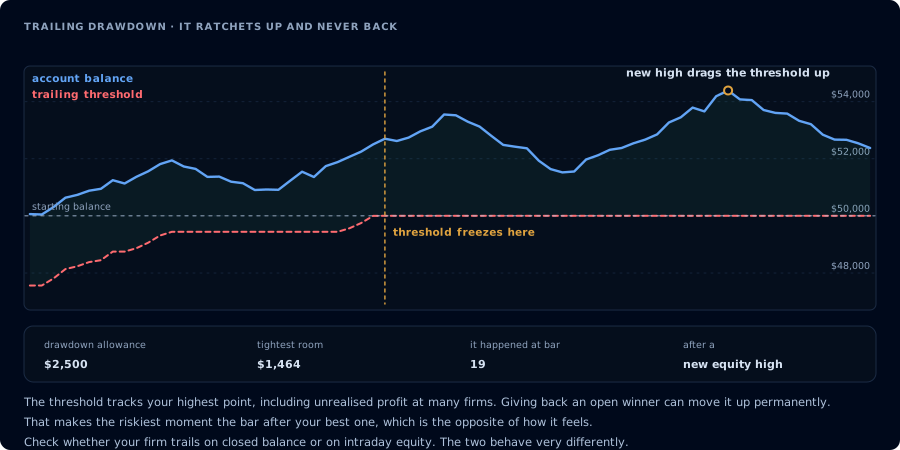
Two details decide how dangerous that is, and both are set by your firm. The first is when the line recalculates. An intraday trailing drawdown can move with unrealized profit, so a winning trade that runs and then pulls back can raise the line mid-trade and close the account on a position that is still green. An end-of-day drawdown only moves on the closing balance. The second is where it stops. Many firms stop trailing once the line reaches the starting balance, after which it behaves like a fixed floor. Check your firm's current rules for both, and if you want the math worked for your account, the trailing drawdown survival guide has a calculator.
The takeaway: the firm's line is a moving target that you do not control and are only told about when it is too late. A line you set yourself, a fixed distance above it, is one you do control.
Three lines you can draw with CrossTrade
The CrossTrade Account Manager gives you three kinds of limit, and they answer different questions.
| Rule | What it measures | Resets |
|---|---|---|
| Daily Loss Limit | The session's P&L | Every session |
| Trailing Drawdown | Giveback from the session's high-water mark, after a trigger you set | Every session |
| Account Floor | Net liquidation against one fixed amount | Never, until you change it |
The first two are about the day. They stop a bad session from getting worse, and stop a good session from turning into a bad one. Account Floor is about the account itself. It does not care what happened today; it compares the account's net liquidation value to one number and acts when the account goes below it.
That is the piece that maps to a firm's drawdown. The firm's line is about the life of the account, not the day, and so is yours.
How Account Floor works
You enable Account Floor in the account's monitor editor and enter an amount in the account's currency. Say $48,500. If reported net liquidation falls below $48,500 (a balance exactly equal to the floor does not trigger it), CrossTrade cancels the account's working orders, flattens it, and blocks incoming signals for the rest of the session.
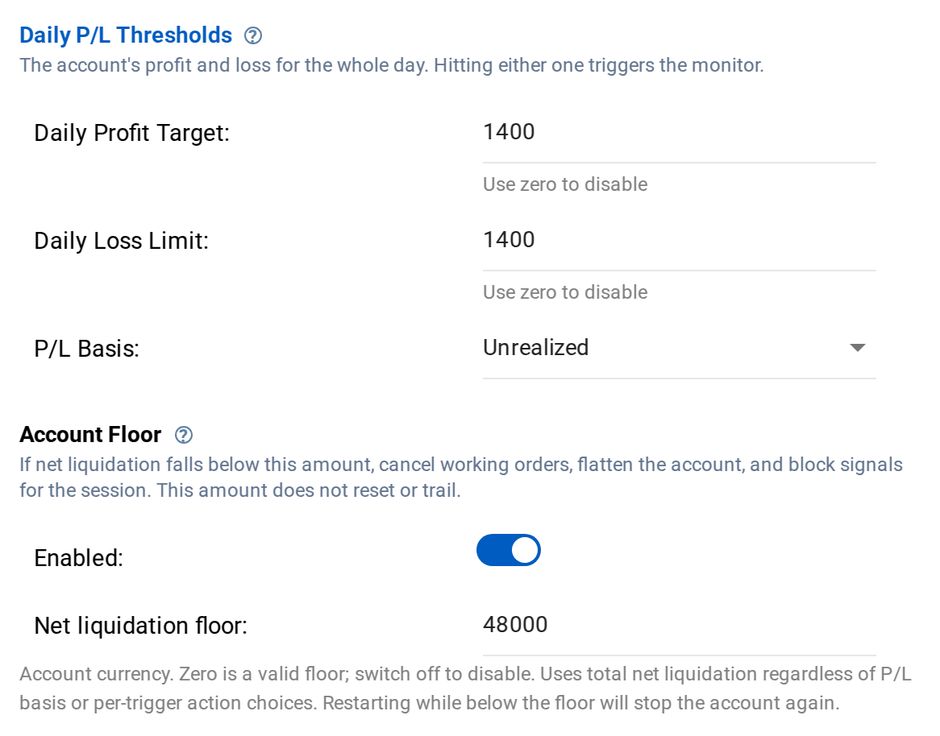
A few specifics that make it predictable. It always uses net liquidation, whatever P&L basis the rest of the monitor reads. Its action is always cancel, flatten and block, regardless of what the other rules on the monitor are set to do. It has no activation profit, no high-water mark, and no daily reset: the number stays exactly where you put it. Zero and negative amounts are valid floors, so the switch, not a zero, is what turns it off.
Restarting does not reset it either. The monitor re-arms under its normal session rules, but if net liquidation is still below the floor, it trips again on the next evaluation. That is the point of a floor.
It works on both platforms. On NinjaTrader 8, it runs on CrossTrade's server from your NT8 Add-On's account reports and needs a report no more than 30 seconds old, so keep the NinjaTrader computer's clock synchronized. On Tradovate, it runs entirely in CrossTrade's cloud using the monitor engine's own valuation of the account, with your computer off. On both, missing or invalid valuation is never read as a zero balance and cannot trigger a floor on its own.
Setting your floor: a worked example
Take the same hypothetical $50,000 account with a $2,000 trailing drawdown. On day one the firm's line is $48,000.
Set the floor with a buffer. An Account Floor at $48,500 means CrossTrade flattens you with $500 of room left before the firm's line. That buffer is not decoration. Account Floor is sampled enforcement rather than a stop order resting at the broker, so there is always some distance between the moment a floor is crossed and a confirmed flat position, and in a fast market that distance costs money. Size the buffer to the instrument and size you trade.
Move it when the firm's line moves. Account Floor is fixed by design, and the firm's line is not. After a good week, if the account's high is $51,200 and the firm trails from that, the firm's line is now $49,200, and your $48,500 floor sits below it, doing nothing. So make raising your floor part of your routine: after a new high, set it to the firm's new line plus your buffer. It takes seconds in the monitor editor, and it means your line is always the one that gets reached first.
Set it once when the firm's line stops. If your firm stops trailing at the starting balance, the firm's line becomes $50,000 for good once the account is far enough up. That is where a fixed floor fits perfectly: set it at $50,000 plus your buffer and leave it.
Keep the daily rules underneath it. The floor is the account-level line. A daily loss limit inside the firm's daily limit, and a trailing drawdown rule on the session, keep an ordinary bad day from ever getting near it. Our Tradovate Account Manager reference walks through those.
What Account Floor is not
It is not a broker-held stop, and it is not a guaranteed exit balance. It is a rule evaluated on CrossTrade's servers against the account's reported value, and connection loss, missing prices and slippage can all prevent an exit at exactly the amount you set. That is why the buffer exists. If a flatten cannot be verified, check the management log and your broker's positions.
It also does not know your firm's rules. CrossTrade does not read the firm's drawdown and cannot tell you where the firm's line is today. You set the number, from the firm's dashboard and rules, and you move it.
And templates carry the absolute amount. If you apply a saved monitor template to a differently sized account, review the floor before you save.
Set account-level limits before the next session
Configure profit and loss thresholds, trading windows and account controls for NinjaTrader 8 or Tradovate. Review how each rule is measured and enforced.
Frequently asked questions
What is the difference between a trailing drawdown and a maximum drawdown?
A static maximum drawdown is a fixed line below the starting balance. A trailing drawdown moves that line up as the account makes new highs and never moves it back down, so the room you have shrinks after every giveback.
Does Account Floor trail like a firm's drawdown?
No. It is a fixed amount that only changes when you change it. Pair it with a routine of raising it after new highs, or set it once if your firm's line stops trailing at the starting balance.
Does Account Floor work on Tradovate?
Yes. It is available in both the NinjaTrader 8 and Tradovate Account Managers. On Tradovate it runs in CrossTrade's cloud with your computer off.
Will Account Floor guarantee I never hit my firm's drawdown?
No. It is sampled enforcement, not a stop resting at the broker. Keep a buffer between your floor and the firm's line, and keep daily limits underneath it.
What happens the next day after the floor trips?
The floor stays at the amount you set. If the account is still below it when the monitor re-arms, it trips again. Raise the account above the floor, or deliberately change the floor, before you trade that account again.
Draw your own line
Open the Account Manager for NinjaTrader 8 or Tradovate, enable Account Floor on the account, and set it a deliberate distance above your firm's current line. Try it on a Demo or Sim account first and watch the management log. Account Manager is included in Pro and above and in the free trial: start a free 7-day trial to set it up today.
CrossTrade is execution and automation software, not a broker, financial adviser, or trading strategy. Futures trading involves substantial risk. Automated account rules are sampled and can be affected by connection loss, missing prices and slippage. Prop firm rules vary and change; confirm them with your firm.