PRO FEATURE

NinjaTrader 8 Trade Copier for Multiple Accounts

CrossTrade copies supported NinjaTrader 8 trades across the accounts you map. You can send a TradingView webhook into your NinjaTrader workflow, then use the trade copier for the account mappings and sizing rules you configure. Test the complete setup in simulation and review each account before live use.

Copy orders or executions between your NinjaTrader 8 accounts. Choose the copy mode, sizing, and limits for each relationship. The Trade Copier is included with CrossTrade Pro.

Server-Side
Cloud Configuration
2 Modes
Order / Execution
0 NinjaScript
Pure WebSocket Architecture
app.crosstrade.io/trade-copier
LIVE COPIERS

Two copy modes

Match the mode to the trading style. Mix and match across different copy relationships.

Order Mode

Precision replication

Mirrors every aspect of trade management โ€” limit orders, stops, brackets, modifications, and cancellations. Perfect for strategies requiring exact order management and precise entry/exit timing.

Execution Mode

Speed-first fills

Triggers immediate market orders on follower accounts whenever the source gets filled. Ideal for scalping, fast-moving strategies, or any situation where getting the fill matters more than replicating exact order mechanics.

Copy TradingView trades to multiple NinjaTrader accounts

A TradingView alert can start a NinjaTrader workflow. Once the trade reaches the source account, configure CrossTrade to copy supported trades to the follower accounts you mapped. Set the quantity rules for each account, then test the entry, exit, stop, target, and reconnect behavior in simulation before live use.

For webhook setup, read TradingView webhook automation. For account mappings and copier settings, read the NinjaTrader trade copier setup guide.

Core features

Every feature is configured per copier relationship. Build whatever architecture matches your trading strategy.

sync_alt

Multi-Directional Copying

Any account can copy from any other account. Account A follows B, B follows C, C follows A โ€” all concurrently. Build circular copying networks, hedging architectures, or any topology you need. No rigid leader/follower hierarchy.

CORE
bolt

Auto-Sync

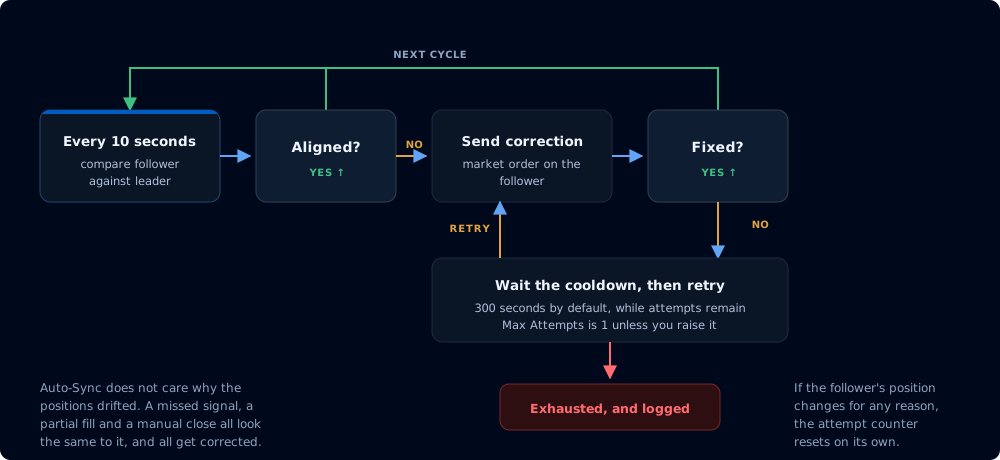
On a configurable interval (as fast as every 3 seconds), CrossTrade compares each follower's position against what it should be and corrects discrepancies automatically. Missed a fill? Connection dropped? NT8 crashed? Auto-Sync picks up where it left off without you touching anything.

AUTOMATION
bar_chart

Position Sizing & Ratios

Set any ratio per follower โ€” 0.5x, 2x, or custom. Maximum position limits prevent any follower from exceeding its risk threshold regardless of leader activity. Essential for copying from large accounts to prop challenges.

CONFIG
swap_horiz

Trade Inversion

Flip follower trades to the opposite direction automatically. Build instant hedges across accounts with no manual intervention. All sizing and timing relationships are preserved โ€” only the direction flips.

CONFIG
filter_alt

Instrument Filtering & Replacement

Filter which instruments each copier handles. Symbol replacement translates contracts automatically โ€” trade ES on the leader, execute MES on the follower with full contract math handled for you.

CONFIG
groups

Copier Groups

Manage multiple followers as a single unit. Create a group, configure settings once, start or stop all copiers with a single click. Essential when scaling to 5, 10, or 20 prop accounts from one leader.

SCALE

Reliability & controls

Features that exist because real traders hit real edge cases. Connection drops, NT8 restarts, and reconnect storms are the technical edge cases the copier handles. Firm rules vary, so check your firm's current rules before using any copier.

visibility_off

Stealth Mode

Removes CrossTrade's automation metadata from copied orders, so trades use standard NT8 order naming conventions. Survives connection failures and full NT8 restarts. Firm rules vary, so check your firm's current rules before using any automation or copier.

PRIVACY
timer

Reconnect Delay

When a broker connection drops and reconnects, NT8 fires a burst of order events as it re-syncs. Without protection, the copier replicates those as real trades. Reconnect Delay suppresses all copier activity for a configurable cooldown window, preventing phantom positions.

SAFETY
link

Tandem Mode

Binds copying to your Account Manager monitors. Copying only runs while the corresponding monitor is active and within your risk parameters. Hit a daily loss limit? All linked copiers halt instantly.

SAFETY
cloud_sync

Server-Side State

Copier configuration and sync logic live on CrossTrade's servers, not inside NT8. Your config survives crashes, restarts, and power failures. Changes made in the web dashboard propagate instantly to the Add-On without restarting NinjaTrader.

INFRASTRUCTURE

Example configurations

Mini โ†’ Micro

Leader trades ES, follower executes MES at 0.5x sizing. Symbol replacement handles the contract math automatically.

Max Contracts

Stealth mode on. Filter to ES and NQ only. Max position of 2 contracts per follower. Use position limits to help enforce your own risk settings. Firm rules vary. Check the current rules before using any copier.

Inverse Hedge

Trade inversion enabled. Leader goes long, follower automatically goes short โ€” instant long/short hedge across accounts.

From our Discord

"I love this copier so much."

"Just wanted to pop in and say that I love the XT copier. It's so fast. Really great job with it."

Choose the workflow before you choose the copier

A copier should fit the way you trade. Use CrossTrade when you need mapped NinjaTrader 8 accounts plus a path from TradingView alerts, REST or WebSocket controls, or supported MCP tools. If you only need a desktop-only copier and do not need webhook or API workflows, compare the setup, account controls, and testing process before you decide.

Compare the best NinjaTrader trade copiers, learn about NinjaTrader API and MCP controls, and review connection recovery for NinjaTrader 8.

The Trade Copier is included with every CrossTrade Pro subscription.
Works entirely on NT8 โ€” webhooks are optional.

Trade Copier questions, answered

Modes, multi-account copying, and firm rules

Does CrossTrade copy NinjaTrader 8 trades?
Yes. CrossTrade's Trade Copier supports flexible, multi-directional copying between NinjaTrader 8 accounts. Configure each copier relationship in the CrossTrade app and test it in simulation before using a live account.
What is the difference between Order Mode and Execution Mode?
Order Mode mirrors order management, including limit orders, stops, brackets, modifications, and cancellations. Execution Mode sends market orders to follower accounts when the source receives a fill.
Can I use a NinjaTrader trade copier with a prop firm?
Rules for third-party trade copiers and automation differ by firm and can change. Check your firm's current rules before using any copier. CrossTrade does not override firm terms.
Can I copy TradingView trades to multiple NinjaTrader accounts?
CrossTrade can receive TradingView webhooks for NinjaTrader workflows and includes a NinjaTrader 8 trade copier. Configure the source and follower account mappings, then test the setup in simulation before live use.
Can I set different quantities for each NinjaTrader follower account?
CrossTrade provides account mapping and sizing controls for the NinjaTrader 8 trade copier. Confirm the configured quantity rules in simulation before live use.
Can I use an API or MCP tools with a NinjaTrader trade copier workflow?
CrossTrade offers REST, WebSocket, and MCP access for supported NinjaTrader workflows. Review the applicable tool documentation and safeguards before using any automated workflow live.