
What's New at CrossTrade
Product updates, new features, and everything we're building to make automated futures trading better.
Start Your Free 7-Day TrialCrossTrade Mobile Is in Public Beta on Android
The CrossTrade app for Android is in public beta on Google Play, open to every CrossTrade user. Check P&L, close positions, flatten accounts, cancel orders and reconnect data feeds on the NinjaTrader 8 running on your own PC, and manage your Tradovate accounts, from your phone. No remote desktop, no VPS.
The headline this round is the WebSocket API, which can now stream a Tradovate account with nothing running on your machine. That is a genuinely new capability rather than an improvement to an existing one, so it leads.
Underneath it: your webhook speaks JSON, Account Floor gives an account a hard balance line, and Add-On v1.13.13 spends most of its effort on the copier and Signal Share telling you the truth about what happened to an order.
Live Tradovate Streaming on the WebSocket API
Until now, live order and fill events over /ws/stream meant NinjaTrader had to be open and connected, because every event passed through the add-on on your PC. Tradovate accounts are now streamed server-side, on the same connection, with nothing running locally.
- Add
"origin": "tradovate"to a subscribe and you receive order, execution and position events from your linked Tradovate accounts, plus account P&L streaming andTv_-prefixed calls over the same socket - No NinjaTrader, no VPS, nothing installed. If you trade Tradovate, you can now build against live account events with your computer switched off
- Execution reports are a Tradovate-only event key carrying the broker's acknowledgement of each order command. It is the only real-time source of a rejection reason
- NinjaTrader events arrive immediately. Order, execution, position and connection updates used to be batched by the add-on and delivered within about three seconds. On add-on v1.13.13 they are sent the moment NinjaTrader raises them, typically well under a second
Nothing you have already written changes behavior. Omitting origin still means nt8, subscriptions are tracked separately per origin, and the speed-up needs no client change: the server switches to the immediate path on its own once it sees a v1.13.13 add-on, and older add-ons keep working on the batched path. Alerting and the Trade Copier are unaffected either way.
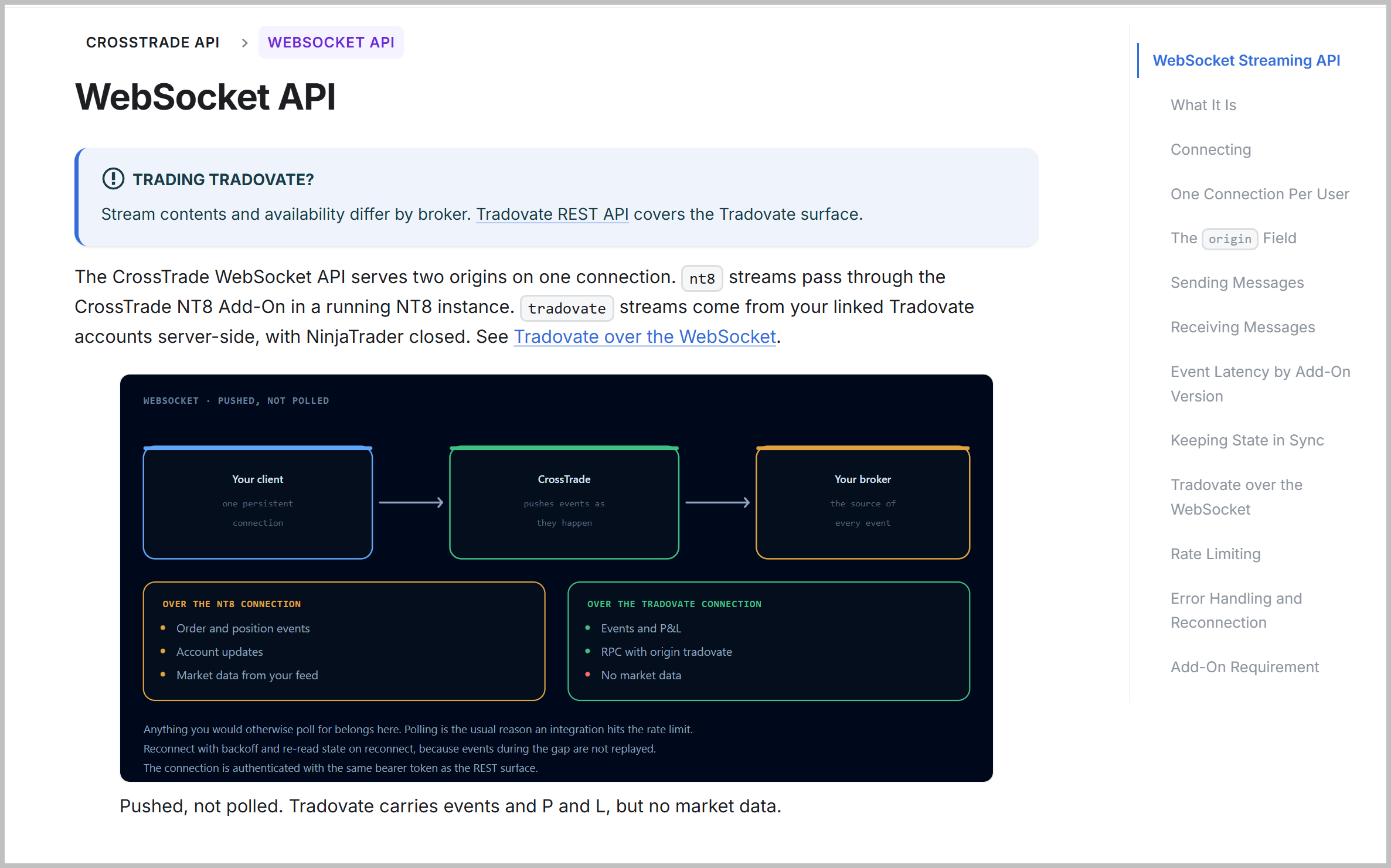
Full details, including every frame shape and the per-origin event table, are in the WebSocket API documentation.
Send Your Webhook Plain JSON
Every alert used to have to be written as key=value; pairs. Your webhook now takes a flat JSON object as well, using the same field names you already know.
Send whichever suits the tool you are alerting from. If the body starts with a brace it is read as JSON, so there is no flag to set and no new webhook URL. Numbers and true/false can stay unquoted, and everything downstream (Alert History, multi-account placement, diagnostics) behaves identically either way.
To be clear about what this is: it accepts CrossTrade field names. It is not a universal translator, and an alert built for another vendor will be rejected rather than guessed at, because guessing wrong on an order is worse than refusing it. If you are carrying one over, the Command Builder now offers a converter at the top of the page instead of at the bottom next to the preview. Paste the JSON you are sending today and get the CrossTrade command back, with anything it cannot carry across named in plain language rather than quietly dropped.
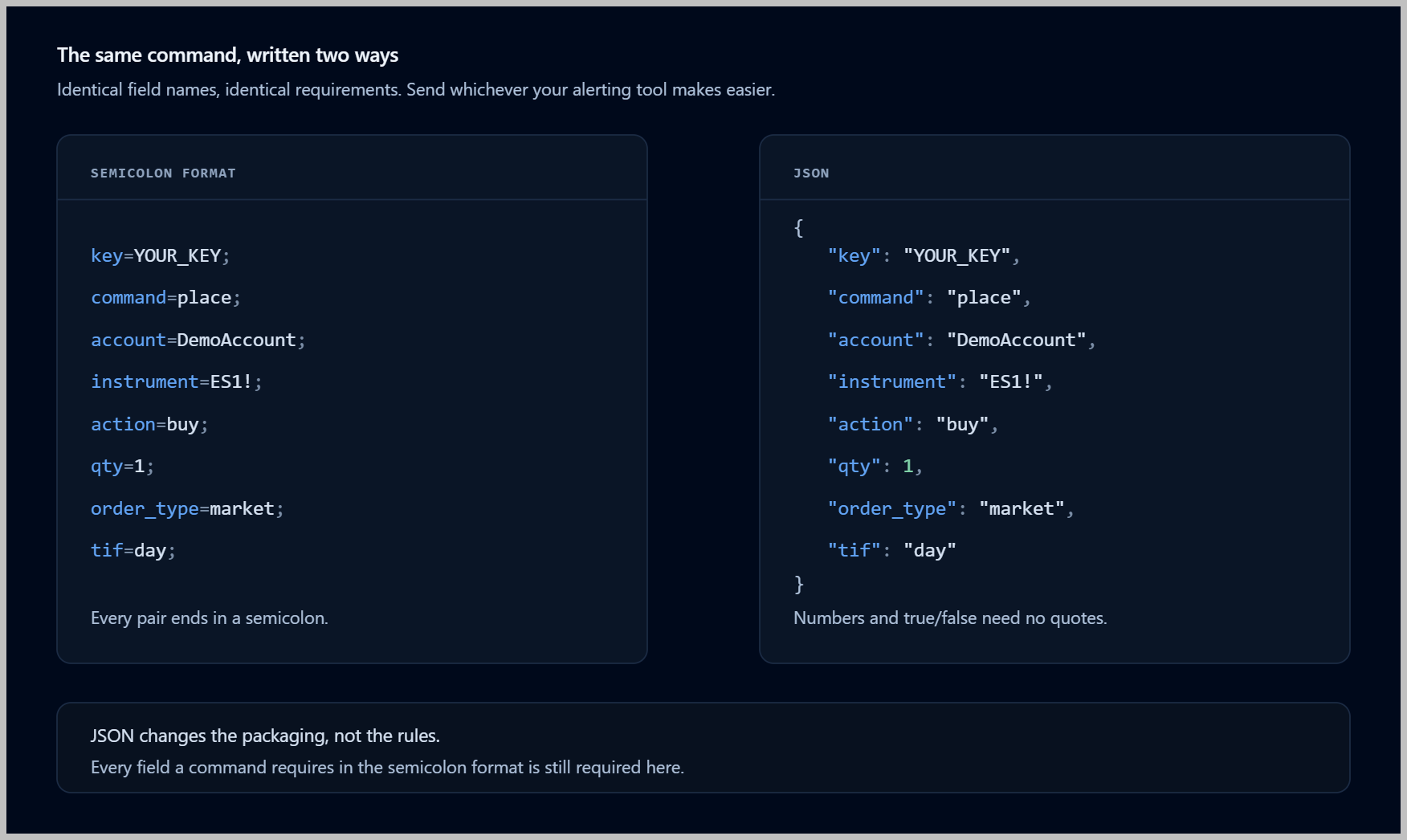
The rules, examples and error messages are written up in JSON Webhook Format.
Account Floor
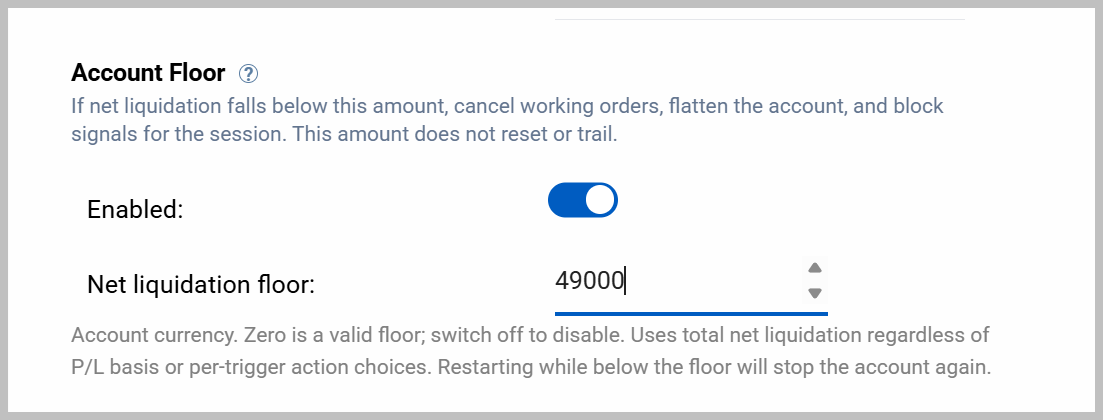
A new rule in the Account Manager on both brokers: a fixed minimum net liquidation value. Set a floor of 48,000 and if the account's reported balance falls below it, CrossTrade cancels working orders, flattens the account, and blocks incoming signals for the rest of the session.
It is deliberately the simplest rule in the monitor, and that is the point of it. Daily Loss Limit measures session P&L and Trailing Drawdown follows a high watermark, so both move with the day. Account Floor compares your balance to one number that never moves. No activation profit, no watermark, no daily reset. It is the right tool for a hard line you never want crossed regardless of how the session got there, which is exactly the shape of most prop-firm blowout thresholds. It trips on balance alone, so even a monitor set to watch unrealized P&L stops for the session when its floor breaks.
The Documentation Was Rebuilt
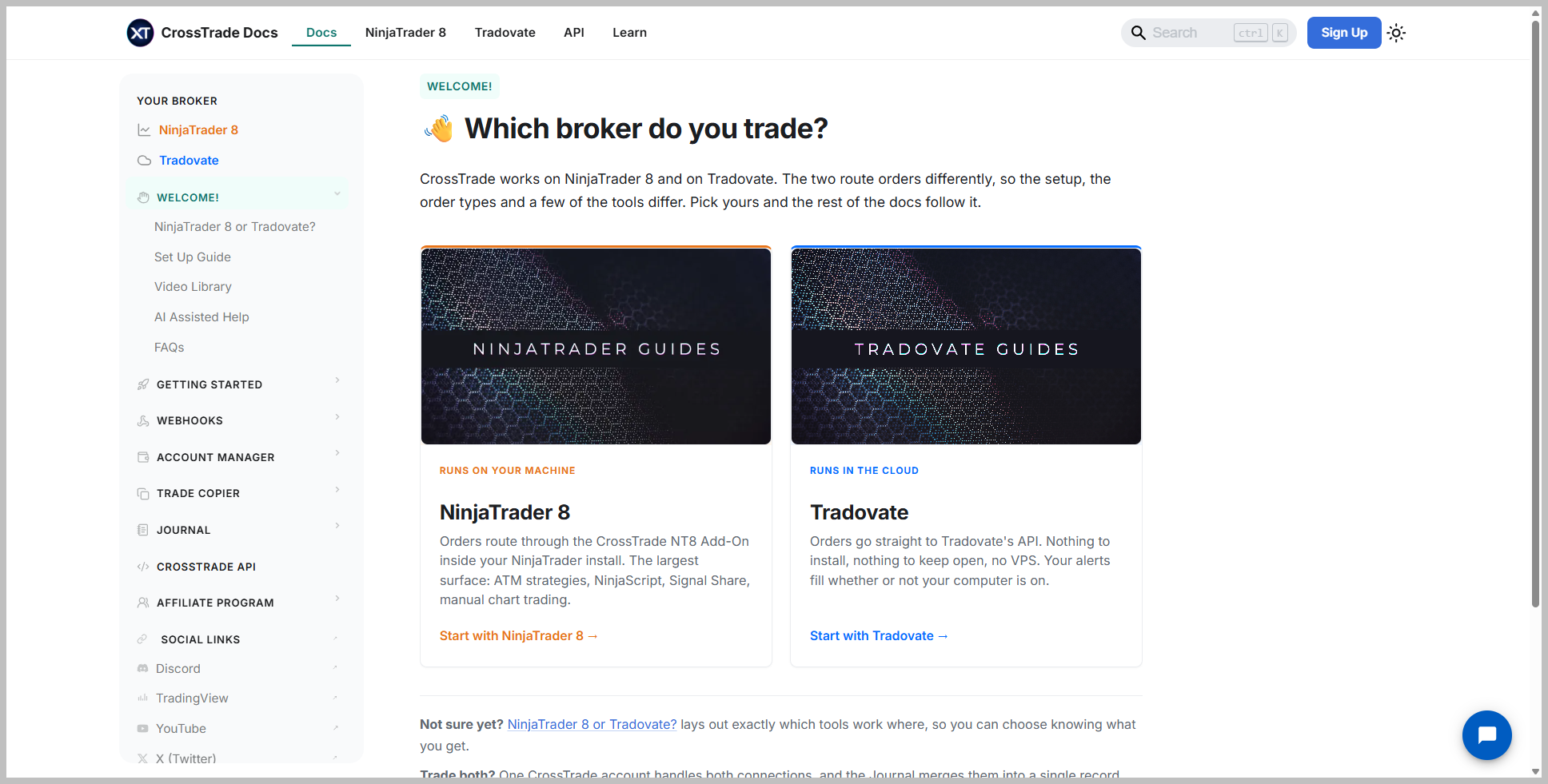
Useful if you have ever gone looking for something and given up. NinjaTrader 8 and Tradovate now have their own separate sections, so you are not scrolling past the other broker's guides to reach yours. There is a new NinjaTrader 8 or Tradovate? page that lays out exactly which tools run on both and which are exclusive to one, over 200 new diagrams, and a Learn library covering the ground next to the product: connecting AI assistants, what each webhook command does, chart patterns and indicators. Account Floor and the Economic Calendar finally have written pages too.
The Copier Confirms Before It Copies
Three fixes round out the release. Copies now wait for the leader's broker to acknowledge an order before going out, so an order the broker refuses, because the account is liquidation-only or has hit a prop-firm limit, is never copied at all. The wait costs about 20 milliseconds on an accepted order.
- Repeated rejections stop fanning out. The copier pauses that instrument, says so in the Activity Log, and resumes as soon as the leader fills again
- Auto-Sync rechecks a busy account in about two seconds instead of waiting a full interval, so a follower position the leader no longer holds is cleaned up promptly
- The copy log records what actually happened. A copy that filled before a cancel reached the broker is no longer written down as cancelled
- Copied market orders hold off position corrections until the broker reports a final state, closing a race that could briefly double a follower's exposure
Signal Share Reports the Real Outcome
The Activity Log now separates submission from outcome. An order is logged as Submitted when it is sent, and its result once NinjaTrader confirms it. Rejections name the instrument and the broker's own reason, fills are confirmed, and a submission is never left without an outcome. A received order that needed no action, because the account already matched the sender's position, now says exactly that.
Download v1.13.13 to pick these up, or read the full add-on changelog for the rest of the release.
Faster Tradovate Reconnects
When Tradovate rolls its sessions, or our services restart, many account connections drop at once and try to return at once. Reconnections are now paced and staggered across our fleet rather than firing in lockstep, so a full reconnect completes in about a minute. We also improved how we route around a rate limit, and connections are spread across more outbound addresses than before.
Most of this release is about closing the gap between what the Tradovate tools can do and what the NinjaTrader ones have always done. The copier gets a third mode that watches the broker directly, monitors get Trading Windows, and two of the CrossTrade-managed ATM enhancements finish their beta.
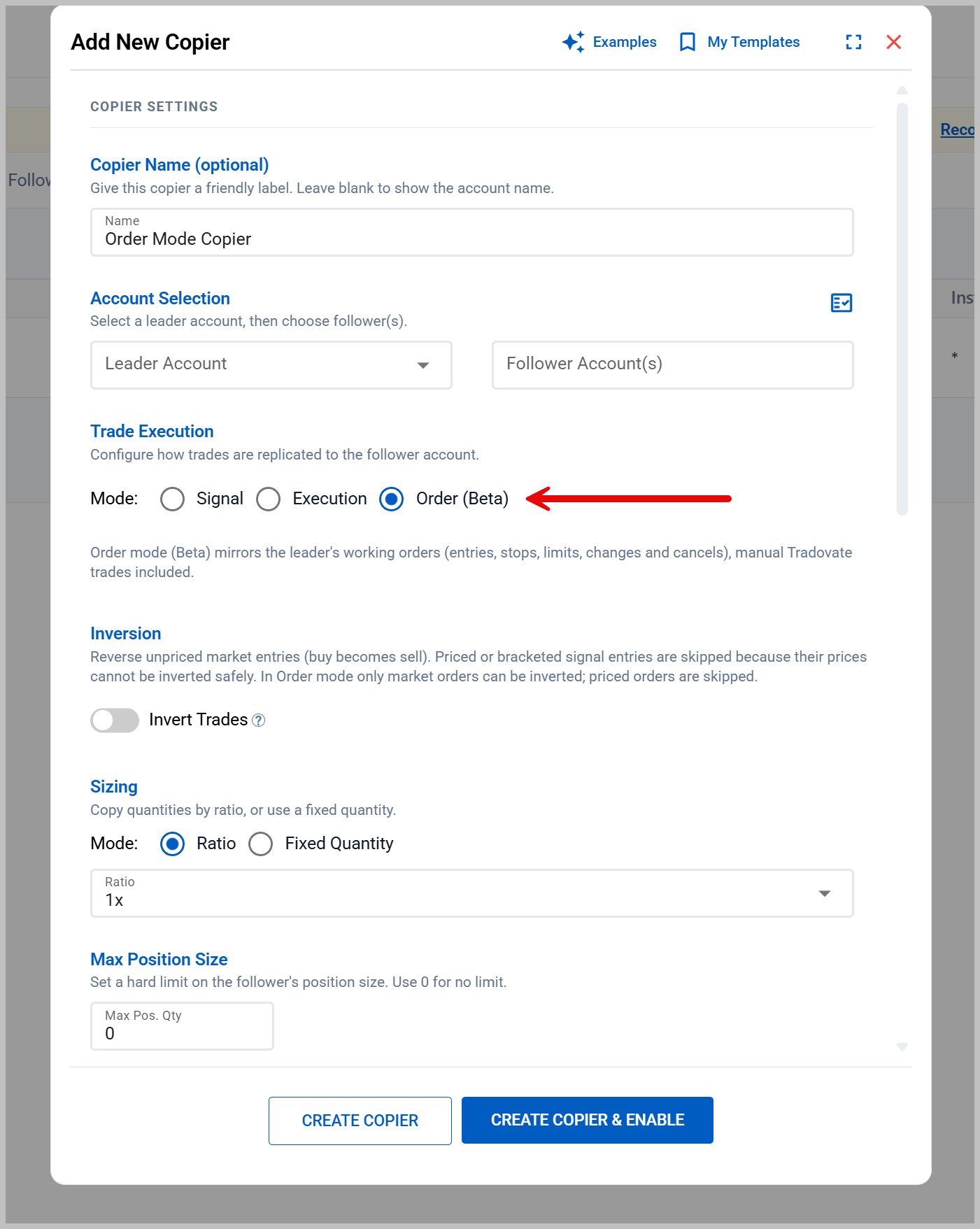
Order Mode for the Tradovate Trade Copier (Beta)
Signal Mode copies what CrossTrade sends. Execution Mode copies what fills. Neither one could copy a leader who trades by hand inside Tradovate's own platform, because both were watching the wrong thing. Order Mode watches the leader account at the broker level instead, so it sees orders whatever placed them.
- The full order lifecycle mirrors: placements, price and quantity changes, and cancels. Followers hold the leader's working orders instead of chasing them at market
- Manual and third-party trades copy: orders you place by hand in Tradovate, and orders sent from TradingView's native Tradovate integration, both mirror the same as webhook-driven ones
- Brackets stay brackets: entry, stop, and target copy as a real OSO family on the follower, not as three unrelated orders
- It never adopts history: enabling an Order Mode copier stamps an activation baseline, and only leader orders created after that moment mirror. Your leader's existing resting book is left alone
Order Mode is beta. It is available to every Tradovate user now, as a third choice in the copier editor's Mode selector. Signal and Execution Mode are unchanged. Existing copiers keep the mode they are already on — nothing migrates on its own, and switching an active copier's mode is a deliberate change you make yourself.
Bracket Protection When a Partial Fill Leaves You Uncovered
A Tradovate OSO sizes its stop and target to the entry's first fill. If the entry fills 2 of 5 contracts and the target then completes, the parent order keeps working for the remaining 3, and anything that fills after that arrives with no protection attached to it at all. That is a broker behavior, not a setting you can turn off.
CrossTrade now tracks every bracket family it places on Tradovate. When a protective leg goes terminal while the entry is still working and has already filled something, the residual entry is cancelled and the cancel confirmed, then fills are re-read to verify coverage. Anything still uncovered raises a critical alert rather than sitting silently. A family is re-checked on socket resync and on a background sweep, so a dropped event cannot leave one unwatched.
Trading Windows on Tradovate Monitors
Account-level Trading Windows were an NT8 Account Manager feature. They now work the same way on Tradovate.
- Five windows per monitor, each with a start and end time in US/Eastern, configured in the monitor editor
- Signals outside every window are blocked and logged with the reason, exactly as on NT8
- Optional flatten at each window's end, and the monitor stays armed afterward, so you are back in business for the next window without touching anything
Triggered Trails and Target-Fill Breakeven Leave Beta
Two CrossTrade-managed ATM enhancements on Tradovate are now generally available. Triggered trailing holds a fixed stop until price reaches a profit distance you set, then hands off to a native Tradovate trail. Target-fill breakeven moves your remaining stops to entry once a target tier fills, which Tradovate has no built-in equivalent for.
Both run on CrossTrade's own live pricing. Your dashboard does not need to be open, and no TradingView, NinjaTrader, or Tradovate market-data entitlement is required. If reliable pricing is not available, CrossTrade will not substitute a lower-quality quote: the fixed stop stays where it is, the watcher retries for its 24-hour lifetime, and a degraded-management alert is raised after repeated misses.
The E-nano Contracts, and a Better Instrument Picker
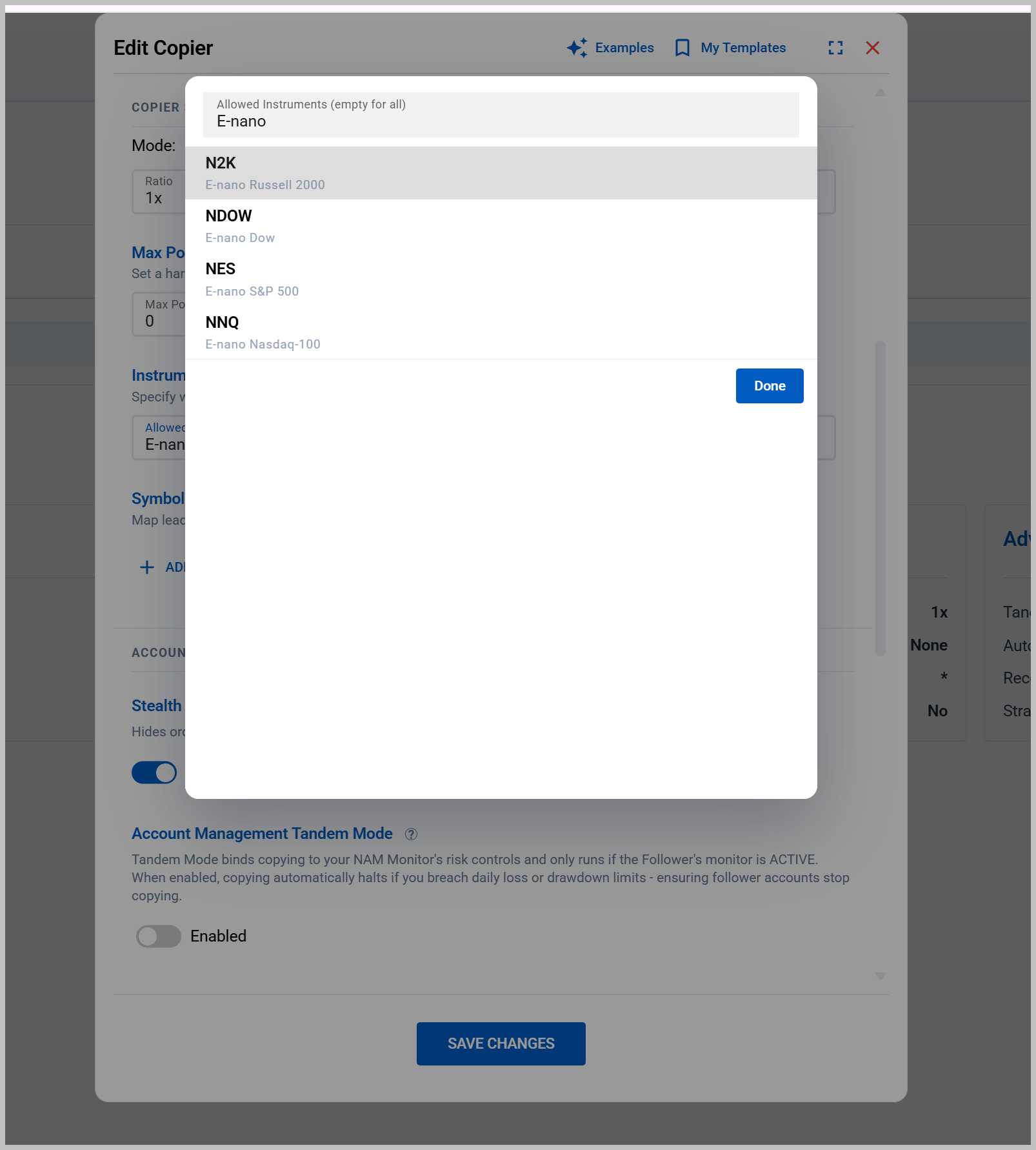
CME's E-nano equity index futures launched on August 24 at one-tenth the size of the Micro E-minis. All four are now on the platform: NES (S&P 500), NNQ (Nasdaq-100), N2K (Russell 2000), and NDOW (Dow). They are available everywhere an instrument list appears, including copier filters, symbol replacements, anti-cross pairs, and Signal Share, and they are wired into the related-products map so an E-nano and its E-mini or Micro sibling are correctly understood as the same underlying market.
Adding four more symbols to an already long list meant the picker needed work, so it was rebuilt. Every instrument now shows its contract description as subtext, and search matches that description as well as the symbol: type "nano" and you get the four E-nanos, type "gold" and you get GC. The list opens as a properly sized dialog instead of a menu that fought with scrolling modals, multi-select gets a Done button, and where custom roots are allowed the empty state tells you that you can press Enter to add one.
Configure Your Own Account Manager Columns
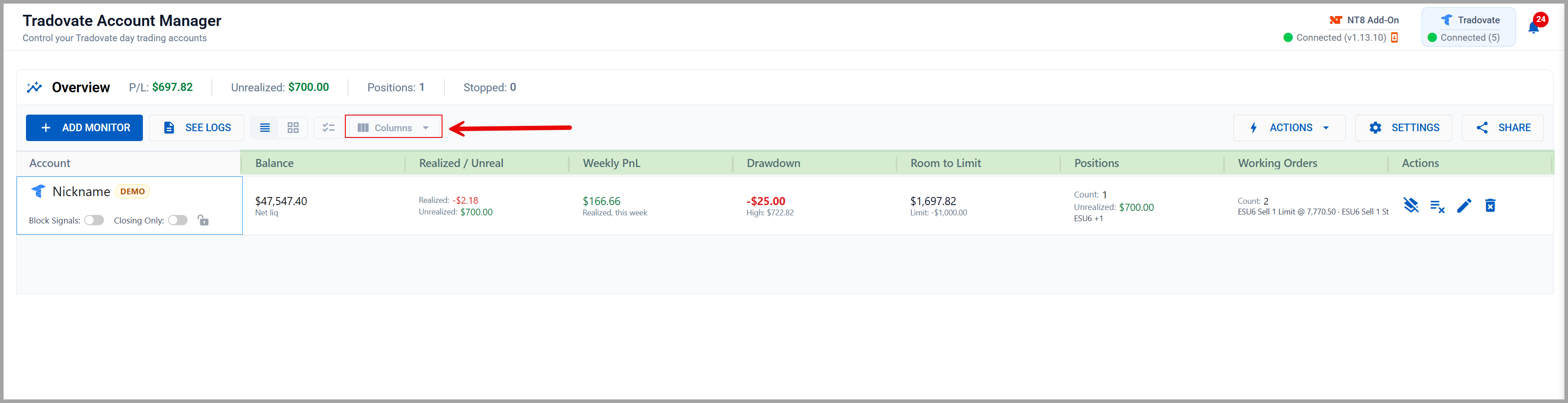
The Tradovate Account Manager grid gets a Columns picker and six new columns. Uncheck what you do not want and the choice sticks across reloads.
- Balance: net liquidation value, cash plus open P&L. The detail modal always had it; the grid never showed it
- Realized / Unrealized: the session P&L split, banked over open
- Weekly PnL: realized P&L for the trading week, straight from the broker
- Drawdown: how far session P&L currently sits below its session high
- Room to Limit: how much further session P&L can fall before your loss threshold trips
- Working Orders: resting orders per account, beside the existing positions column
Click to view full size
Every numeric column sorts, and the P&L columns sort on their underlying number rather than the formatted string. Realized/Unrealized and Weekly PnL start hidden so the default grid does not get wider than it was.
NT8 Add-On v1.13.12
Two releases since the last update. v1.13.11 was largely a stability and Signal Share accuracy release: broadcasts sent between a fill and the platform's position update no longer advertise the wrong position transition, copied OCO groups are scoped per source and instrument, receiving-side cleanup waits until the receiving account is confirmed flat, and several crashes that could close NinjaTrader entirely (during unstable connectivity, overlapping message handling, or background reporting) were fixed. Restarting the add-on while our servers were unreachable can no longer leave two reconnect loops fighting each other.
v1.13.12 fixes two things worth calling out directly. Account Management could trip on the previous session's realized P&L in the moments after NinjaTrader starts, because NT8 restores that figure at launch and only refreshes it once the account connects, which meant a flat account could be blocked or flattened on yesterday's result. Thresholds are now evaluated only once the connection is up and the reported P&L is consistent with the session's actual fills. Separately, Auto-Sync in the NT8 copier's Order Mode could cancel a follower's own stop and target copies as orphans after the broker reassigned an order id (common with Stealth Mode on), then refuse to re-place them as duplicates, leaving the follower holding an unprotected position. Copies are now recognized through their live order links.
Download v1.13.12, or see the full add-on changelog for everything else.
Three weeks ago the Tradovate Account Manager and Trade Copier opened as a beta. They are now out of beta, and the Tradovate Journal has come with them. Alongside that, the copier gets the sizing control most of you asked for, and the config editors got the rebuild they needed once those forms outgrew their tabs.
Tradovate Account Manager & Trade Copier: Out of Beta
Both tools are done with their beta window. Nothing about how they work changed at the flip, they simply carry the same status as their NinjaTrader counterparts now: server-side risk monitors with daily thresholds, trailing drawdown, Monitor Lock and end-of-day flatten, plus account-to-account copying with groups, drift correction, Tandem Mode, and the network view.
On a Standard or Free plan? The beta lent these tools to every plan while it ran. Now that it has closed they are Pro tools again, and your access continues through August 28. Anything you built during the beta stays exactly as you left it; upgrade to Pro before then to keep using it. Pro, Elite, and trial accounts are unaffected.
Per-Follower Position Sizing (Trade Copier)
This is the big one. A group copier used to size every follower off one shared multiplier, so a group holding a small account and a large one had to pick a compromise. Now each follower can carry its own.
- Per-follower multiplier: set a size override directly on any follower row in the picker. Leave it blank and that follower uses the group's multiplier, which is shown as the placeholder so you always know what blank means
- Range: overrides run from 0.25x to 10x. The Sizing section stays honest about which followers are overridden, so a group with mixed sizing never looks uniform
- Ratio groups only: a fixed copy quantity beats any follower multiplier in both engines, so the per-follower controls appear on ratio-sized groups, where they actually do something
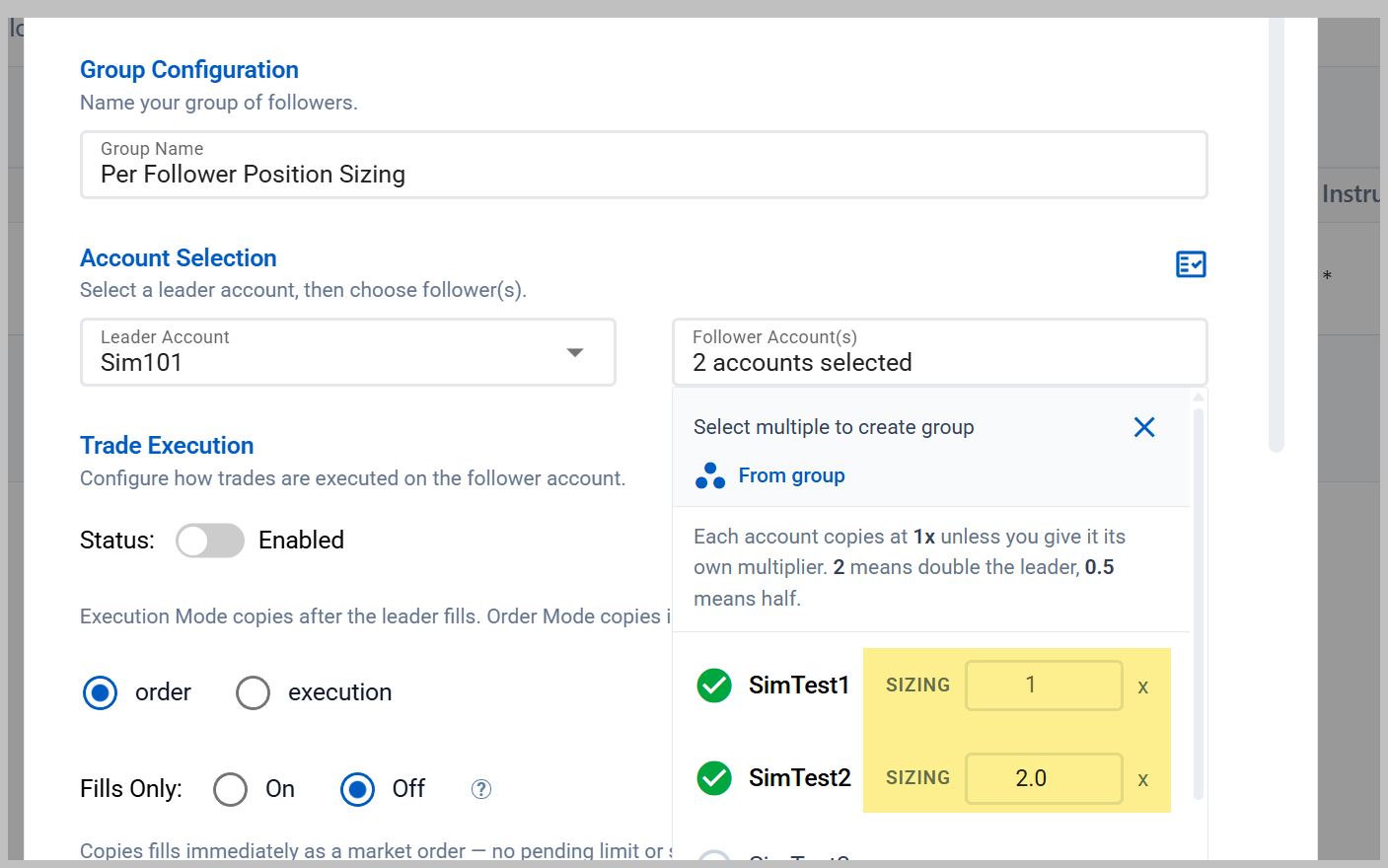
Both copiers (NinjaTrader and Tradovate) validate sizing through the same shared rules on save, so a config that is legal in one is legal in the other.
Config Editors: Tabs Gone, Expand Added
The copier and Account Manager config dialogs had grown past what a stack of tabs could hold. Settings you wanted to compare lived on different tabs, and finding one meant remembering which tab owned it.
- No more tabs: every setting sits on one scrollable form in two columns, so related controls are visible at the same time instead of a click apart
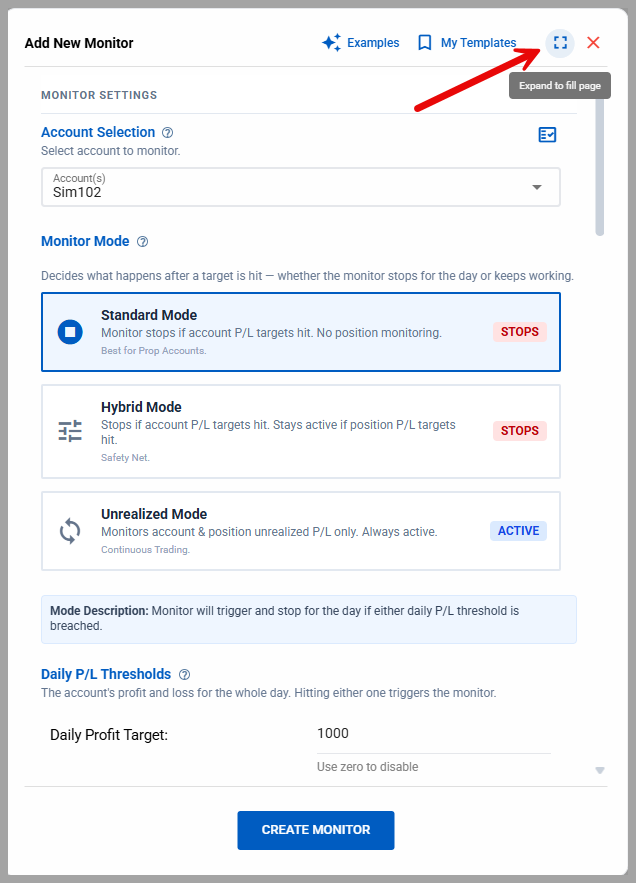
- Expand to fill the page: an expand button in the dialog header takes the editor full width against the nav, which is where the follower list and the per-follower sizing controls get room to breathe. Click it again to drop back to the centered card
- All four editors: NinjaTrader copier, Tradovate copier, NinjaTrader monitor, and Tradovate monitor all got the same treatment, so the two brokers stop feeling like two products
Templates, Including Ones We Ship
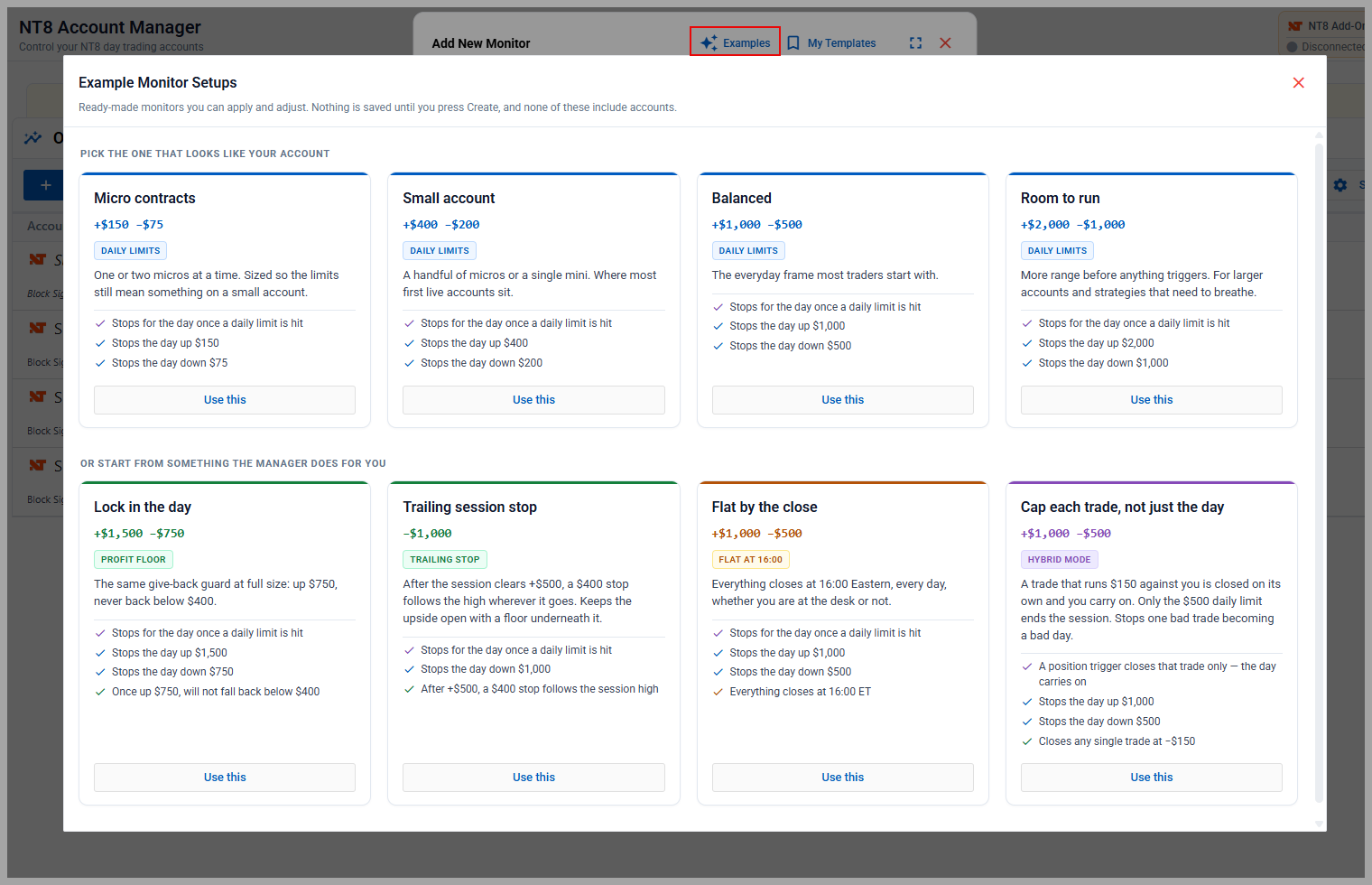
Same idea as the webhook Command Library: configure something once, save it under a name, and apply it in one click the next time you set one up.
- Save and reapply: available in all four config editors, up to 25 templates. Templates capture settings only. Never accounts, leaders, followers, nicknames, or runtime status, so applying one to a new monitor cannot drag another account's identity along with it
- Starter templates: the picker is never empty on a new account. One set is sized by how much is on the line, from a single micro contract upward, so you can pick the row that looks like your account and be done
- Templates that teach a feature: the second set each demonstrates one tool (a profit floor, a trailing stop, bad-print rejection, a session window), because none of those is discoverable from a form full of empty number inputs. Apply one, read what it did, and you have learned the feature
Multi-Select Deleting
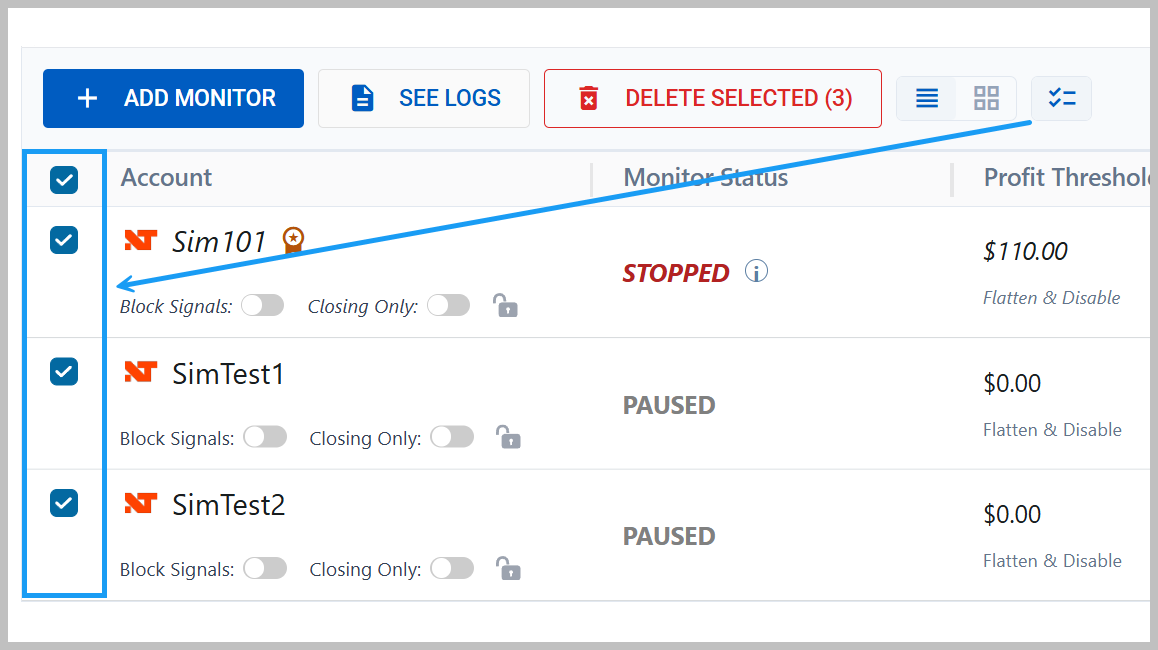
Clearing out a batch of finished copiers or monitors used to be a one-at-a-time job with a confirmation on each. The toolbar now has a select-mode button that reveals a checkbox column and a Delete Selected action in the header, on all four grids: copiers and monitors, both brokers.
Tradovate Journal: Fully Functional, Plus CSV Backfill
The Tradovate Journal is complete. Fills sync server-side with no add-on required, and they land in the same buckets as NinjaTrader trades, so a consolidated view of both brokers works the way you would expect.
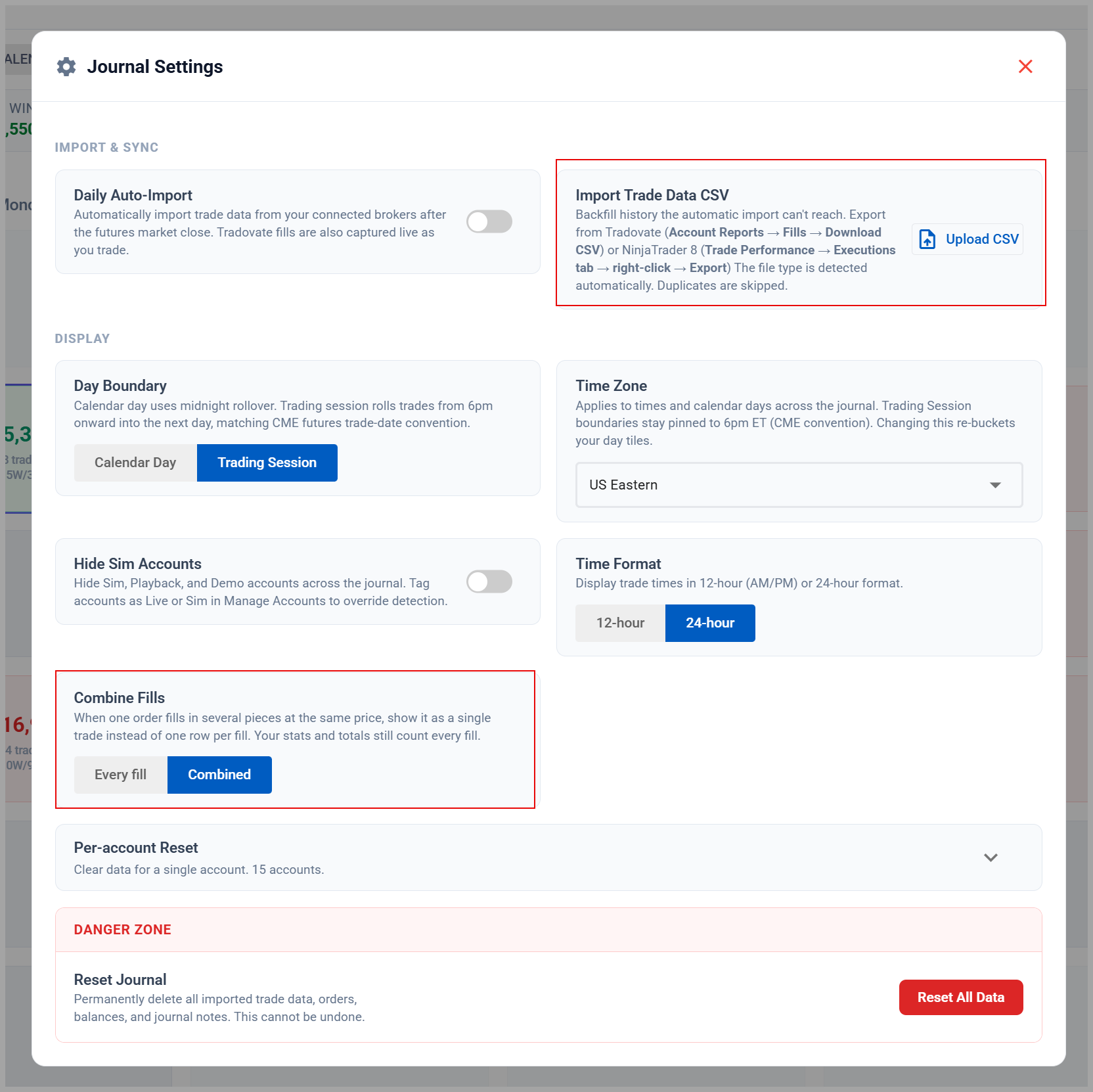
- CSV import for history: Tradovate's API is session-scoped, which means a trading day the sync missed is unreachable through it forever. Their web platform exports the full fill history though, so the Journal now imports it. Use the Fills export specifically; the other exports do not carry the fill id the importer keys on
- Preview before it commits: the import shows you what it found, which accounts it resolved, and how many rows are new before anything is written
- Overlap is handled: re-importing the same file, or a file covering days the sync already captured, classifies as already-imported rather than duplicating. If you traded a Tradovate account through NinjaTrader, those fills are matched and skipped too
Win Streaks in the Calendar
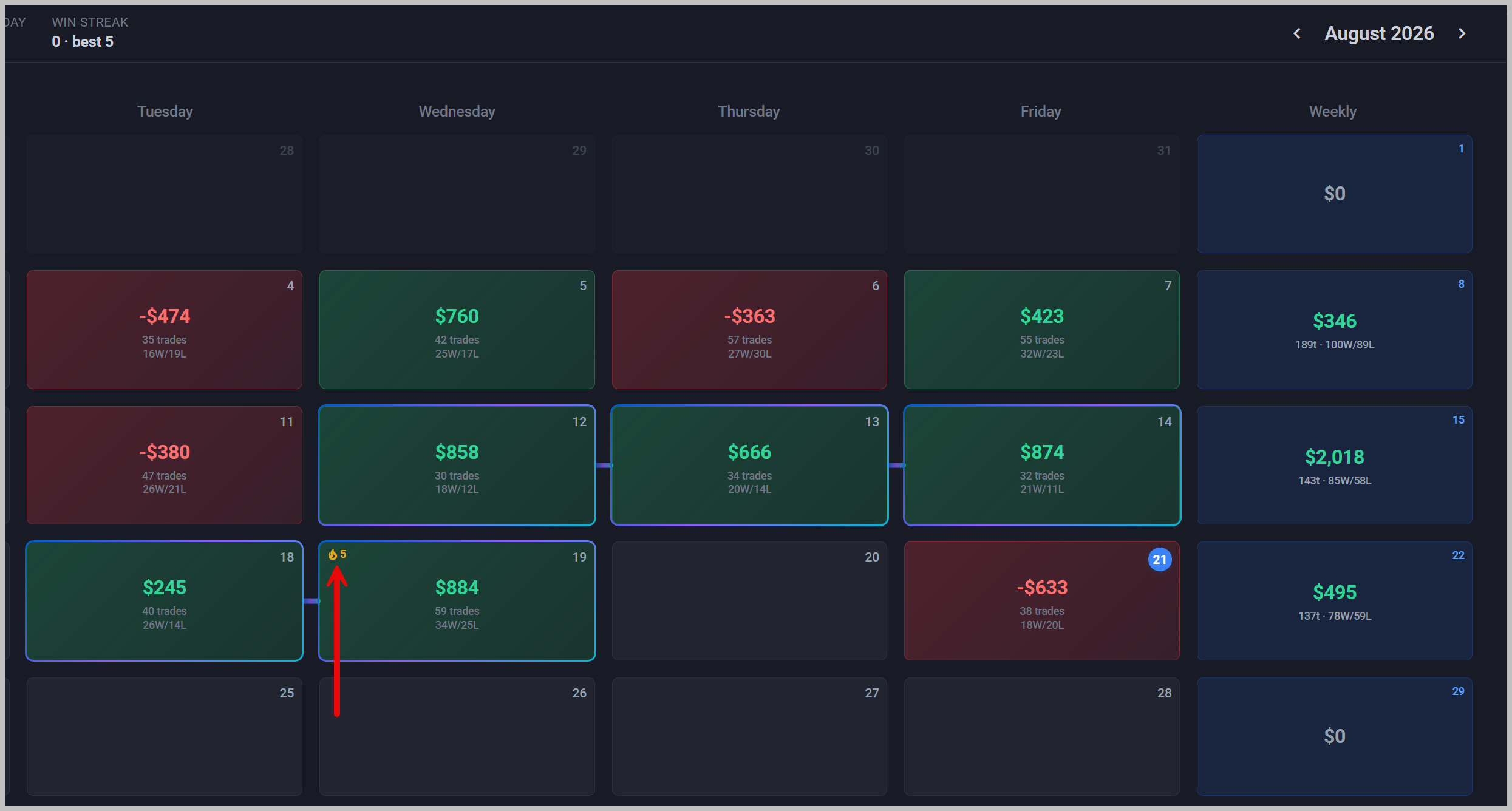
Consecutive green days now read as consecutive green days. Runs of two or more winning days get a streak treatment on the calendar tiles with a connector between them, and the header carries a chip showing your current streak alongside the month's best. Days with no trades do not break a run, so a weekend or a day off leaves the streak intact.
Nicknames for Your Tradovate Logins
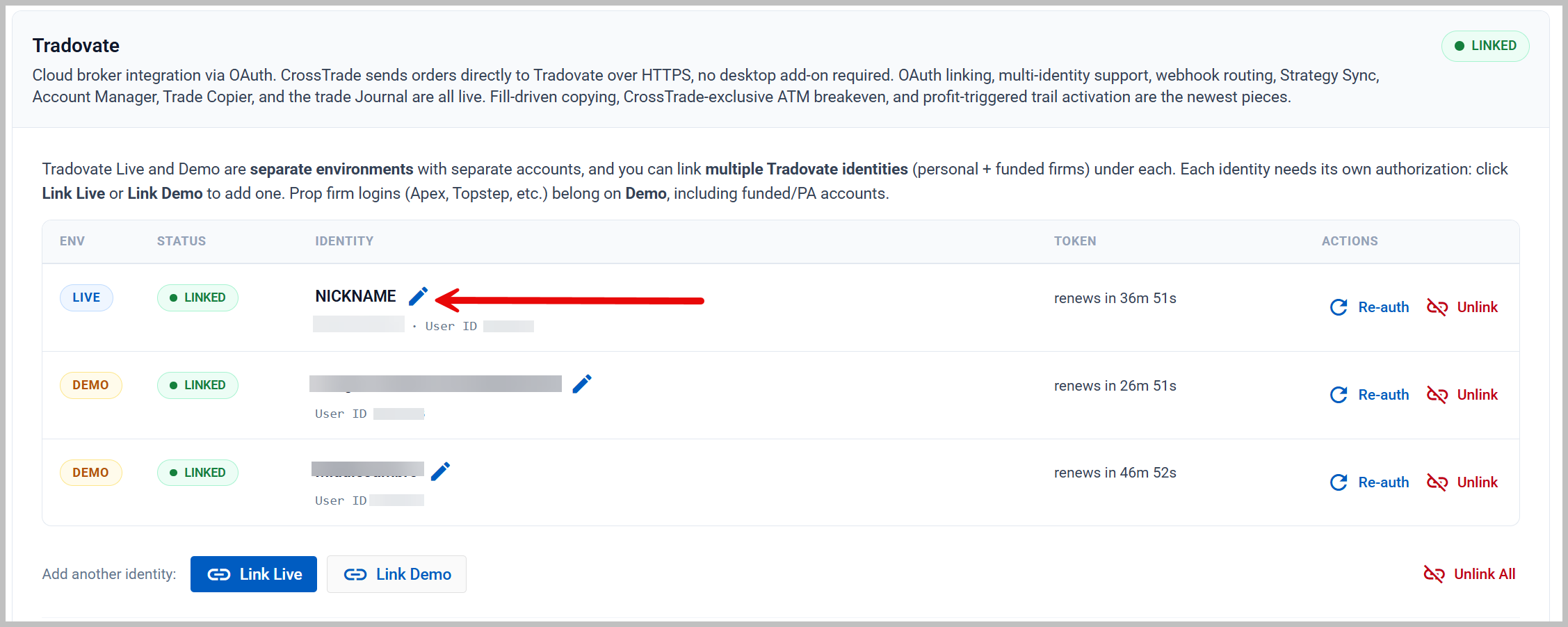
If you run several Tradovate logins (personal plus one or more funded firms), the raw broker identity is not much help in telling them apart. Under My Account you can now name each linked identity, and that name is what shows wherever the identity appears, with the raw broker identity kept underneath.
Smaller Things Worth Knowing
- Stopped monitors explain themselves: a stopped monitor now tells you whether it was a threshold trip or an unclean session start, whether Monitor Lock is holding it, and (the part nothing used to answer) whether restarting with your current thresholds would just re-trip on the next evaluation pass
- Setup checklist on Home: four milestones (broker connected, test order sent, TradingView alert working, account controls set) checked against live state rather than self-reported. It retires itself once you finish
- Tradovate rate meter: Tradovate meters API traffic per login and penalizes bursts. The Home page Health Report now shows how close your busiest login is running, with per-login detail behind a click
- Continuous roots resolve correctly: a root like
MGC1!could pick the nearest contract even during the weeks it only accepts closing orders, which rejected every entry. Front-month resolution now skips contracts inside that window - Combine fills: a Journal preference that rolls multiple fills of the same order into one line
✨ Update: Add-On v1.13.10 is ready for download with a round of performance improvements and bug fixes.
Two weeks ago Tradovate went GA and we said the Account Manager and Trade Copier were next. They are here: both tools are now in beta for every Tradovate user. Alongside them, the Home page has been rebuilt around a live view of your webhooks actually working, and a new Manage Accounts hub gives your accounts names, order, and groups that follow you across the whole platform.
Tradovate Account Manager (Beta)
The same discipline system NT8 traders rely on, rebuilt for Tradovate, and it runs entirely on CrossTrade servers: no NinjaTrader, nothing running on your machine. Monitors evaluate roughly every 5 seconds, around the clock.
- Daily thresholds: set a profit target and a loss limit in dollars, measured against your choice of Total, Realized, or Unrealized P/L
- Pick what a trigger does: alert only, allow closing orders only, or block all signals, with optional flatten at profit or at loss
- Minimum Profit & Trailing Drawdown: protect banked gains with a give-back floor, or trail your session high by a dollar or percent amount. High-water marks are tracked server-side, so they survive a browser refresh or a dropped connection
- Signal locks: Block Signals and Closing Only sit on every row and work the moment you flip them, whether or not P/L monitoring is on
- End-of-day flatten, Monitor Lock & logs: schedule a daily flatten time, stop yourself restarting after a loss limit with Monitor Lock, and audit every automated action in the management log
One honest caveat. Triggers block signals arriving through CrossTrade and can close positions through the Tradovate API. Trades you place by hand inside Tradovate cannot be blocked, though auto-close still applies to them after the fact.
Tradovate Trade Copier (Beta)
Mirror one Tradovate account onto others, sized and filtered the way you want:
- Two copy modes: Signal mirrors trades placed through CrossTrade webhooks on the leader (place, brackets, flatten, reverse, cancel, change). Execution mirrors the leader's fills instead, manual Tradovate trades included
- Sizing & filters: copy at a ratio or a fixed quantity with a per-copy cap, whitelist instruments, and add replacement pairs (ES → MES) to map contract sizes between accounts
- Groups: one leader fanning out to many followers under a single shared config, shown as one row in the grid
- Network view: a diagram of your whole copying topology that flags duplicate leaders, double-targeted followers, and followers whose monitor is paused or stopped
- Drift Check: continuously compares each follower against the leader and corrects divergence, which is what converges a follower that was briefly offline. Correction volume is bounded, and every action is logged
- Tandem Mode: tie copying to the follower's Account Manager monitor. If the monitor stops on a loss limit, copying halts with it, catch-up passes included
Beta means beta. Both tools are fully functional, and both are the newest Tradovate builds we ship. You will get a one-time heads-up on first visit; keep an eye on your accounts, size accordingly, and tell us what you hit through Support or Discord. On a trial? Both pages include step-by-step getting-started guides.
Home: Live Signals & Signal Summary
The Home page now answers the question that actually matters when you automate: did my webhook work? A new Live Signals feed shows every webhook CrossTrade receives, NinjaTrader and Tradovate together, within seconds of arrival, each marked Accepted, Warning, or Rejected.
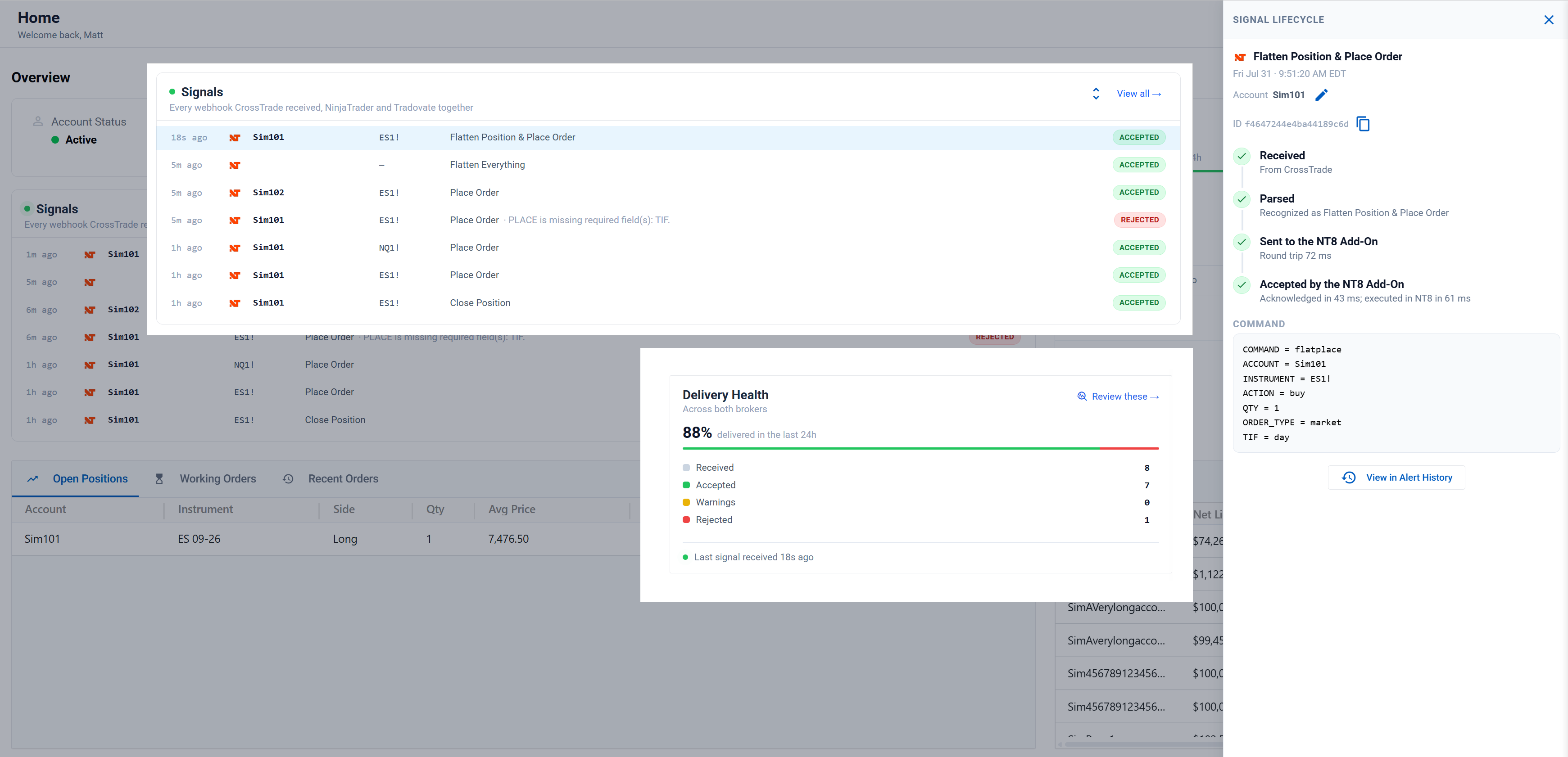
- Click any signal for its life story: Received (and from where), Parsed, Sent, and Accepted by the broker, with real timings at each hop. When something fails, the timeline shows exactly which step it died on and why
- Noise control: a strategy misfiring all session collapses into one ×N row instead of owning your feed (toggleable)
- Signal Summary: your delivered rate for the last 24 hours with Received / Accepted / Warnings / Rejected counts that deep-link into filtered Alert History views. If something is failing, the Troubleshoot with AI button hands our support assistant a summary built from your own recent failures
- One vocabulary everywhere: Alert History now speaks the same language as the feed, same statuses, same lifecycle timeline, and "View all" lands you there pre-filtered
Manage Accounts: Nicknames, Visibility & Groups
As account lists grow (prop traders, we see you), keeping them organized became its own job. The new Manage Accounts hub does that job in one place, and what you set there follows you everywhere:
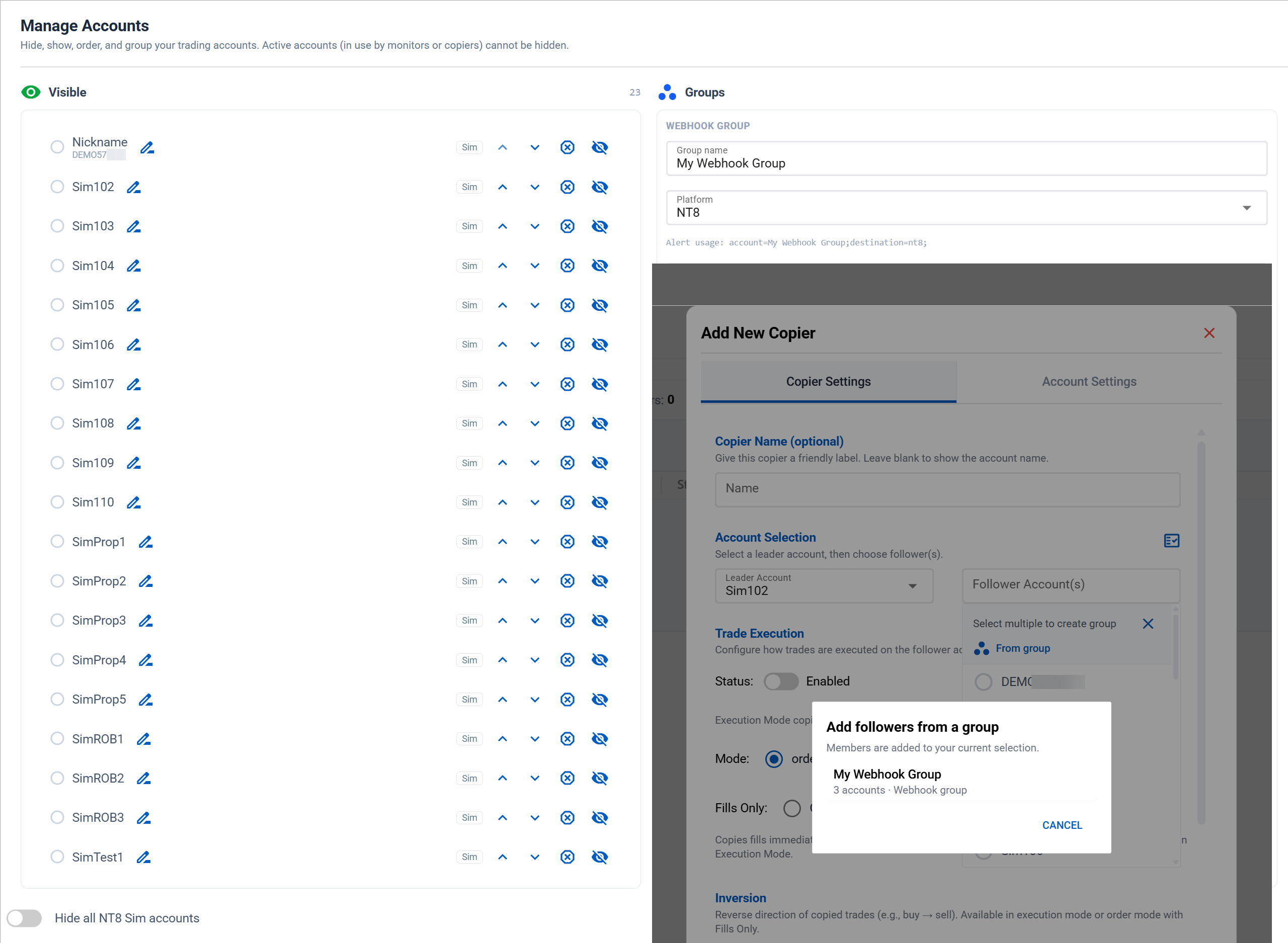
- Global nicknames: name an account once and the nickname shows up across the platform: Home, Journal, Account Manager, Trade Copier, and the signals feed, with the raw name kept as subtext where it matters
- Visibility & order: show, hide, and reorder accounts, and every account dropdown in the app follows your order. Hide all NT8 Sim accounts with one switch, and park blown evals in a "Blown" list so they stop cluttering your pickers and dashboards until you restore them
- Webhook groups: put accounts in a named group and target it from a single alert with
account=GroupName;. One webhook fans out to every account in the group, and both copier editors can fill a follower list straight from a group - Analysis groups: journal-only groupings for stats, free to mix NT8 and Tradovate accounts, so you can analyze "all my prop evals" as one unit. When an analysis group earns a promotion, one click turns it into a webhook group
✨ Next Up: The Tradovate Journal is in final testing (server-side fill sync, no add-on required), and Manual Trading charts for Tradovate are on the bench next.
This week is about AI help in two directions. Inside the platform, a new AI assistant is available to every CrossTrade user, built on our own data. And in the docs, we published a guide designed to be handed to whatever AI you already use, so it can wire up your TradingView automation for you. Plus a new way for affiliates to turn referrals into a free CrossTrade subscription.
Meet the CrossTrade AI Assistant
There is a new chat bubble in the corner of your dashboard. Behind it is our in-house AI assistant, and it is available to everyone: every plan, including trials.
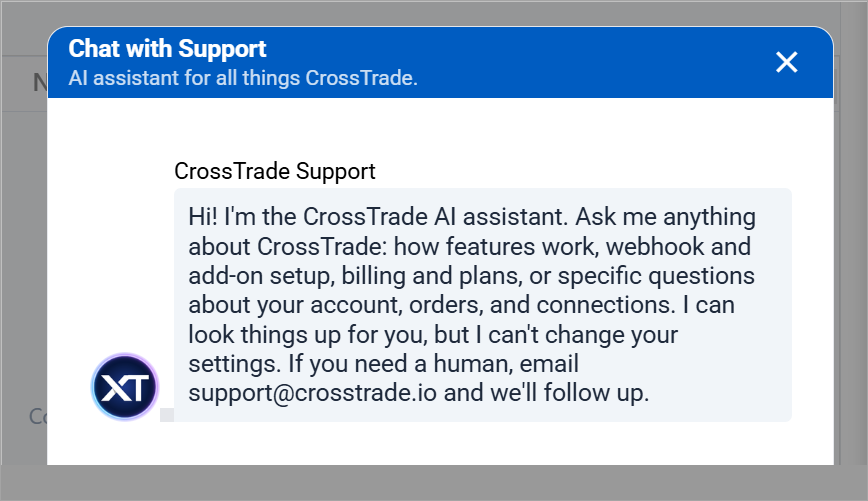
- Ask anything about CrossTrade: how features work, webhook payloads, add-on setup, billing and plans, Tradovate linking; if it is in the platform, it is fair game
- It knows your setup: the assistant can look up your own accounts, connections, and orders to answer questions about your data, not just questions about the product
- Built on our data: it is grounded in CrossTrade documentation, our knowledge base, and years of real support conversations, so answers reflect how the platform actually works today
- Read-only by design: it can look things up for you, but it cannot change your settings or place trades
Why not just ask ChatGPT? Because a generic chatbot has never seen most of CrossTrade and will happily invent commands and fields that do not exist. This assistant only knows how to answer from our material, which makes it dramatically more reliable for anything CrossTrade-specific. Ask it the question you would have emailed us, and see what happens.
Like any AI, it can make mistakes. Training it on our data makes it far more accurate about CrossTrade; it does not make it infallible. If an answer does not seem right, or you are about to act on something important, check with a human: ask in our Discord or email [email protected] and we will pick it up.
Hand Our Docs to Your Own AI
The other half of this release lives in the docs. The hardest part of automating a TradingView script is the mapping: what kind of script you have, how it signals, and what alert settings and payload that calls for. That is exactly the kind of work an AI assistant does well, if you give it the right material. So we wrote it for them:
- A file written for AIs, not humans: crosstrade.io/ai/automate-tradingview.md is a single plain-text guide that teaches any assistant the whole system: script classification, every webhook command, alert dialog mechanics, payload recipes, and Pine Script templates
- Paste and go: drop the file into Claude, ChatGPT, or Gemini alongside your Pine Script and ask it to build your alert. You get back what kind of script you have, whether it can be automated at all, your exact TradingView alert settings, the complete payload, and a test plan
- A new docs page: Automate with an AI Assistant in Getting Started walks through using it, including a copy-and-fill starter prompt
- Wired through the docs: six guides now point to it at the moment you would need it, including TradingView Alerts, the NinjaTrader and Tradovate strategy and indicator walkthroughs, and the API's AI-assisted development page
Same idea as the assistant, from the other side: instead of your AI guessing at CrossTrade, we hand it the ground truth.
CrossTrade Match: Double Your Affiliate Earnings
Affiliates now have a second way to get paid. Instead of a cash payout, you can elect CrossTrade Match: we double your unpaid balance and apply it as credit toward an annual CrossTrade subscription. Every $1 you earn becomes $2 toward your plan. We are excited about this one because it gives more of you a realistic path to upgrading your plan and letting your referrals cover your CrossTrade subscription.
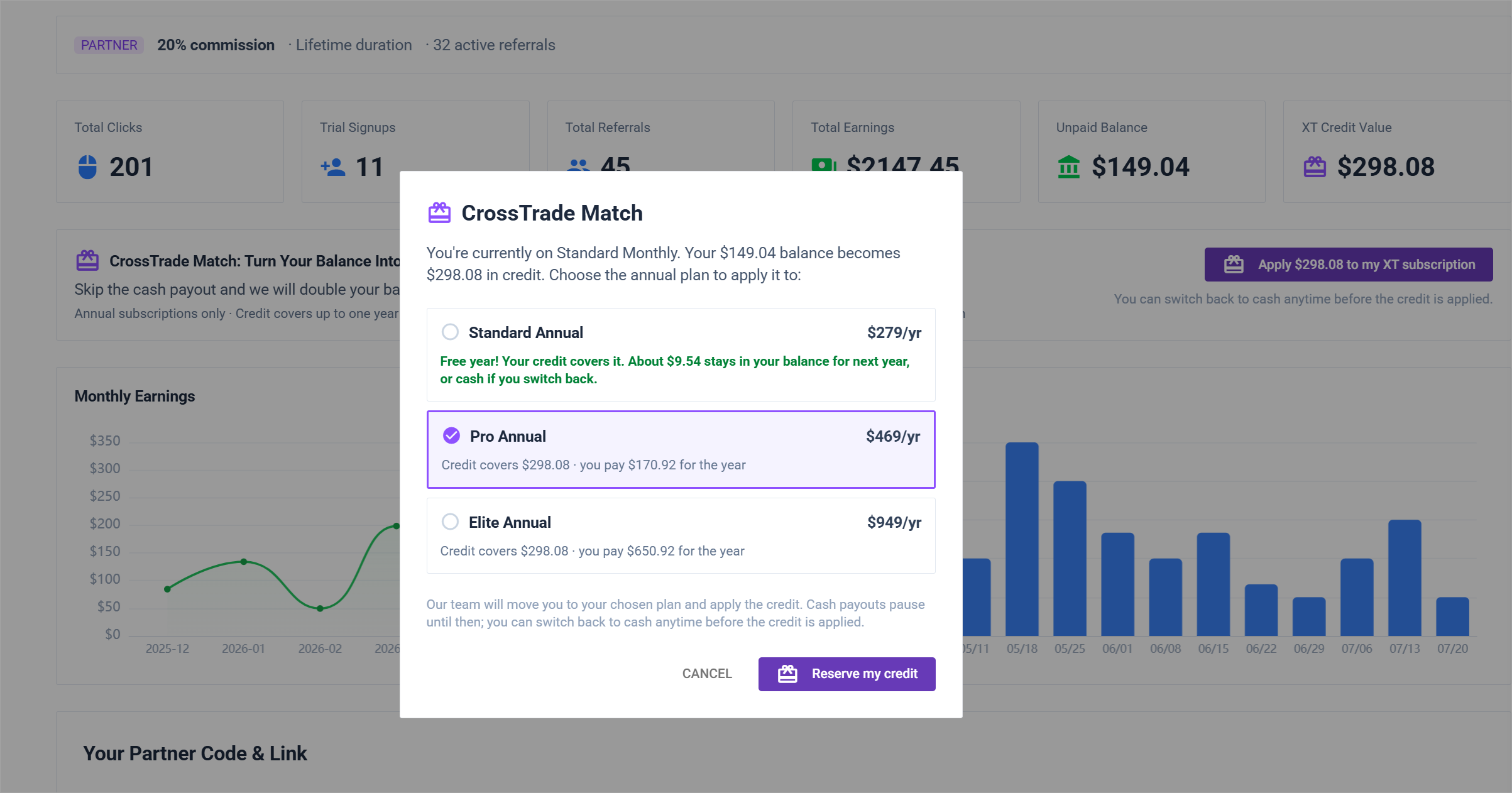
- How it works: elect Match on the Affiliates page, pick the annual plan you want the credit applied to, and we handle the rest
- The terms: annual subscriptions only, credit covers up to one full year at list price, and anything beyond that banks toward your next renewal
- Fully reversible: you can switch back to cash payouts any time before a credit is applied
Full details are in the referral program terms. Not an affiliate yet? The Affiliates page has the pitch and the sign-up.
✨ Next Up: Tradovate Account Manager and Trade Copier are within reach and cued up for a release soon.
Tradovate support started as an alpha just a few weeks ago. Today it is generally available: Tradovate webhooks, AI trading, and the Tradovate REST API are all out of beta and fully supported. Huge thanks to our alpha and beta testers: you ran real orders through the early builds, told us exactly what broke, and this release is the result.
Tradovate: Now Generally Available
The headline for this milestone is parity. What started as basic order routing now covers the pieces that make Tradovate a first-class destination alongside NinjaTrader:
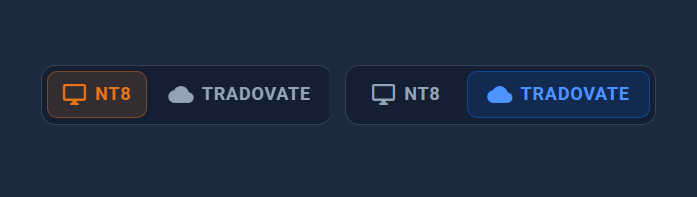
- Updated Nav: Running two brokers meant the sidebar was showing you tools that didn't apply to whichever one you were focused on. So the left nav is now platform-aware. The NT8 / Tradovate switch at the top of the nav (and the matching header pills) now reshapes the menu, not just the live-data feed
- Supported shared commands: place, limit, stop, close, flatten, cancel, reverse, and the rest of the documented Tradovate command set. Add
destination=tradovate;; NT8-only lifecycle commands remain explicitly excluded - Strategy Sync: Webhook-driven strategies keep their position state in sync on Tradovate the same way they do on NinjaTrader, so a strategy that scales in and out tracks correctly instead of firing blind
- ATM brackets: Tradovate natively hosts multibracket targets, stops, OCO links, and continuous trails. CrossTrade adds named cloud templates plus beta target-fill breakeven and profit-triggered trail activation with durable restart replay
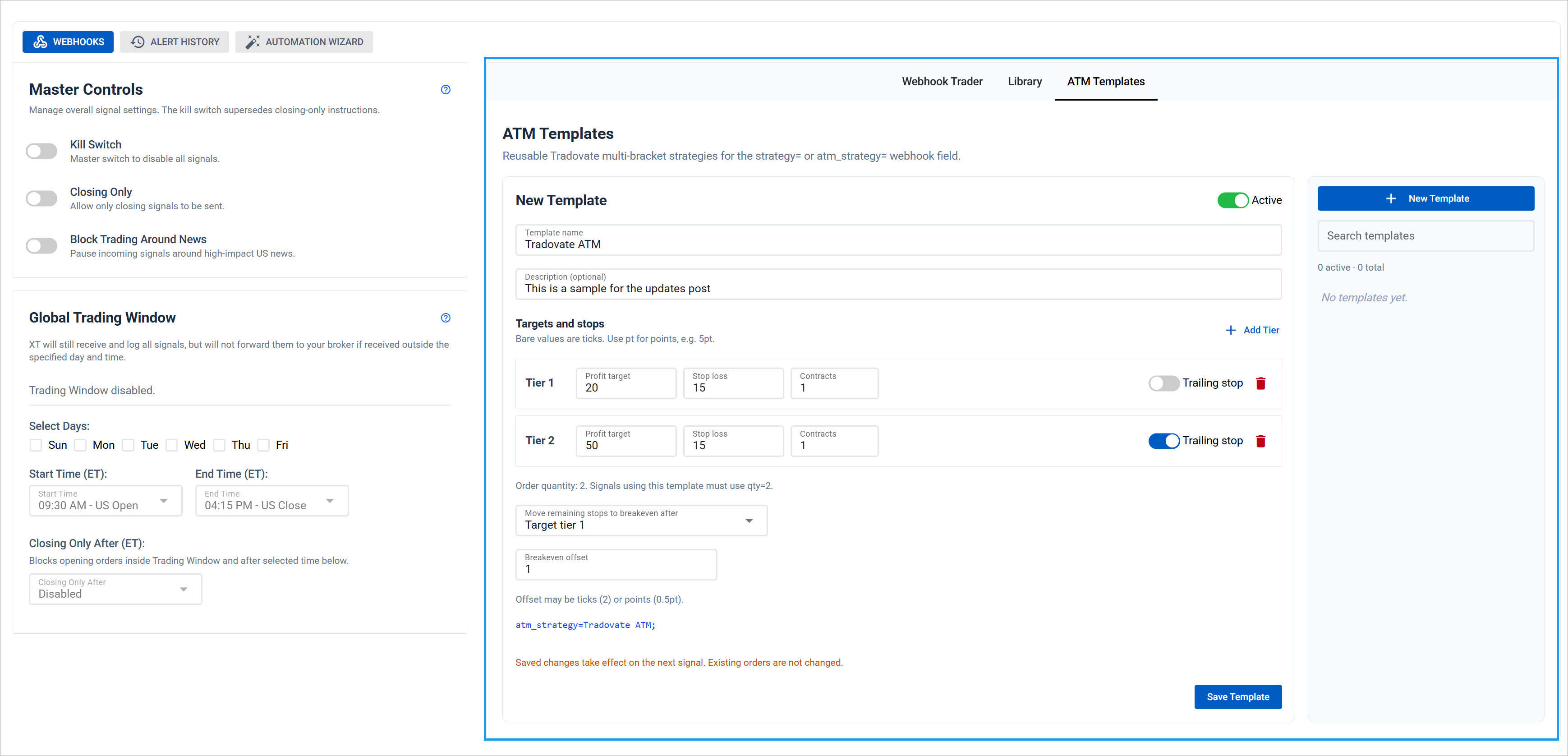
Generally available. Tradovate-native routing, webhooks, AI trading, and REST are GA. CrossTrade-managed ATM breakeven and triggered-trail activation remain beta. Keep the feedback coming!
Tradovate API & AI Trading
Both developer surfaces are generally available too, and neither one needs NinjaTrader running. These calls execute server-side against Tradovate, so your automation keeps working with your desktop closed.
- Tradovate REST API: A full
/v1/api/tvsurface using the same bearer token as the rest of the API. Read accounts, positions, orders, fills, balances, and margin. Place, change, cancel, replace, close, flatten, and reverse. Mutations run through the same parser and broker-side execution controls as your Tradovate webhooks - 29 new MCP tools: The
Tv_*tool set lets Claude, ChatGPT, Cursor, or any MCP client read and trade your linked Tradovate account. 16 read tools and 13 trade tools, split across the read and trade scopes so you decide how far your agent can reach. Elite plans, with a linked Tradovate account - API Playground, Tradovate mode: The Playground now follows your platform switch. Flip to Tradovate and it loads the
/v1/api/tvcatalog, sending real requests from your browser against your live account. Pro plans and above - Docs to match: A new Tradovate API section in the reference, a Tradovate MCP tools page, a Tradovate block on every shared endpoint page, and an OpenAPI spec covering the whole surface
Contract symbols are flexible throughout: ES1!, ES 09-26, and ESU6 all resolve, so you can keep whatever notation your existing tooling already speaks.
Journal: Your Timezone, Your Data
Two Journal upgrades this round, both about meeting you where you are:
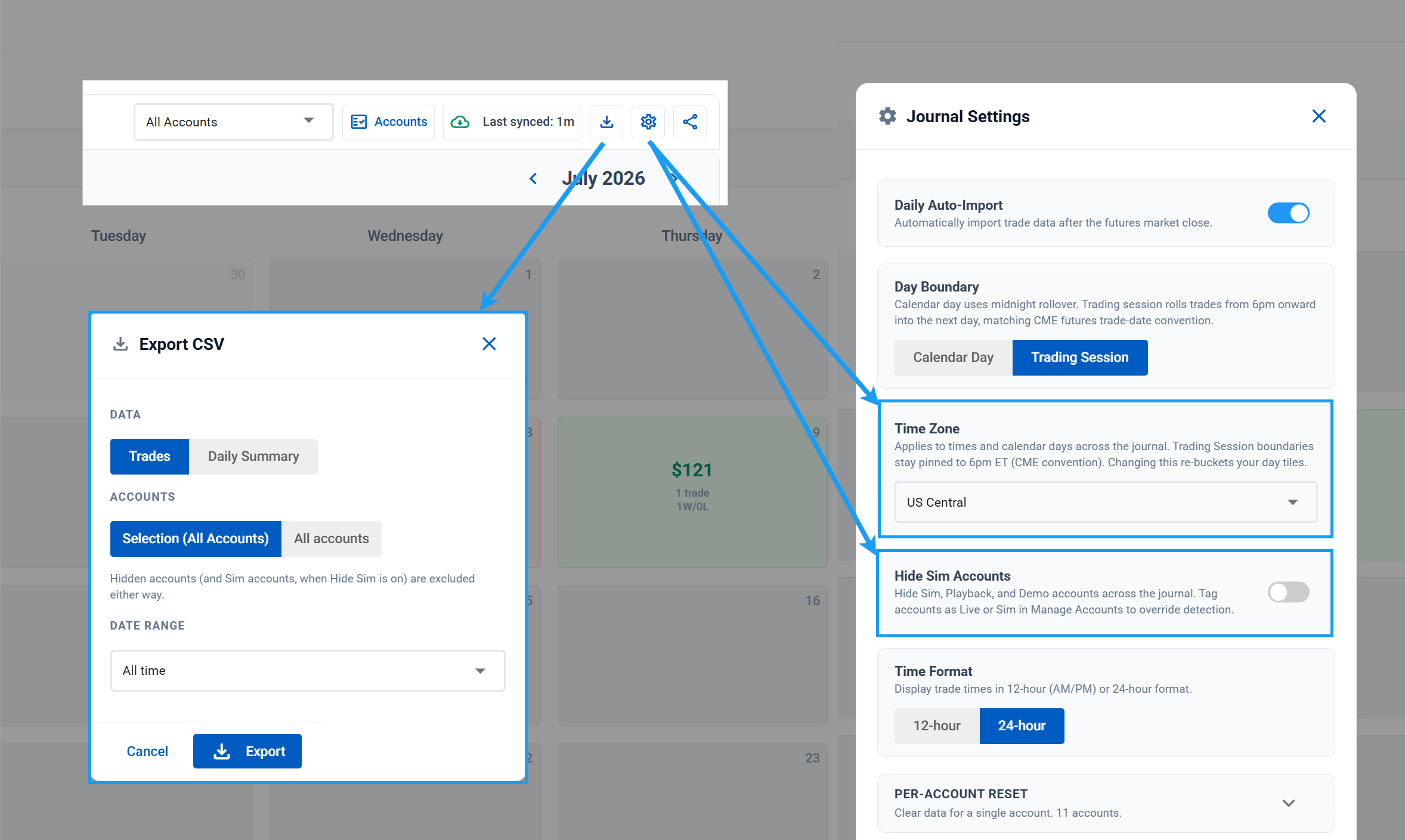
- Timezone setting: Pick the timezone your trades are bucketed and displayed in from the analytics header Settings menu. Leave it on Auto to follow your browser, or pin it to a specific zone. Trading Session mode still rolls on the 6:00 PM ET futures trade-date boundary, since that one belongs to the exchange
- CSV export: A new export button in the analytics header downloads your journal as a spreadsheet-ready CSV. Choose Trades or a Daily Summary, the current selection or all accounts, and a date range (all time, YTD, 90 or 30 days). Hidden and Sim-filtered accounts are excluded to match what you see on screen. Available on Standard plans and above
- Hide SIM: Easily focus on your live and prop accounts by hiding any NT8 Sim accounts with a single click
Economic Calendar
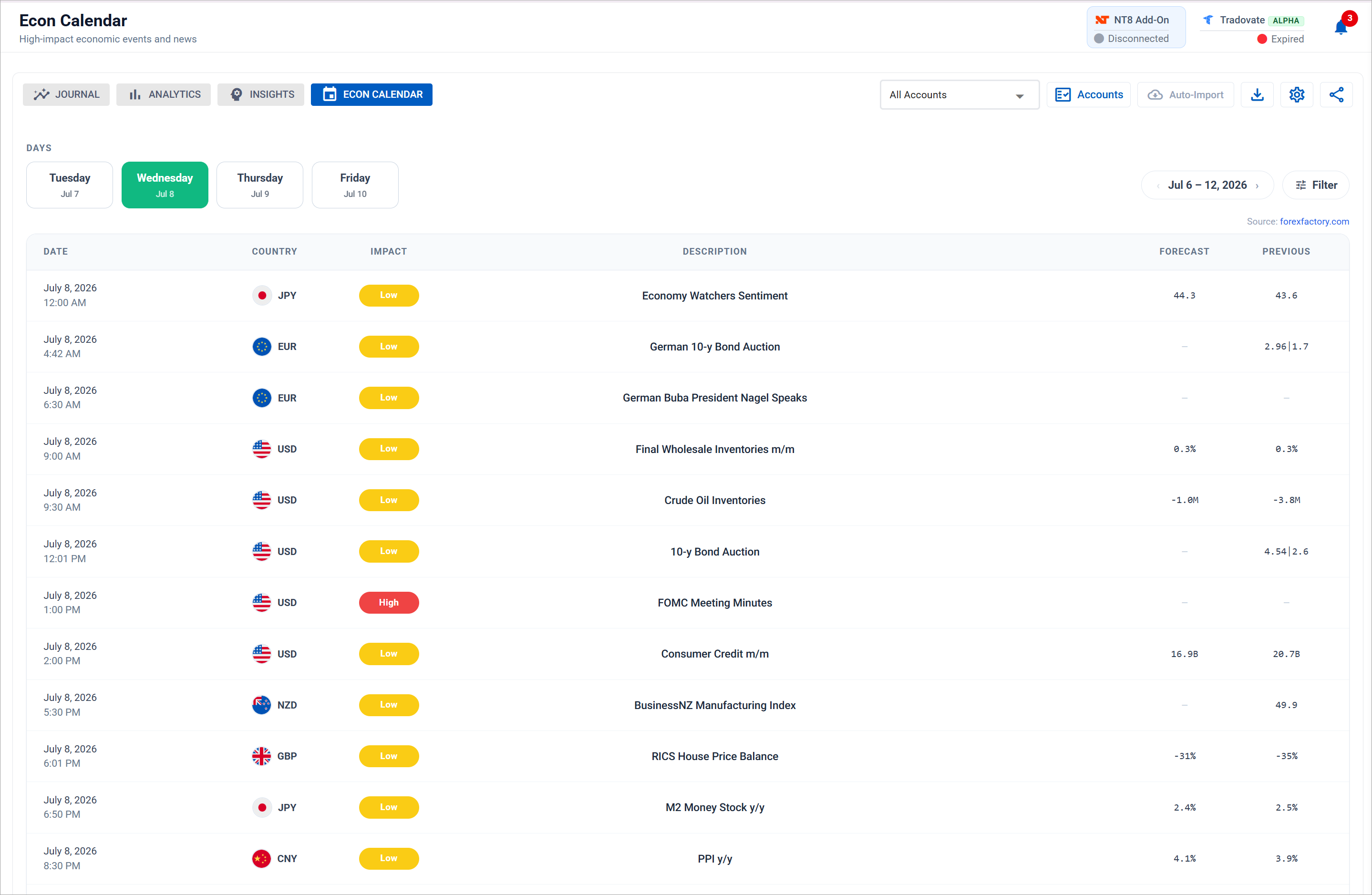
A new Economic Calendar brings high-impact events into the platform, so you can see what's on the schedule without leaving CrossTrade. Filter it down to exactly the releases you care about:
- By impact: Show only High, Medium, or Low events (plus holiday closures) so the day isn't buried under low-impact noise
- By currency: Narrow to the economies you trade with flag-tagged rows, from USD to EUR, GBP, JPY and the rest
- By day: Focus on a specific day to plan around the sessions you actually trade
Your filter choices are remembered per account, and they also feed the "Up Next" events on your Home dashboard.
News Blocking
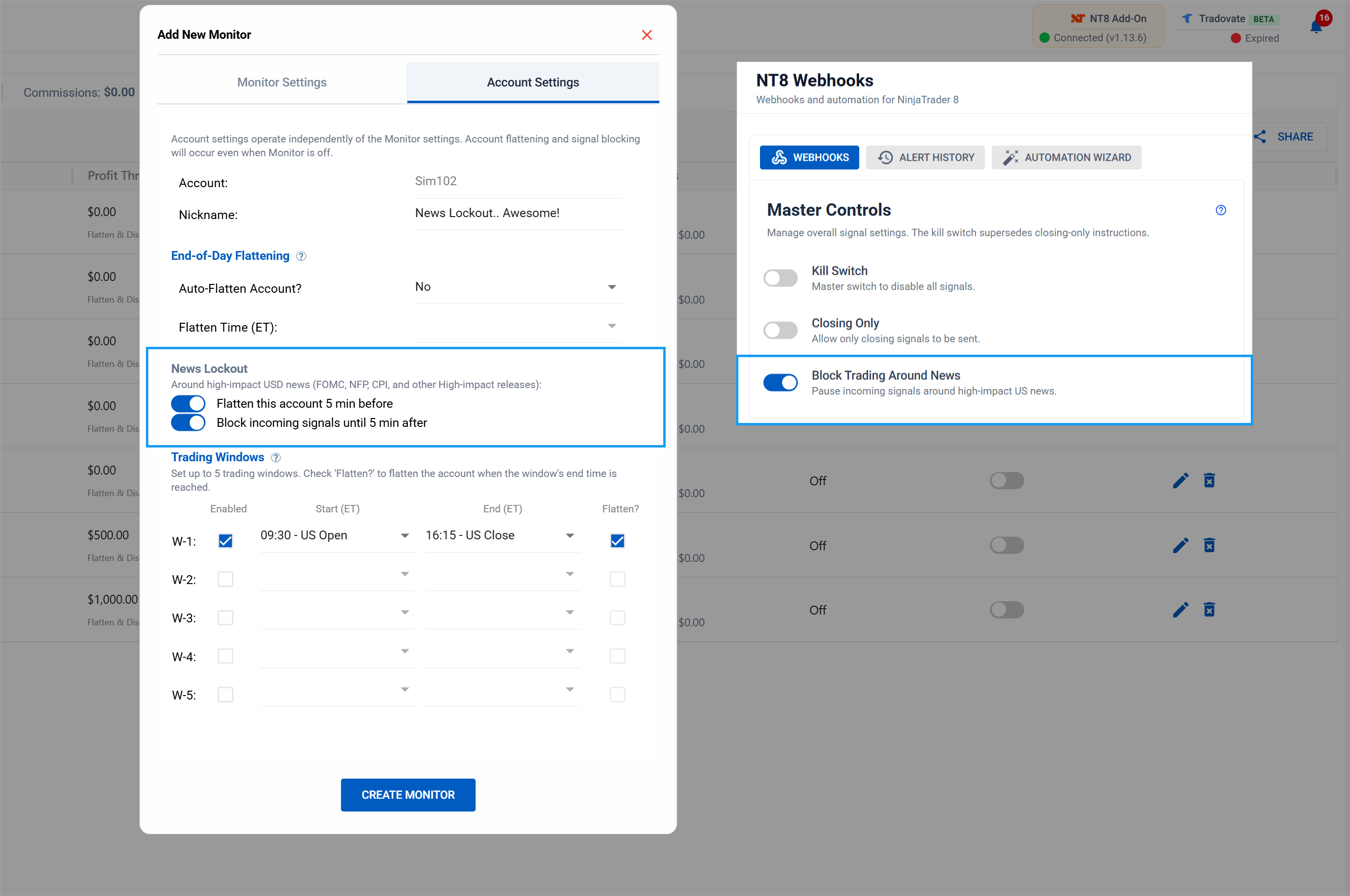
Two levels of control for keeping high-impact news out of your trading:
- Webhooks, global: A single Block Trading Around News toggle on the NT8 Webhooks page pauses incoming signals for 5 minutes before and after every high-impact, USD-only release (FOMC, NFP, CPI, and the rest). One switch covers every account behind that webhook
- Account Manager, per-account: Each monitor's Account Settings tab adds its own News Lockout controls: flatten the account 5 minutes before the release, block incoming signals until 5 minutes after, or both. Set it per account, independent of the monitor's own on/off state, for full control over which accounts sit out the news
Commissions, PnL Accuracy & NT8 Naming
If you ever saw a small negative Unrealized figure on an account with nothing open, usually about the size of one round trip's commissions, that was a real bug and it's fixed. The add-on had been reconstructing session commissions from trade history, and the reconstruction missed fills. The leftover residue showed up as Unrealized and quietly followed through into your Total PnL.
- Commissions from the source: Session commissions now come straight from NinjaTrader's account-level commission counter instead of a history rebuild. The phantom value is gone, including at the Globex open where it used to reappear each evening
- Unrealized is pure mark-to-market: What we show as Unrealized PnL is always the market value of your open positions now, matching NT8's own Unrealized column. It reads $0.00 when you're flat, because it structurally has to
- Commissions on screen: The Account Manager shows session commissions in the overview row, beneath Total PnL on each account, and on the mobile cards. Open-position commissions are in the tooltip
- Thresholds evaluate on the corrected numbers: Monitors with Include Commission enabled now trigger on true P&L. If you tuned a threshold tightly around the old value, expect it to fire a touch differently
- NinjaTrader's vocabulary: Labels across the live surfaces now read Realized PnL, Unrealized PnL, Total PnL, and Session PnL, matching what NT8 calls them. No more translating between our screen and theirs
Update your NT8 Add-on to v1.13.7. The dashboard side works on add-ons back to v1.12.0, so Unrealized reads correctly right away no matter what you're running. Total PnL and your monitor thresholds keep the old offset until you install the new build. You'll see the update prompt the next time your add-on connects.
Coming Soon & Beta Features
Tradovate Account Manager and Trade Copier are coming soon. CrossTrade-managed ATM breakeven and profit-triggered trail activation remain beta while we complete broker-side validation.
✨ Get started with Tradovate. Link your account under My Account → Brokers, flip the header to Tradovate, and route an order with destination=tradovate;. Tell us what you think.
Journal upgrades lead this round, with new Webhook Trader shortcuts and mobile polish right behind.
Analytics: Time of Day + Day of Week, Combined
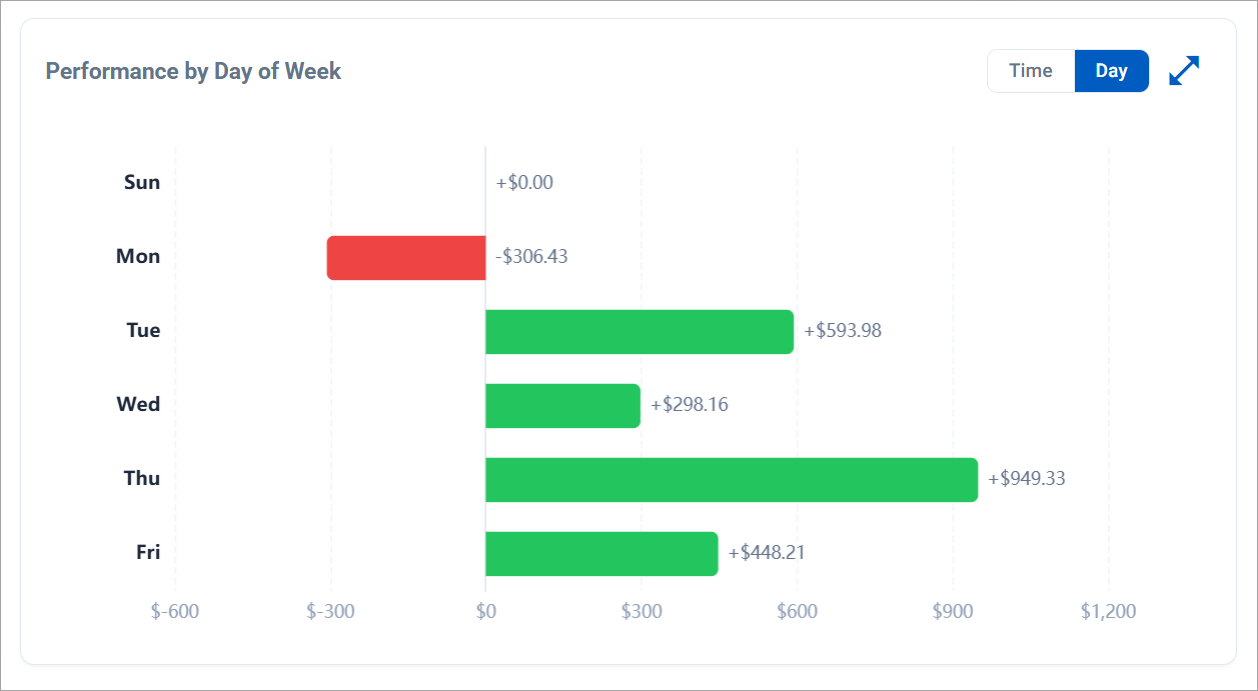
The Day of Week chart used to share the bottom row of the Analytics tab with Time of Day as a sibling card. The two views were competing for the same real estate without offering a way to compare them side by side. They now share one card with a Time / Day toggle, mirroring the Scatter / Metrics pattern on the MAE vs MFE card to the left. Each view also picks up an expand-to-modal button for a bigger canvas.
Saturday is excluded from the Day breakdown because markets are closed, and any P&L bucketed there is almost always a Friday late-session bleed. The order also flipped top to bottom so Sunday sits at the top of the chart, Friday at the bottom — matches the reading order most traders expect.
Journal Time Format Preference
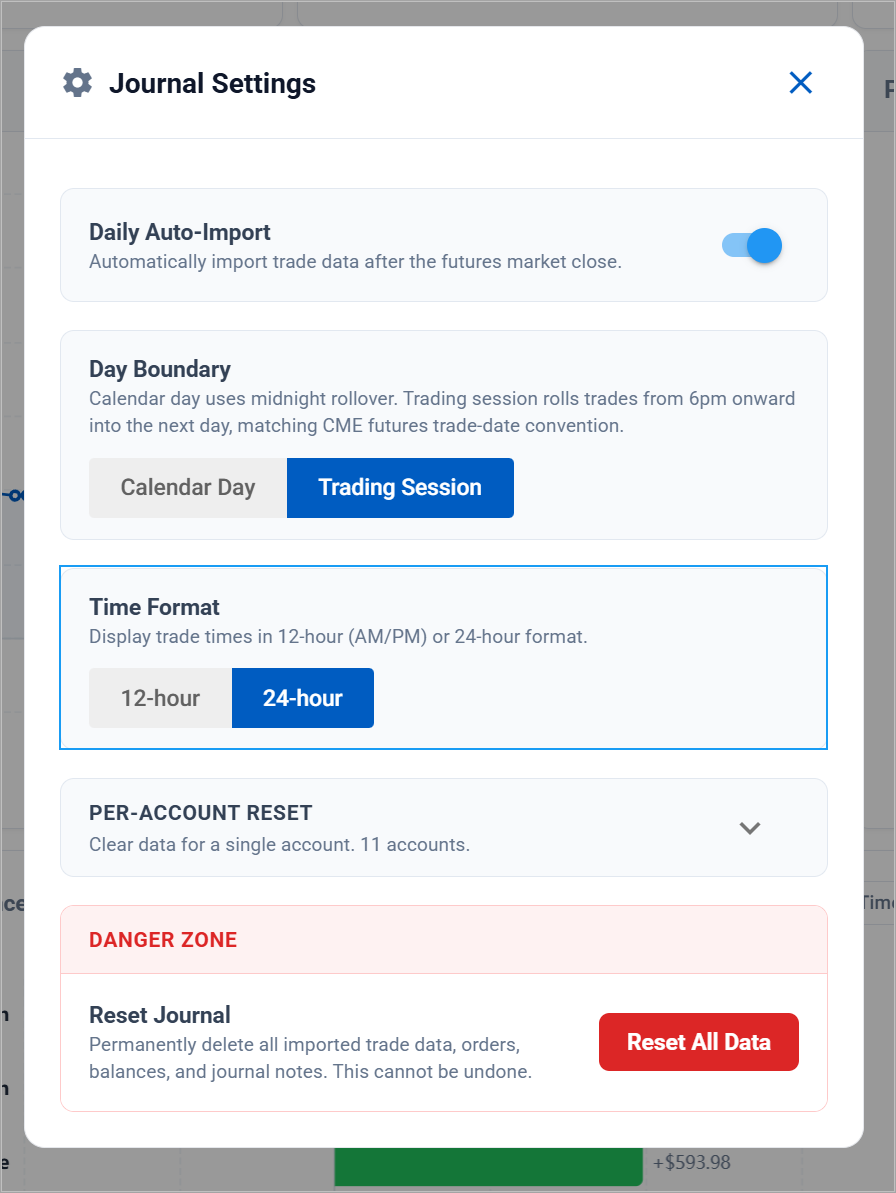
The analytics header Settings menu picks up a 12-hour / 24-hour toggle for the times rendered across the Journal, Analytics, and Insights tabs. Persists per user, so the choice survives between sessions and across devices.
Quick Send for Favorites
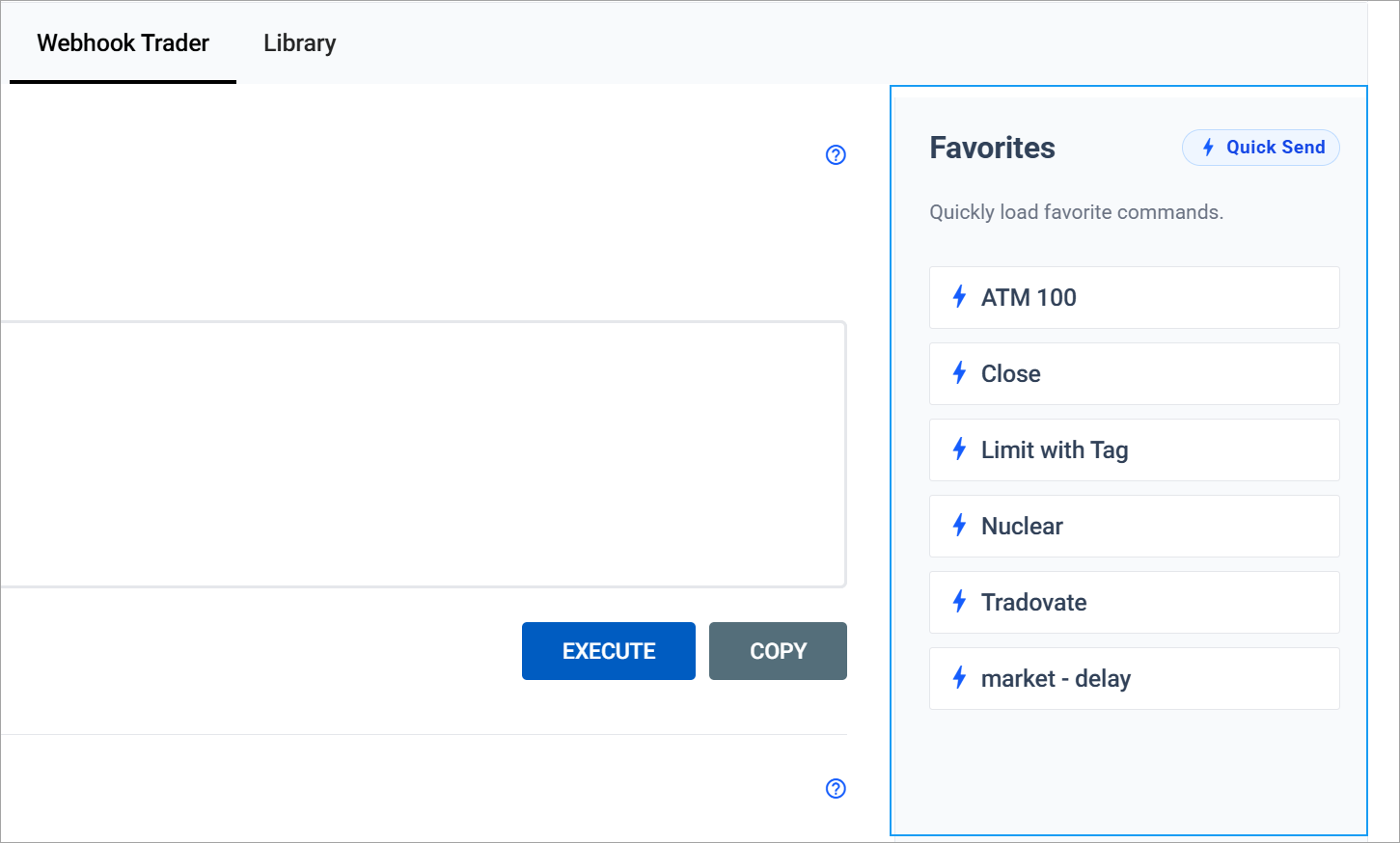
Firing a saved favorite used to take two clicks: load into the Trader, then Send to NT8. The Webhook Trader picks up an opt-in Quick Send toggle in the Library header. With it on, every favorite becomes a single-click action and a bolt icon sits next to its name. Off by default; flipping it on opens an acknowledgement dialog so the behavior is explicit.
When Quick Send is active, a small bolt pill sits in the top of the Favorites rail as a standing reminder. The 3-second cooldown that already gated Execute now surfaces a "Slow down" notice instead of failing silently, so a quick double-click can no longer feel like a dead button. The Execute button also shows a spinner during the send so the click is visibly registered.
Automation Wizard: Tradovate Destination
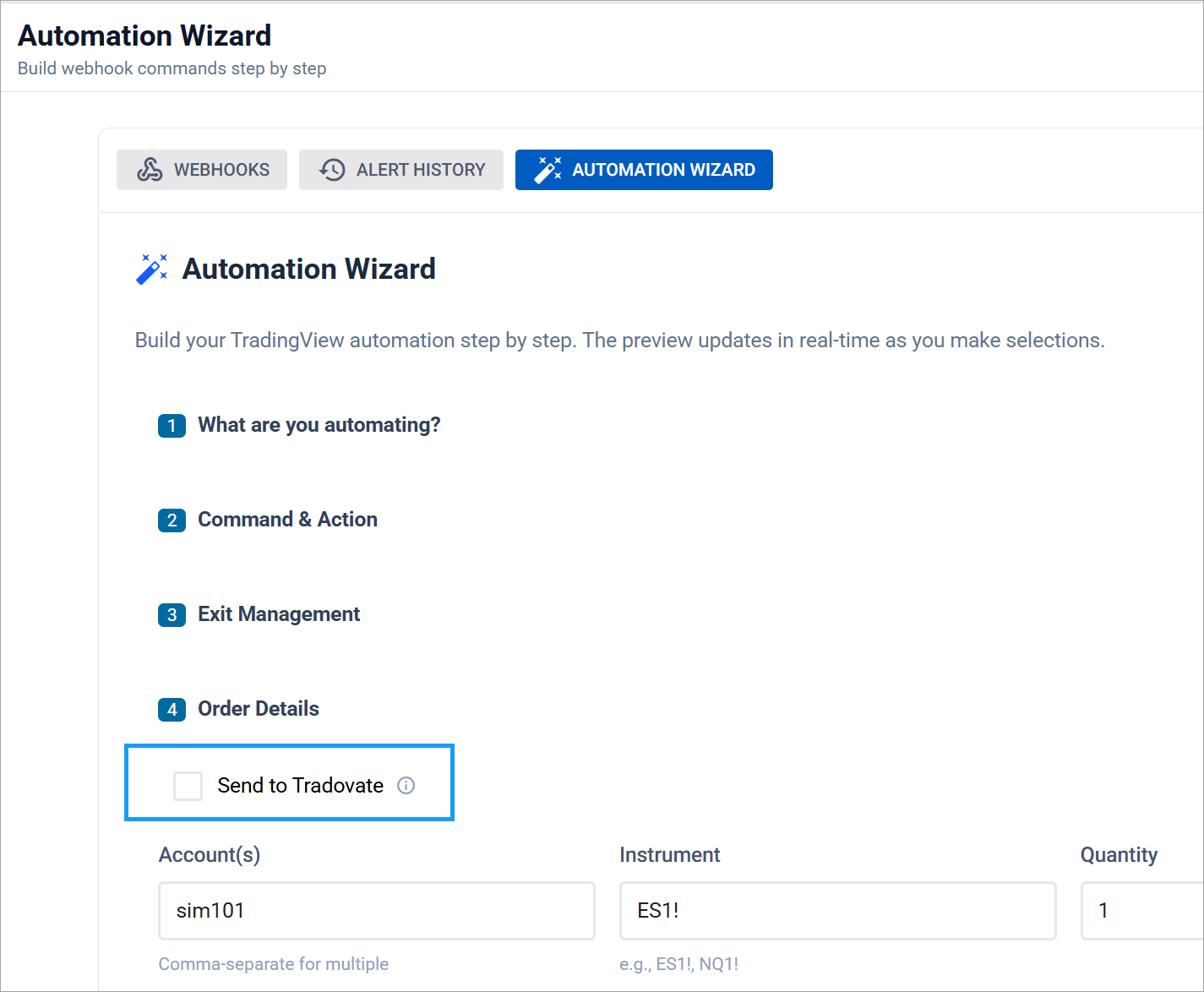
The Automation Wizard picks up a Send to Tradovate toggle at the top of Order Details. When checked, the generated payload appends destination=tradovate; so the order routes to your linked Tradovate account. Leaving it off keeps the existing NT8 default for every webhook you already have running. NEXT buttons across the wizard also dropped 1px in size so they sit lighter against the form they belong to.
Net P&L on the Home Dashboard
The Home Overview row gains a Net P&L chip that sums session realized P&L across your visible accounts. Color flips green / red / neutral, refreshes on the existing 6-second cadence. The tooltip calls out that it aggregates across every connected source, so it can trail per-account values by a few seconds.
Mobile Polish & Loading Indicators
A round of mobile work touched almost every primary page:
- Left nav auto-collapses on first paint below 768px. The choice doesn't persist, so a user who lands on mobile and later opens the same account on desktop finds the desktop drawer in whatever state they left it
- Home Overview reflows into a clean 2-column grid on phones and tablets, with all icons aligned vertically and typography scaled down so each chip stops swallowing 80px of vertical space
- Loading pill centered on the viewport while data fetches, on Journal, Analytics, Insights, Webhook Trader, Home, and My Account. Runs alongside the existing skeletons rather than replacing them
Smaller Wins
- Copy button on every saved command in the Webhook Library, outline-styled to match Load / Edit / Delete
- Insights page renders cleanly even when a manual trade row has a NULL exit time
- Added Trades now display a purple badge alongside Edited and Deleted
This release opens CrossTrade up to a second broker for the first time. Tradovate support enters alpha today, and a stack of webhook, alert, and journal improvements land alongside it.
Tradovate Support — Now in Alpha
Connect a Tradovate account directly to CrossTrade from the new Brokers tab in My Account. The connection runs entirely in the cloud, so there's no desktop add-on to install just to link Tradovate.
- Cloud connection — Authorize Tradovate once from the Brokers tab. No NinjaTrader, no add-on, no machine left running for the link itself
- Webhook routing — Point any webhook order at your Tradovate account with a single line (see below). The same command syntax you already know, a new destination
- Live-data mode — A broker toggle in the header switches the dashboard's live panels (positions, working orders, P&L) between your NinjaTrader and Tradovate data
- Futures-focused — Tradovate is a futures broker, so the alpha covers futures symbols. NinjaTrader continues to cover everything it does today

⚠ This is an alpha. Tradovate support is brand new and rough edges are expected. Running it means helping us find the bugs. We'd love your feedback as we harden it toward beta. Cross-broker copying and a few related pieces are still on the way.
Webhook Destinations
Webhooks now take an explicit destination line that tells CrossTrade which broker to route the order to:
key=your-secret-key;
                  command=place;
                  account=your-tradovate-account;
                  instrument=ES1!;
                  action=buy;
                  qty=1;
                  order_type=market;
                  tif=day;
destination=tradovate; destination=tradovate;— routes the order to your linked Tradovate accountdestination=nt8;— routes to NinjaTrader 8. This is the default, so existing webhooks keep working untouched
The Webhooks builder now includes a full Tradovate Commands set (buy market, buy limit, close position, flatten everything, cancel all, reverse) with the destination line highlighted, so you can copy a ready-to-use payload and go.
Alert History — Origins, Senders & Destinations
The Alert History can now tell you not just what fired, but where it came from and how it was sent.
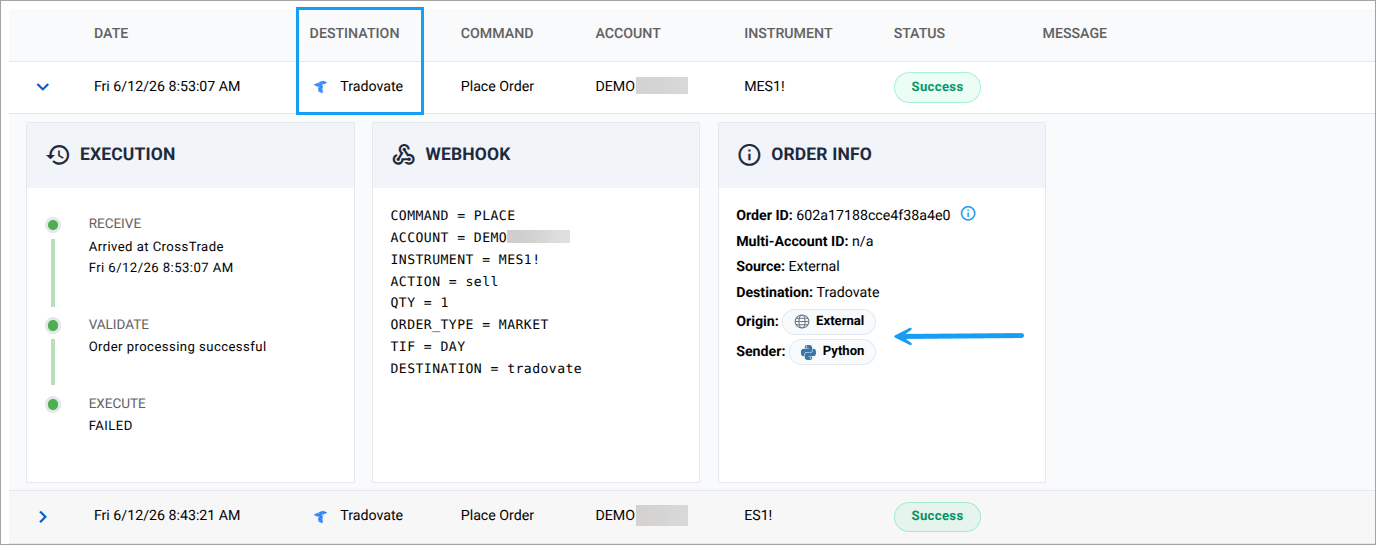
- Origin badge — Each alert is tagged TradingView, CrossTrade, External, or Unknown based on where the request originated. Hover to see the raw IP
- Sender badge — A client icon shows what actually sent the alert: TradingView, Python, Node.js, curl, PowerShell, Postman, Zapier, n8n, Make, a browser, and around twenty more. Hover for the raw User-Agent
- Destination column — See at a glance whether each alert went to NinjaTrader or Tradovate, with the broker logo inline
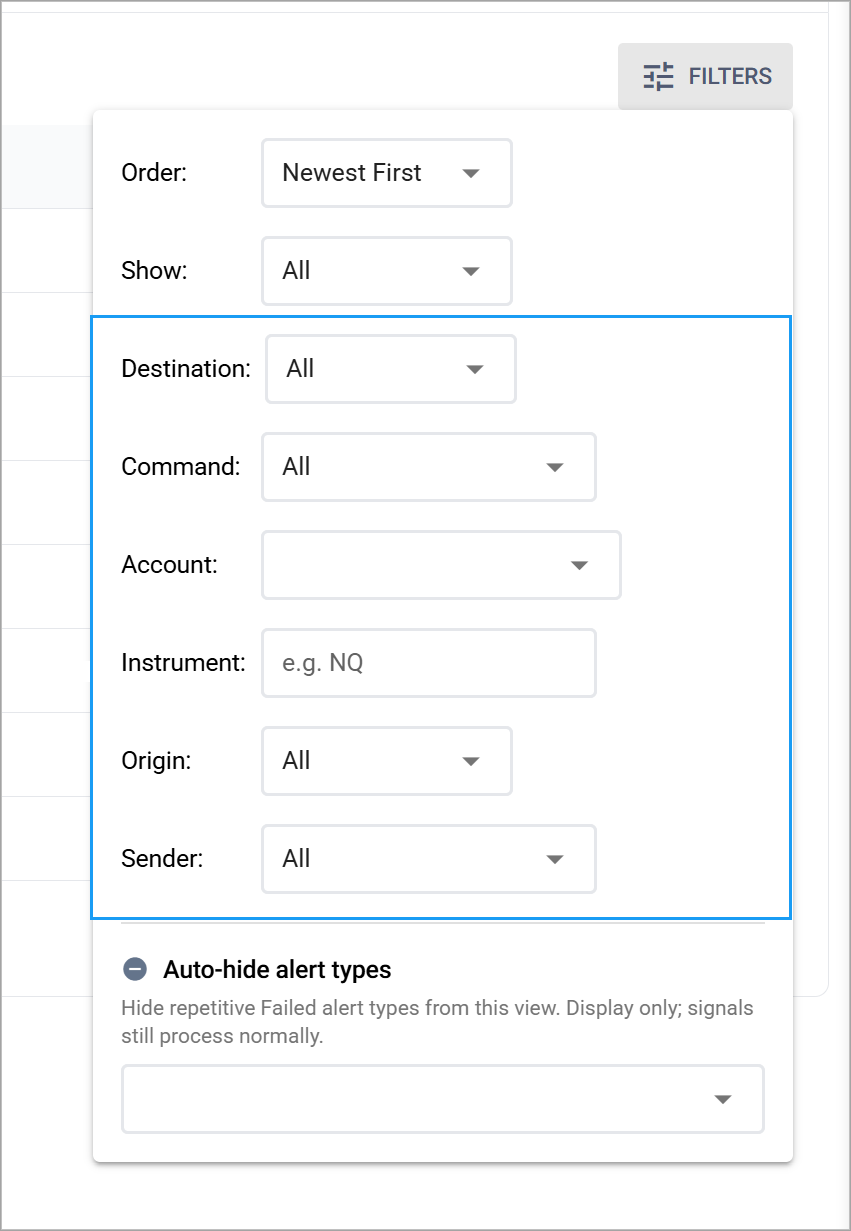
- Expanded filtering — Filter by status, order direction, destination, account, command, instrument, origin, and sender. Active filters surface as removable chips, and the Filters button flags whenever a non-default filter is on
Trading Journal — Calendar Day vs Trading Session
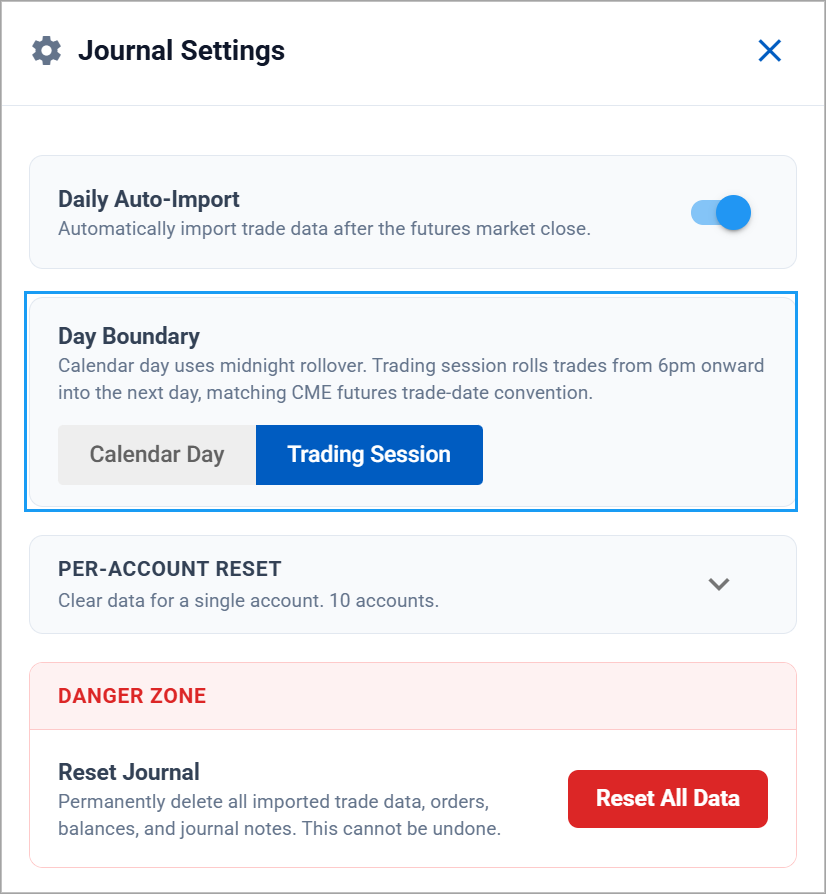
A new Day Boundary toggle in the analytics header lets you decide how trades are bucketed into days across the Journal, Performance, and Insights views:
- Calendar Day (default) — the familiar midnight rollover
- Trading Session — rolls trades from 6:00 PM ET onward into the next day, matching the CME futures trade-date convention. An evening trade lands on the right session instead of getting split off at midnight
Your choice saves to your account and the calendar and analytics re-bucket immediately.
TradingView Tools — XT Alert Builder Ultimate (Pro)
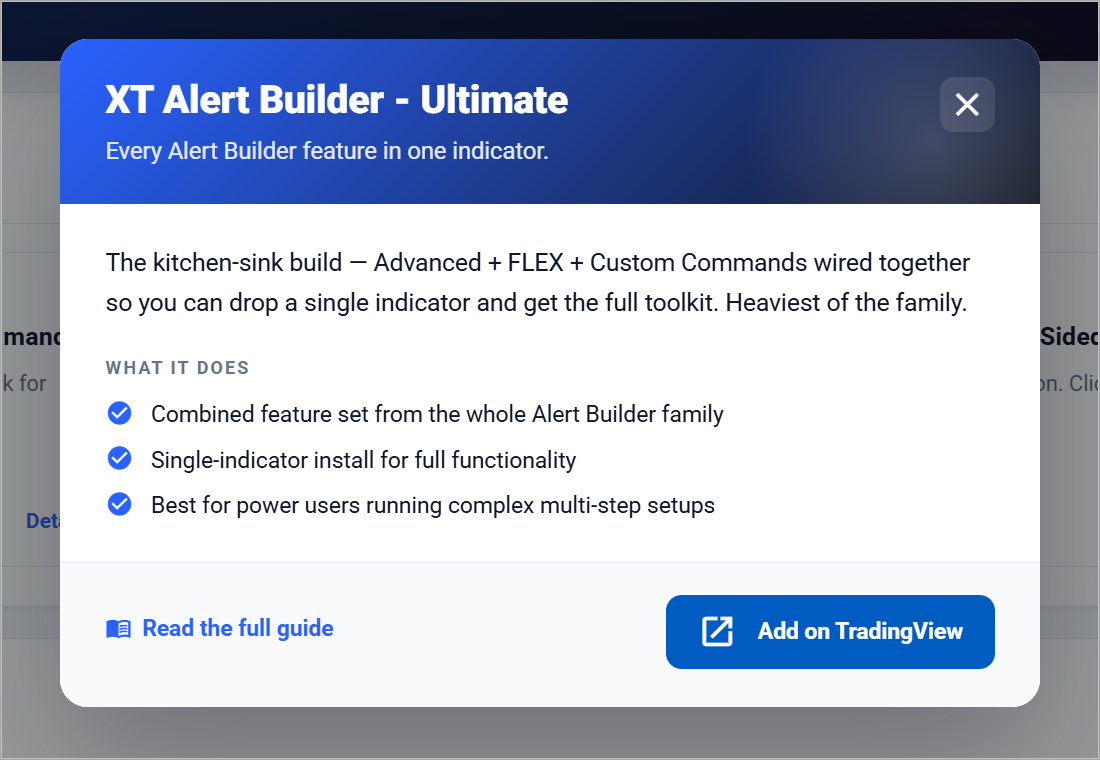
The TradingView Tools page has a new top-tier script: the XT Alert Builder Ultimate. It rolls the Advanced, FLEX, and Custom Commands builders into a single indicator, so power users can drop one script and get the whole toolkit.
We've also reframed the page. The premium scripts are now Member scripts, included with any paid subscription, while the Ultimate carries a Pro badge and is reserved for Pro subscribers. Connect your TradingView username once and CrossTrade grants everything your plan covers automatically.
✨ Try Tradovate today. Head to My Account → Brokers to link your account, then route a test order with destination=tradovate;. Tell us what breaks — that's what the alpha is for.
This release is a polish pass on the management surfaces. Account Manager and Trade Copier now share a consistent header pattern, the Home and Manual Trading dashboards collapse three competing widgets into one tabbed module, and the Add-On bumps to v1.13.3 with a new in-app update notifier in the left nav.
Unified Manager Headers
Both Account Manager and Trade Copier now share the same header layout — Actions dropdown on the left, Settings, and Share on the right.
- Actions dropdown — Page-specific bulk actions live here. Account Manager gets a new Cancel Orders action you can fire across all monitored accounts in one click
- Per-page shareable images — Account Manager renders a dedicated Account Manager Performance card with hero P&L, per-account leaderboard, and tile stats. Trade Copier renders a Trade Copier Performance card mirroring the same layout, scoped to copier-involved accounts
- Privacy mode — A new "Hide account names" toggle in the share modal masks non-Sim account identifiers (e.g.
PROP***instead of the full account number). Sim accounts pass through. Default on so you don't accidentally leak prop-firm IDs to a public timeline. The setting persists between shares
Trade Copier Networking Tab
A new Networking tab on the Trade Copier page visualizes your copier graph: leaders, followers, the routes between them, and the active state of each connection. Quickest way to spot a misconfigured copier, a leader with no listeners, or a follower pulling from a paused source.
Combined Live Data Tabs
The Home dashboard and Manual Trading page used to render Open Positions, Working Orders, and (on Manual Trading only) Recent Orders as separate widgets stacked vertically. They now collapse into one tabbed module:
- Open Positions — Same live position grid as before, now tab 1
- Working Orders — Same live working orders grid, now tab 2
- Recent Orders — New for the Home dashboard. Click any row to open the full order lifecycle drawer with placed-time, fill events, commission, slippage, and final state
Less vertical scroll, no widget competing for the same screen real estate, and the tab choice persists per-user so you land back on whichever view you used last.
✨ Add-On v1.13.3 is live. Point release that supports the new Cancel Orders bulk action and recent-order lifecycle tracking. Also lands the update-notification button in the primary left nav — a small indicator now appears when a newer Add-On version is available, so you'll know to update without checking My Account.
Polish & Fixes
Beta-tool fixes piling up from the May 18 release, plus the usual cleanup:
- Manual Trading — Optional OHLC strip at the top of the chart (toggle in Chart Settings → Style) with TradingView-style symbol · timeframe · O H L C · change for the candle under your crosshair
- Mobile layouts — Tighter Order Activity tab strip on phones (icon + short label), better spacing on the Home dashboard, and an alignment fix for the Account Manager lock icon when the monitor is in locked state
- Empty-state polish — Consistent icon + caption between Open Positions and Working Orders so switching tabs no longer produces a vertical layout shift
- Account Manager visibility filter — Improved hidden-account refresh when you save changes from the visibility manager modal
- Signal Share & AI Trading — A long list of smaller beta fixes from the last release: more reliable receiver reconnects, clearer scope summaries on the AI Clients tab, faster MCP tool round-trips
✨ Update the Add-On from crosstrade.io/upgrade-instructions, then drop by the other tools and have a look!
Three brand-new products go live today. They are independent tools, but they share one foundation: the new NT8 Add-On v1.13, which lands at the same time and quietly powers the deeper integrations under the hood. Some of it you see in the new pages. Most of it is the foundation that lets agents and your other NinjaTrader installations talk to your NinjaTrader instance without ceremony. The old v1.12 builds keep working for everything they did before, but the new features are dark until you upgrade.
✨ Add-On v1.13 is the backbone. Required for Signal Share, AI Agent Trading, and the new reconnect actions. Also required for NinjaTrader 8.1.7.0: older Add-On builds will fail to connect on the new NT8 release. Update from My Account or grab the latest installer at crosstrade.io/download.
Manual Trading — Charts & Order Entry in the Browser
A new page at User → Manual Trading gives you a real trading interface backed by your own NinjaTrader feed and accounts:
- Live chart — TradingView charts with basic indicators (SMA, EMA, Bollinger, VWAP, RSI, MACD, Stochastic), and basic drawing toolset to start.
- Order entry panel — Market, Limit, Stop, and Stop-Limit orders. Click the chart to pre-fill the price. Pick an ATM Strategy Template right from a dropdown that reads live from your NT8
- Session pill — Live "Open / Closed" indicator with a countdown to the next session boundary, per-instrument
- Live data modules — Open Positions, Working Orders, and Accounts panels pulling in real time from your add-on stream
- Right-click context menu — Buy/Sell limits and stops at the cursor price for chart trading capabilities
- Working orders on chart — Live order lines you can drag to modify the price, with a one-click cancel chip in the top-right
Market Data: Manual Trading is part of every paid plan. Everything you see flows from your own NinjaTrader connection through the CrossTrade Add-On. We don't redistribute market data, so what you see is exactly what your NT8 sees.
Signal Share — Broadcast or Receive
Mirror every fill across your trading accounts and devices. Place an order on one NinjaTrader instance and watch it land on the rest, across machines and brokers, in milliseconds.
- Broadcast — Send trades from one of your accounts to your other NinjaTrader installations, on any machine or VPS you run
- Receive — Your other installations receive those trades. They land on the accounts you designate, with the same per-account guardrails you already configure for the Trade Copier
- Per-source filters — Allowlist or blocklist instruments per source, so you can take ES but skip CL from the same source
- Live broadcast & receiver logs — A full audit trail of every message exchanged. No more guessing whether a signal made it through
AI Agent Trading — MCP, OAuth, and the Whole Toolkit
Connect your favorite AI assistant to CrossTrade over the Model Context Protocol. Ask it about your positions, run a backtest, or place an order — all through a token your account controls and can revoke any time.
- MCP server — CrossTrade now speaks the Model Context Protocol natively. Connect Claude Desktop, Cursor, ChatGPT desktop, or any MCP-aware client
- OAuth consent — Real authorization flow with scope-by-scope opt-in. Approve only what an agent needs — market data, account inspection, order placement — and revoke any time
- AI Clients — See every agent connected to your account on the AI Trading page. Last-used timestamps, scope summary, one-click revoke
- Prompt libraries — Pre-built workflows for account inspection, market research, NinjaScript strategy development, and account-risk monitoring. Documented at crosstrade.io/learn/mcp-trading
- NinjaScript awareness — Agents can read, write, compile, and deploy NinjaScript strategies through the same MCP interface
You'll be asked to acknowledge the terms once before the first agent connects — agents are powerful, and we want the consent moment to be explicit.
A few things you can ask an MCP-connected agent to do, in plain English:
- Place orders on your behalf (market, limit, bracket) on the account you choose
- Query your Trading Journal: "How did MES perform last month?", "What was my win rate on the morning session?"
- Author a complete NinjaScript strategy from a natural-language description, then backtest it on the NT8 backtester, run the optimizer, and deploy the winning parameter set straight to a live account
- Monitor positions and risk in real time, with the agent firing alerts when thresholds you describe are crossed
✨ Open beta with early-bird Elite pricing. AI Agent Trading and Signal Share are part of the new Elite subscription tier. Open beta runs for 2 weeks. Lock in early-bird pricing at $79/month or $749/year before the standard pricing of $99/month or $949/year takes effect. See Elite pricing →
Journal — Per-Account Resets & Better Analytics
The Trading Journal got a meaningful tune-up under the hood and a polish pass on the surface:
- Per-account resets — Remove journal data for individual accounts from your settings. Data will be reimported if you do not also reset the account on NT8's Account page.
- Percentage based analytics — Equity Curve and P&L Distribution charts now offer a percentage view option.
- Trade list refinements — newest to oldest sorting, 12hour time display with local browser time matching
- Expanded MAE vs. MFE chart — Expand your MAE vs MFE scatter plot to a full screen modal for easier viewing
- Trade matching improvements — More accurate matching across executions, especially for partial fills and reversals
Polish, Plumbing, and Fixes
A long tail of smaller wins worth calling out:
- Reconnect Actions (requires v1.13.0+). Auto-Reconnect and Data Watchdog rows in My Account → Trading can now run a flatten and/or strategy restart the moment a dropped connection is restored. Pick the scope (all accounts, accounts that had strategies running, or specific accounts) and CrossTrade applies the policy automatically.
- Trading Alerts account filter. Trading-related alerts in the bell tray and channel routes can now be scoped to a specific subset of NinjaTrader accounts, configured under My Account → Alerts. Mute the noise from sim accounts, or focus a Telegram channel on just your prop firm accounts.
- Trade Copier troubleshooting docs — New troubleshooting guide covering the most common copier issues with concrete fixes
- SEE LOGS improvement — Full screen mode with expanded rows for easier viewing
- Time IDs for trading windows — Time lists now show important open and close times for reference (i.e. US Open)
- Add-On conflict — Multiple copier conflict notification now shown on Trade Copier page when detected
- Market status banner — More accurate weekend/holiday handling and clearer messaging when feeds are sleeping
- Bug fixes — A long list of smaller fixes across the platform, including more reliable streaming reconnects, better mobile layouts, and improved error messaging for edge cases
✨ Get started today: Update the Add-On from Download, then check out Signal Share, Manual Trading, and AI Trading.
Three things land this release: a hands-on API Playground (with the full AI/LLM toolkit underneath it), a refreshed Alert History with active-filter chips, and a Do-Not-Disturb multi-select that mutes the chatty alert types you already know about.
API Playground
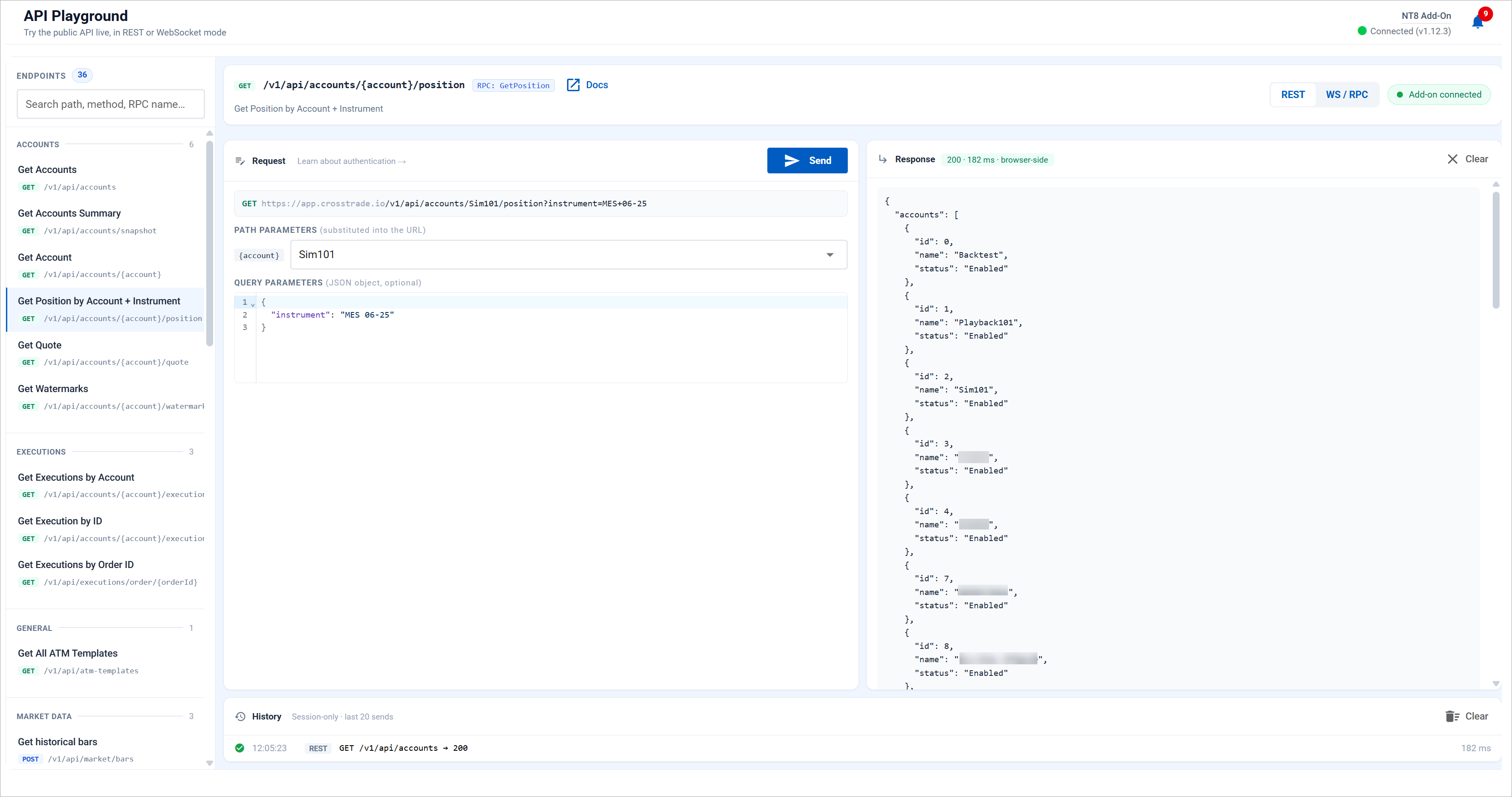
A new page at User → API Playground lets you exercise the public CrossTrade API live. REST or WebSocket, your real bearer token, your real account list, your real add-on. No Postman, no curl, no scratch script.
- REST mode — Pick an endpoint from the OpenAPI spec, fill the body, watch the URL preview update as you swap accounts. The fetch runs in your browser, so what you see is exactly what your code will see (CORS, latency, response shape, the smart 404 with
did_you_mean) - WS / RPC mode — Edit the
{api, args}envelope and send it through your add-on over the same wire format the streaming endpoint uses - Add-on aware — The Send button gates on your NinjaTrader connection so you never fire a request into a void
Built for AI Agents, Not Just Humans
The Playground is the visible piece of a much bigger push. Underneath, we shipped the full developer experience an LLM needs to drive the platform on your behalf:
- AI Clients — Manage which agents are connected to your account from the AI Trading page. OAuth consent flow, revoke at any time
- Full OpenAPI 3.x spec — Published at docs/api. Drop the JSON or YAML into any code-gen tool and you have a typed client in seconds
- llms.txt + llms-full.txt — Agent-readable docs at
app.crosstrade.io/v1/api/llms-full.txtso models pick up the platform context without a single human-written prompt
Coming soon: MCP server - CrossTrade now speaks Model Context Protocol. Connect Claude Desktop, Cursor, or any MCP-aware agent. List your accounts, place orders, query strategies, and read alerts directly.
Alert History — Active Filter Chips
Filters now show up as removable chips above the table. Status, sort direction, and your auto-hide selection each get their own pill. Clear them one at a time, or use Clear all. The Filters button itself picks up a blue outline whenever any non-default filter is active, so you always know whether you’re looking at the full feed or a subset.
Auto-Hide High-Frequency Errors
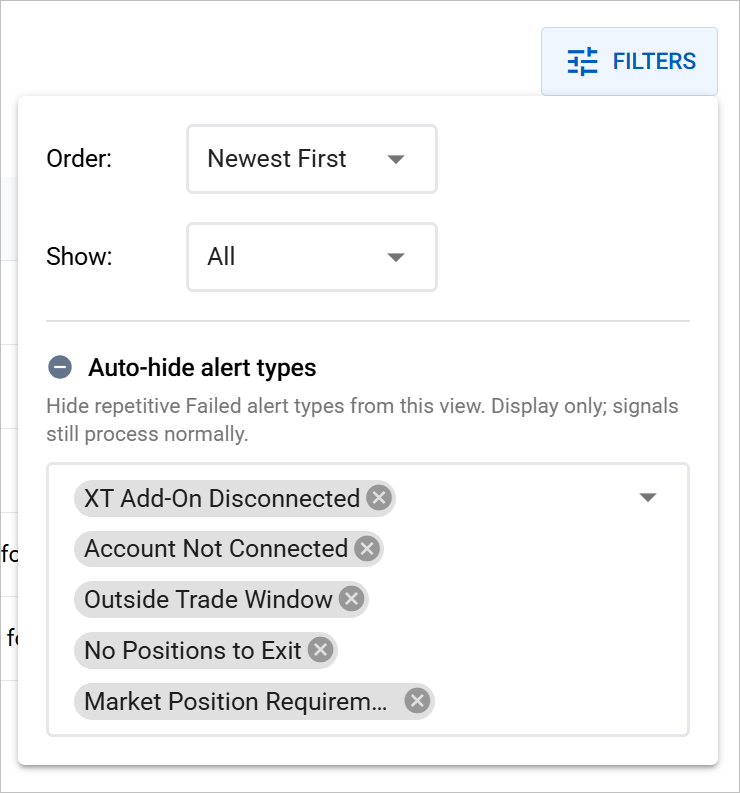
The Filters menu has a new Auto-hide multi-select for the alert types that fire over and over when something is just temporarily off:
- Connection errors when NinjaTrader is closed
- Account not connected notices
- No positions for close-position alerts on flat accounts
- Trade window rejections outside session hours
- Market position required for stop or target alerts when there’s no open position
Pick the ones that aren’t useful to see and they vanish from the view. Your selection saves to your account, so it sticks across sessions and devices. A small “X alerts hidden by your auto-hide filter” notice keeps you honest. One click on Show all brings everything back.
✨ Coming soon: MCP server - CrossTrade now speaks Model Context Protocol. Connect Claude Desktop, Cursor, or any MCP-aware agent. List your accounts, place orders, query strategies, and read alerts directly.
This release expands where your CrossTrade alerts can land, refreshes the TradingView Tools page, and gives you a peek at what's coming next at the top end of the platform.
Pro Alert Channels
The in-app bell tray we shipped a couple of weeks ago is just the start. Pro subscribers can now fan the same alerts out to the channels you actually live in — Telegram, Discord, Email, or your own HTTP endpoint.
- Telegram — Plain-text messages delivered through your own bot. You bring the bot token and chat ID, we deliver instantly
- Discord — Rich embed formatting via a server webhook. Drop the URL in once, alerts flow into the channel of your choice
- Email — Formatted HTML email sent to your account address. Great as a backup channel or a paper trail
- HTTP Webhook — JSON POST to any URL you control. Wire CrossTrade alerts into your own automations, dashboards, or downstream systems
Configure everything from My Account → Alerts. Each outbound destination requires a successful Send Test before it can be enabled — so you'll never have an alert quietly fail to a misconfigured endpoint. The in-app bell tray remains free on every plan; the outbound channels above are part of Pro.
Heads up: Switches save automatically. Toggle a channel on, send a test, you're live.
TradingView Tools — Refreshed
The TradingView Tools page got a meaningful revision this week — clearer per-tier sections, and an automated access management system.
With that plumbing solid, the next phase is content: new TradingView indicators and strategy scripts are coming soon. Watch the page over the next few weeks — we'll be adding scripts to both Free and Paid subscription tiers.
On the Horizon — Elite Tier
✨ Coming soon: An Elite subscription tier sitting above Pro, built around a new generation of advanced platform tools.
Two big additions land this week: a platform-wide notifications system and a full suite of shareable performance cards. Plus a reminder to get on the latest Add-On.
In-App Notifications
CrossTrade now has a proper notifications system. Important events — disconnections, monitor stoppages, payment issues, Add-On updates, clean session warnings, and more — now surface in two places: the bell icon tray in the main platform header, and a feed on your Home page. Click any notification to jump directly to the page it relates to.
- Bell icon tray — A red unread-count badge on the bell icon in the header shows new notifications at a glance. Click to open the tray and review recent alerts
- Home page feed — Your most recent notifications also appear on your Home page so you see them the moment you log in
- Configurable — Head to My Account → Alerts to turn individual notification types on or off. Critical alerts (security, payments, account locks) are always on by design
Coming soon: Email notifications for the alerts you care about most.
Shareable Performance Cards
You can now generate branded performance snapshots and share them to X or Reddit in one click — or download the image for anywhere else. Every shared card includes your personal affiliate link, so the traffic your wins drive comes back to you as referrals.
Three card types are available, each with Desktop and Mobile layouts:
- Calendar View — Your monthly P&L calendar with daily results, available from the Journal page
- Daily Snapshot — Today's aggregate P&L from your account monitors, available from the Account Manager
- Performance Chart — Your analytics card with equity curve and core stats, available from the Analytics page
Look for the Share button on each of those pages to generate a card. You can post directly to X, post to Reddit, or download the image to share anywhere.
Watermark Your Cards
Want your X or Reddit handle on every shared card? Head to My Account → General → Social Profile and set your Share Handle. It'll appear as @handle on every card you generate. Leave it blank to share anonymously.
Analytics — MFE/MAE Scatter & Symbol Breakdown
The Performance Analytics page picked up two meaningful additions this week:
- MFE/MAE Scatter Plot — A new visualization that plots Maximum Favorable Excursion against Maximum Adverse Excursion for every trade. Instantly spot patterns in how much heat you take on winners vs. losers, and how close to the peak you're actually exiting
- Symbol Aggregation Chart — The symbol performance chart has been reworked to aggregate results more clearly across instruments, making it easier to see which symbols are carrying your P&L and which are dragging it down
NT8 Add-On — Upgrade to v1.12.4
⚠ Important: All NT8 Add-On versions prior to v1.12.1 will be deprecated after May 1st, 2026. Please update to v1.12.4 as soon as possible to ensure uninterrupted service.
Version 1.12.4 includes stability improvements, performance optimizations, and compatibility updates required for the latest platform features. If you're on any version older than 1.12.1, your Add-On will stop functioning after the May 1st cutoff.
This release brings dark mode across the entire platform, gives you full control over your journal trades, completes our migration to 100% in-house documentation, and includes an important Add-On version update.
Dark Mode
CrossTrade now supports a full dark theme. Toggle it from My Account → General using the new Appearance switch at the top of the page. Your preference is saved to your account and persists across sessions and devices.
- Platform-wide — Every page, card, grid, chart, and dialog respects your theme preference
- Docs sync — The Help Docs automatically match your chosen theme. Toggle in either place and both stay in sync
- Instant toggle — No page reload required. Switch between light and dark at any time
Journal — Manual Trade Editing
You can now manually add and edit trades directly inside the Trading Journal. Missing a trade that didn't auto-import? Data look off on an execution? You can now fully rectify any discrepancies from NT8.
- Add missing trades — Manually enter trades that weren't captured by auto-import, including instrument, side, quantity, prices, and timestamps
- Edit existing trades — Correct inaccurate data on any trade. Update prices, quantities, times, or any field that doesn't match your actual execution
- Journal Settings — Disable auto-importing and delete journal data in the journal settings
CrossTrade Docs — 100% In-House
We've completely ported our entire help documentation over to our own platform. CrossTrade is now officially 100% in-house — no bolt-on software, no third-party doc hosts, no external dependencies. Everything you need lives under one roof.
- Faster & integrated — Docs load inside the app with no external redirects. Search, browse, and read without leaving CrossTrade
- Theme-aware — Docs automatically follow your light/dark mode preference
- Knowledge Base — The docs now include a full Knowledge Base — 75 articles covering trading education essentials, from indicaots to market structure to money management.
NT8 Add-On — Upgrade to v1.12.4
⚠ Important: All NT8 Add-On versions prior to v1.12.1 will be deprecated after May 1st, 2026. Please update to v1.12.4 as soon as possible to ensure uninterrupted service.
Version 1.12.4 includes stability improvements, performance optimizations, and compatibility updates required for the latest platform features including journal auto-import and trade editing. If you're on any version older than 1.12.1, your Add-On will stop functioning after the May 1st cutoff.
This is the feature we've been building toward since the beginning. The Trading Journal turns your raw NinjaTrader trade data into a coaching system that tells you what's working, what's not, and exactly what to change. Three interconnected tools, all powered by auto-importing directly from your NT8 database.
Journal — Daily & Weekly Calendar
Your trading history as a visual calendar. Each day shows your P&L, trade count, and win/loss record at a glance. CME holidays are marked automatically. Click any day to open a full trade-by-trade breakdown with entry/exit details, MAE/MFE, and efficiency scores.
- Weekly summary column replaces Saturday with aggregated weekly stats, clickable for a full weekly review modal
- Multi-account filtering inside day/week modals with per-account P&L cards
- Daily notes for journaling your thoughts on each session
- Account Visibility Manager controls which accounts appear across all journal views
Analytics — Performance Dashboard
Six stat cards, an equity curve, P&L distribution chart, metrics over time, time-of-day analysis, and symbol performance. Every chart responds to date range filters (7D, 30D, 90D, YTD, All) and a detailed stats drawer gives you the full picture: Sharpe, Sortino, R-squared, recovery factor, streaks, and execution efficiency.
- Clickable stat cards with educational modals explaining what each metric means and how yours compares
- Click any chart data point to jump directly to that day in the Journal calendar
Insights — Coaching & Eval Survival
This is where the data becomes a coach. Four gauge cards score your Edge, Win Quality, Consistency, and Risk Control. Below that, a two-column layout pairs actionable coaching insights with a prop firm evaluation tracker.
- Coaching Insights analyze your trading patterns and give specific, dollar-denominated recommendations. Not "improve your win rate" — instead, "your avg loss ($187) wipes out 1.3 winners, cap it at $141 and your expectancy flips from +$47 to +$79/trade"
- Suggested Improvements are clickable. Click one and the What-If simulator sliders snap to those values, the output cards update, and the projection chart redraws. You see the impact before making any changes
- Prop Eval Tracker monitors your progress against profit targets, drawdown limits, daily loss rules, and consistency requirements. Pre-loaded with presets for Apex, Take Profit Trader, Tradeify, MyFundedFutures, BluSky, and Lucid Trader
- Monte Carlo Simulation runs 500 simulated evaluations using your actual trade distribution and tells you your probability of passing. A spaghetti chart shows the spread of possible equity paths, with the median, 10th, and 90th percentile highlighted
Auto-Import & Sync
One-click setup. The first time you visit the Journal, a welcome screen walks you through enabling auto-import. CrossTrade pulls your full trade history (executions, orders, and balances) from your connected NinjaTrader database and syncs automatically after each market close. Manual sync is always available from the header.
Requirements: NT8 Add-On v1.12+ must be connected. All accounts connected to NinjaTrader are imported automatically. Use the Account Visibility Manager to control which accounts appear in your dashboards.
Check It Out
This release delivers three things we've been building toward for a while: smarter quantity handling for Strategy Sync, a significantly expanded Pro API, and a ground-up rebuild of our affiliate program.
Strategy Sync — Target Quantity & Resync
target_quantity is a new field that tells CrossTrade what your final position size should be, rather than how many contracts to add or remove. This is useful when your strategy calculates the desired position size directly.
out_of_sync=resync automatically performs strategy adjustments. When used with target_quantity, resync will fix mismatched NT8 positions and align them to your remote strategy.
Heads up: We recommend avoiding target_quantity for Limit and Stop orders unless you fully understand how pending order quantities interact with your target. For most users, standard qty is the safer choice for non-market orders.
Pro API Expansion
This is the largest API expansion we've shipped. Six new REST endpoints and a full real-time WebSocket stream, all available to Pro subscribers.
New REST Endpoints
/v1/api/executions/order/{orderId}— query executions by Order ID/v1/api/accounts/{id}/orders/cancel_and_bracket— cancel pending orders and re-bracket a position/v1/api/market/quote— get a market quote without specifying an account/v1/api/market/bars— pull historical bar data/v1/api/market/info— session times and market metadata/v1/api/orders— get all orders across accounts/v1/api/positions— get all positions across accounts/v1/api/monitors/{account}/watermarks— query account watermark data
WebSocket Streaming
/ws/stream— real-time quotes, position P&L, and order updates over a single WebSocket connection- The full API is also accessible through the WebSocket session
- One concurrent WebSocket session per user
The market endpoints (quote, bars, info) don't require a named account, making them useful for general market data queries outside of trading workflows.
Learn more about the WebSocket API →
Affiliate Program Relaunch
We've completely rebuilt the affiliate program from the ground up. The old third-party tracking system is gone, replaced by an in-house, tiered program with progression-based commissions.
- Starter (10%, 2-year duration): Open to all members. One-click enrollment, link-based tracking.
- Active (15%, 3-year duration): Auto-promoted at 10 active referrals. Link-based tracking.
- Partner (20%, lifetime): Apply at 25 active referrals. Get your own personalized promo code.
Every affiliate gets a dashboard with click tracking, referral history, earnings charts, and a conversion funnel. Partners get a promo code that gives their audience a discount at checkout while tracking commissions back to them.
Learn more about the affiliate program →
Coming Soon
- Performance Metrics: Trade journal, calendar, and analytics powered by auto-importing from NT8.
Version 1.12 is a major release that sets the foundation for everything coming next. New strategy tools, a redesigned Home page, and a guided Automation Wizard — all part of our push to make CrossTrade a powerful automated trading platform.
Important: Add-On versions prior to v1.12.0 will no longer be supported after May 1, 2026. Please update at your earliest convenience. Download v1.12.0 →
Webhooks
- New Command — CancelAndBracket: Cancel all pending orders and apply a new bracket around an existing position in a single command. Send
action: "Buy"to protect a Long, oraction: "Sell"to protect a Short. - Wait-for-fill Bracket Behavior: When using Limit orders, resting TP/SL bracket orders now wait for a fill before being applied.
App Upgrades
- New Home Page: A completely redesigned dashboard with live positions, account summaries, NT8 Health Monitor, and help links. The new Home page is the first of several redesigns to our App that will reorganize existing pages and introduce new tools!
- My Account: Auto-reconnect, Data Watchdog, and Counter Position Protection — all configurable from the web, along with an improved Visibility Manager.
- Automation Wizard: A guided, step-by-step tool for building webhook alert messages without memorizing command syntax. Select your action, configure parameters, and copy the ready-to-use Command. The Wizard is accessible through the new dedicated Webhooks section with your Alert History.
- Market Closed Banner: A new banner reminds you that trades are not pushed through CrossTrade outside of normal market hours. You can use NinjaTrader's Simulated Data Feed during off-hours to push orders through for testing purposes.
- VPS Connection Button: A new 'Connect to VPS' button has been added to the VPS page for easier access. Simply download the RDP file and allow direct access.
Trade Copier & Account Manager
This update introduced changes to existing behavior and settings for new features including:
- Account Manager: Outlier protection to detect and prevent actions triggered by anomalous price data.
- Trade Copier: Fills Only mode, reconnect safety delays, and auto-sync rate limit controls to prevent rapid repeated correction attempts.
Coming Soon...
- Performance Metrics: Trade journal, calendar, and deep analytics all powered by auto-importing from NT8.
- Strategy Sync upgrade: New target quantity controls to ensure proper quantity change between platforms.
- Pro API Expansion: 6 new REST endpoints and real-time WebSocket streaming for positions, orders, and quotes.
We've enhanced the trade bracket functionality with a $-based application.
What's New
- Use dollar based offsets instead of tick, percentage, points, or numerical
- Any $ representation is valid (e.g., $1; $1.00; $ 1; -$1;)
How to Use
Add dollar to your alert message for stop_loss and take_profit fields:
key=your-secret-key;
                  command=place;
                  account=sim101;
                  instrument=NQ1!;
                  action=buy;
                  qty=1;
                  order_type=market;
                  tif=day;
                  take_profit=$1000;
stop_loss=$500; Note: The underlying is quoted at the same time as entry and thats the pivot point for calculating TP/SL. This is distinctly different than how an ATM strategy works, for instance, which calculates levels after the fact once the order is filled. The limits and entry order get submitted at the same time.
We're excited to announce Copier Groups - a new way to organize and manage your trade copiers!
What's New
- Create custom groups to organize your copiers
- Enable or disable entire groups with a single click
- Apply settings to the entire group at once
- Visual indicators show group status at a glance
How to Use
Head to the Trade Copier page and click to 'Add Copier' - then pick your group Leader and select unlimited Followers from your account list.
- Click to select your Leader account
- Select as many Follower accounts as you want from your account list
- Provide a Group Name and select your preferred group settings.
- Toggle view switches to switch between Grid or Cards and display ALL, Only Groups, or Only Single copiers
Pro Tip: Use groups to quickly switch between different trading strategies or disable all copiers during high-impact news events.
We've redesigned the Monitor Settings UI to make it easier to choose how you want your account protected. The star of this update is the brand new Hybrid Mode.
What is Hybrid Mode?
Based on your feedback, we've created a middle ground between Standard Mode and Unrealized Mode:
- Standard Mode: The monitor stops the entire session if your Account P/L targets are hit (ignores individual positions)
- Unrealized Mode: The monitor never stops; it constantly flattens your account or specific positions based on floating P/L
- Hybrid Mode (New): You get the safety of hard stops with the flexibility of position management
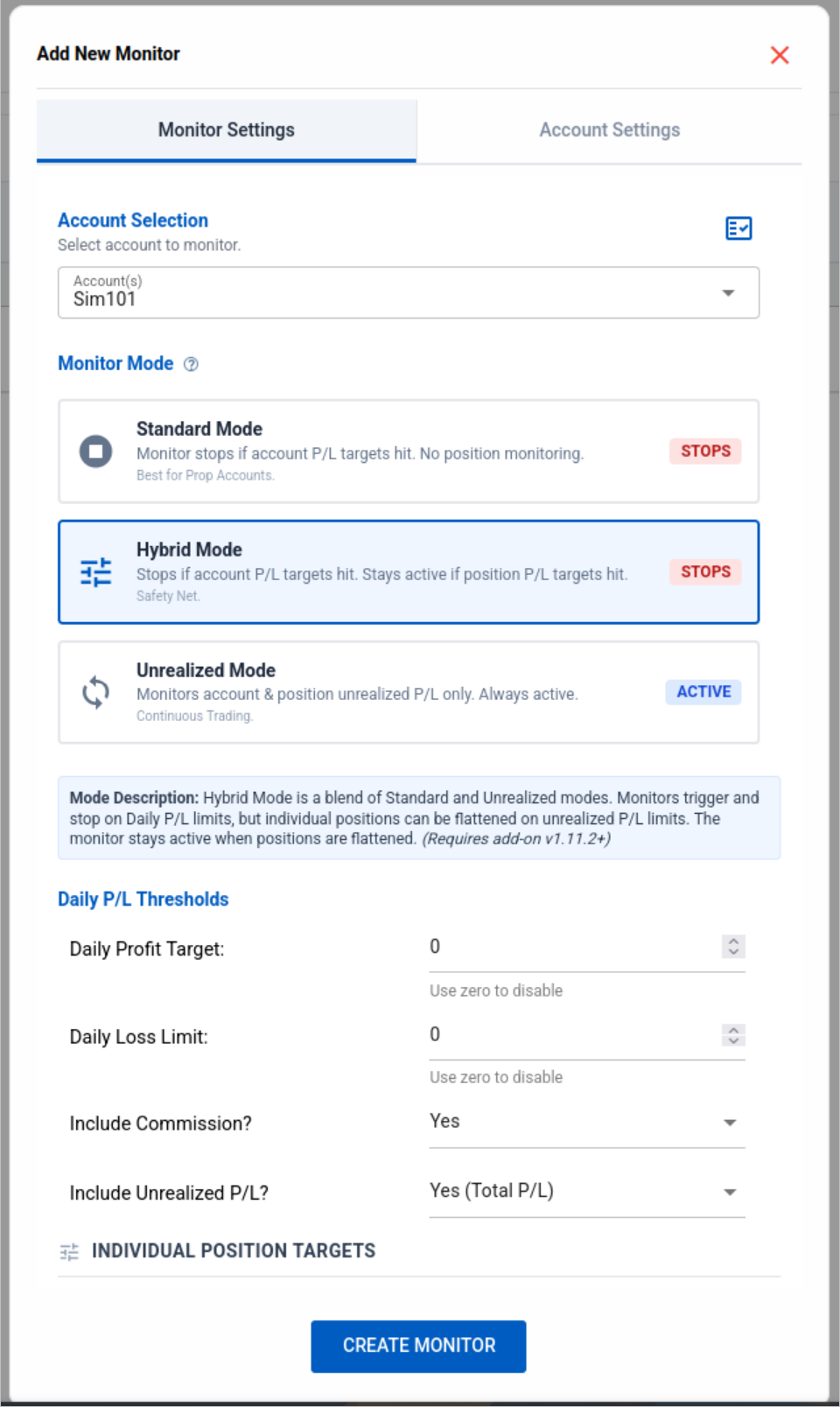
How Hybrid Mode Works
- Account Safety (Hard Stop): If your Daily Profit or Daily Loss limit is hit, the monitor STOPS for the day. This protects your account from over-trading.
- Position Management (Continuous): You can now set Max Position Profit and Max Position Loss targets.
- The "Hybrid" Logic: If a specific position hits its limit, the monitor will flatten ONLY that position, but the monitor remains ACTIVE to manage the rest of your session.
Why use it? It acts as a safety net. You can automatically cut a single loser early (or take profit on a runner) without killing your entire trading session, while still keeping your daily max loss limit active as a fail-safe.
We've updated the Account Manager and Trade Copier with a new Account Visibility Manager and refreshed UI layout.
What's New
- Both pages now have a similar UI layout with an overview bar and double header
- New Flatten button added to the Trade Copier
- Click the visibility icon to open the Account Visibility Manager modal
- Hide/unhide any accounts in your dropdown
How to Use
- Look for the visibility icon in the Account Manager or Trade Copier config screen
- Click to open the modal
- Toggle visibility for any accounts you want to hide (as long as they're not actively used)
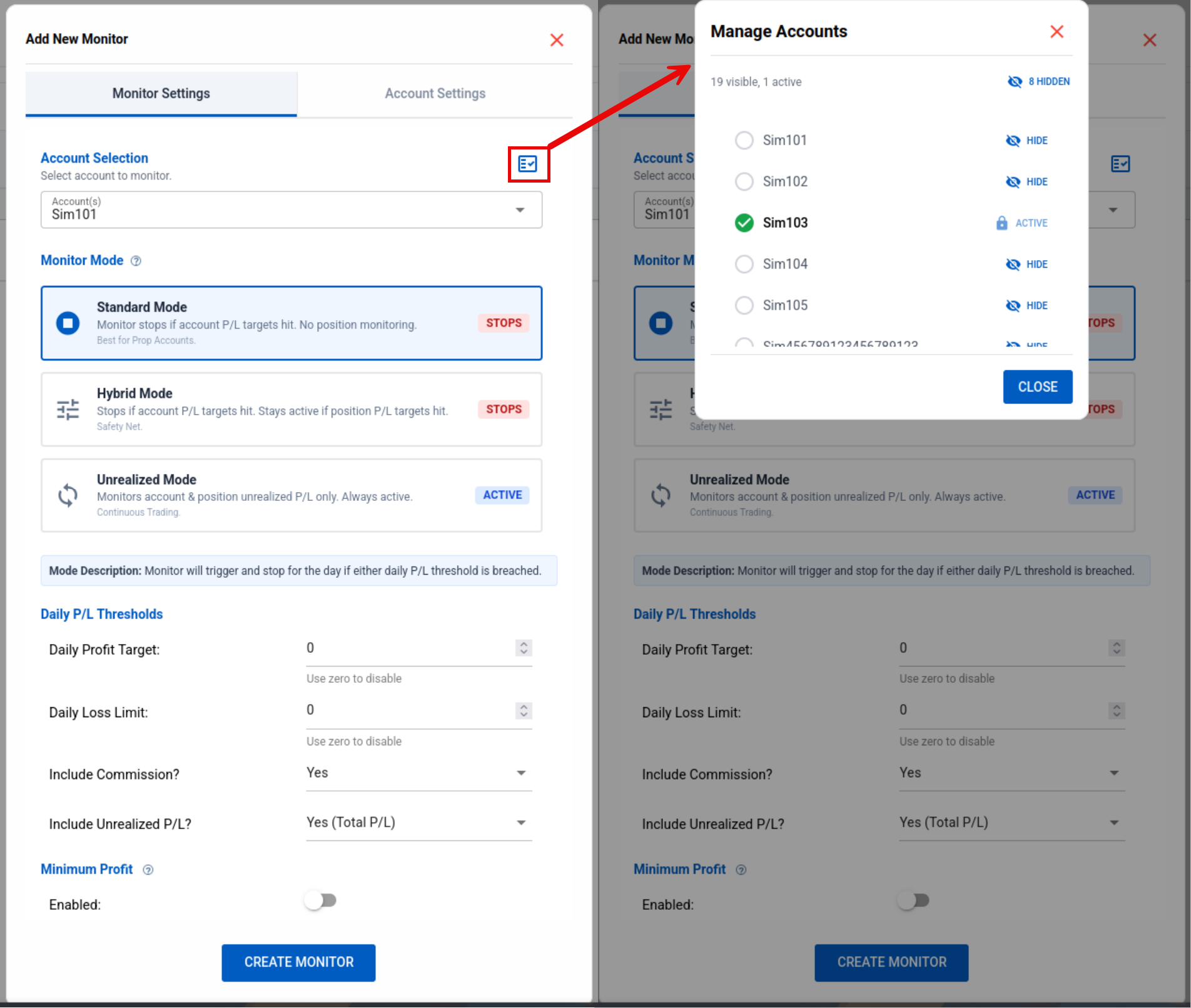
Coming Soon: Group Mode for easier creation of multi-follower groups.
We are proud to launch our own Chicago-based Virtual Private Servers designed specifically for CrossTrade and NT8 users! Offering VPS services directly allows us to save CrossTrade users significantly compared to other providers. We have cut costs significantly, with plans starting at only $29 per month.
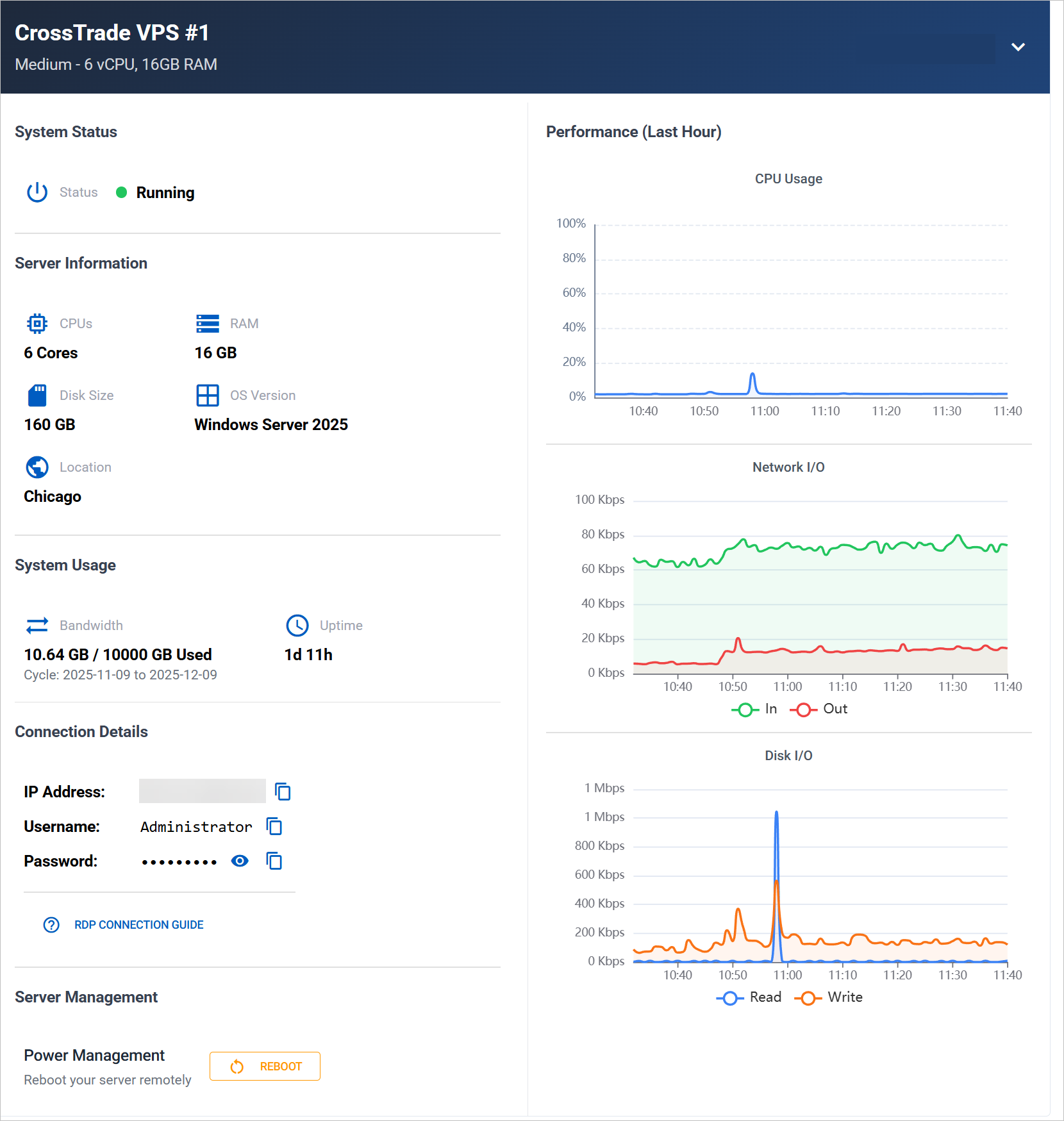
Why Switch to CrossTrade VPS?
- Ready to Trade: Comes pre-installed with CrossTrade & NinjaTrader 8
- CME Proximity: Located in Chicago for ultra-low latency (under 1ms ping to CME)
- Enterprise Power: AMD EPYC Processors & NVMe Storage (no consumer-grade junk or old Xeons)
- One Support Team: We handle the software and the server - everything is under one roof
Available Plans
- Small Plan (4 Cores/8GB RAM)
- Medium Plan (6 Cores/16GB RAM)
- Large Plan (12 Cores/32GB RAM)
- X-Large Plan (24 Cores/64GB RAM)
Deploy Now →
VPS subscriptions are separate from your XT tools subscription.
You can now use either TradingView contract format and CrossTrade will automatically convert it to the correct NT8 compatible symbology. No more warning messages in your Alert History for contract format mismatches.

What's New
We've implemented automatic conversion for all TradingView non-continuous contract formats like ESZ2025.
- TradingView contracts are now automatically converted into the correct NT8 format (e.g.,
ESZ2025→ESZ5) - No more warning messages in your Alert History for contract format mismatches
- Works seamlessly with all TradingView alert configurations
We made a little house-keeping improvement to introduce help modals right into the Alert History for any errors or warnings.
How to Use
- Navigate to your Alert History page
- Find any row with an error or warning
- Click on the WHY? link
- A modal will appear with more info and a link to the appropriate help doc
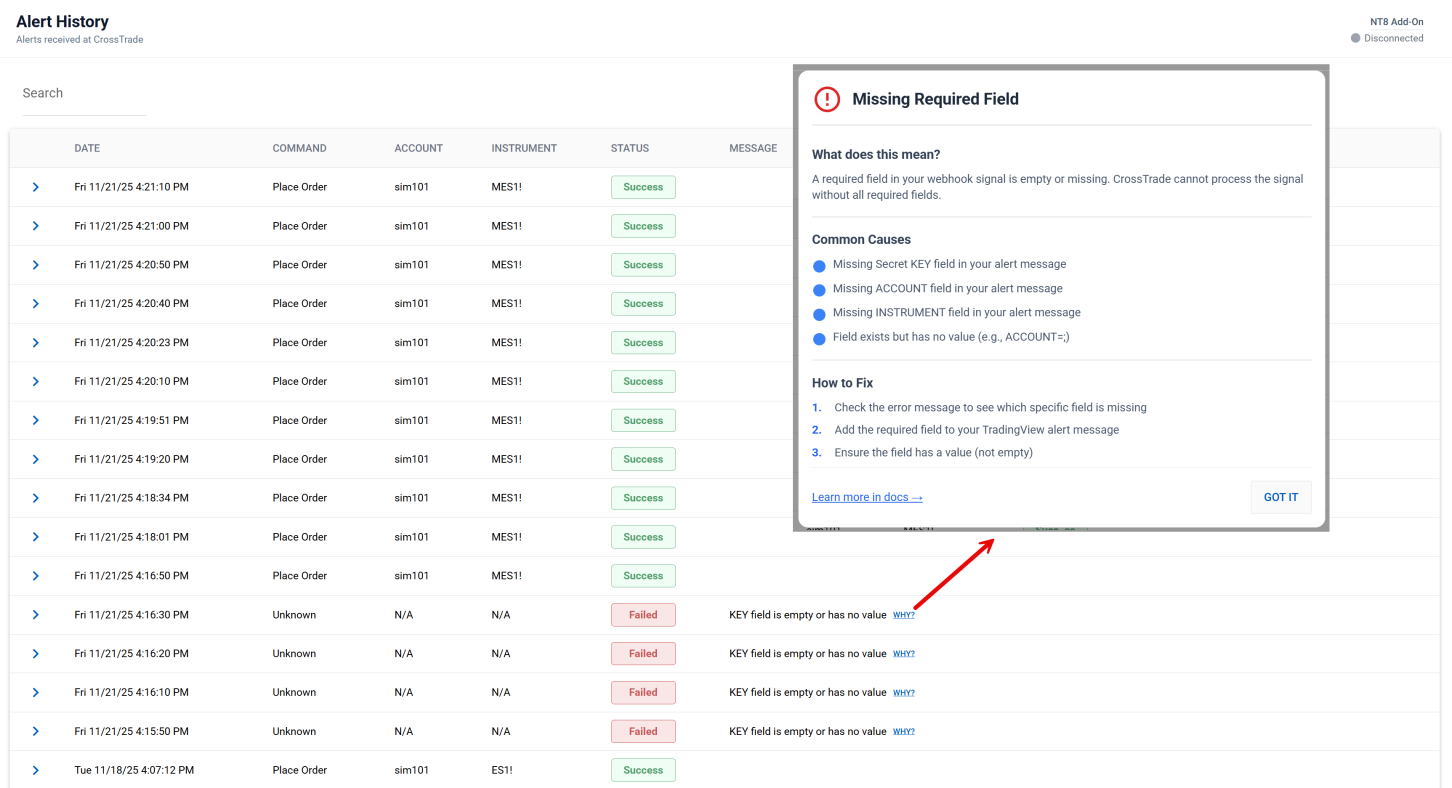
All help modals link to a unified page in the Docs for each Error or Warning you might encounter along the way.
We've received sooooo many requests to allow follower accounts in the Trade Copier to copy the same instrument from multiple leaders.
The Use Case
Traders running multiple strategies from multiple leaders on one instrument (like NQ) across multiple timeframes or trade windows.
The Problem
We hadn't considered this scenario when building Auto-Sync. If 2 leader accounts started trading NQ at the same exact time, Auto-Sync would go nuts opening and closing positions to try to match 2 different leaders.
The Solution
Allow traders to do it if and only if Auto-Sync is disabled. We now evaluate instrument conflict only if Auto-Sync is on.
Note: To copy the same instrument from multiple leaders, make sure Auto-Sync is turned OFF for those copier configurations.
As part of our Account Management and Trade Copier UI revamp, we've introduced two highly requested features.
What's New
- Non-Emotional Colors: Gets rid of the green/red color scheme that can trigger emotional responses to winning (dopamine) and losing (cortisol, fight or flight)
- Monitor Lock: Prevents you from restarting an Account Management monitor in the middle of the trading session — when the monitor says you're done for the day, you're done
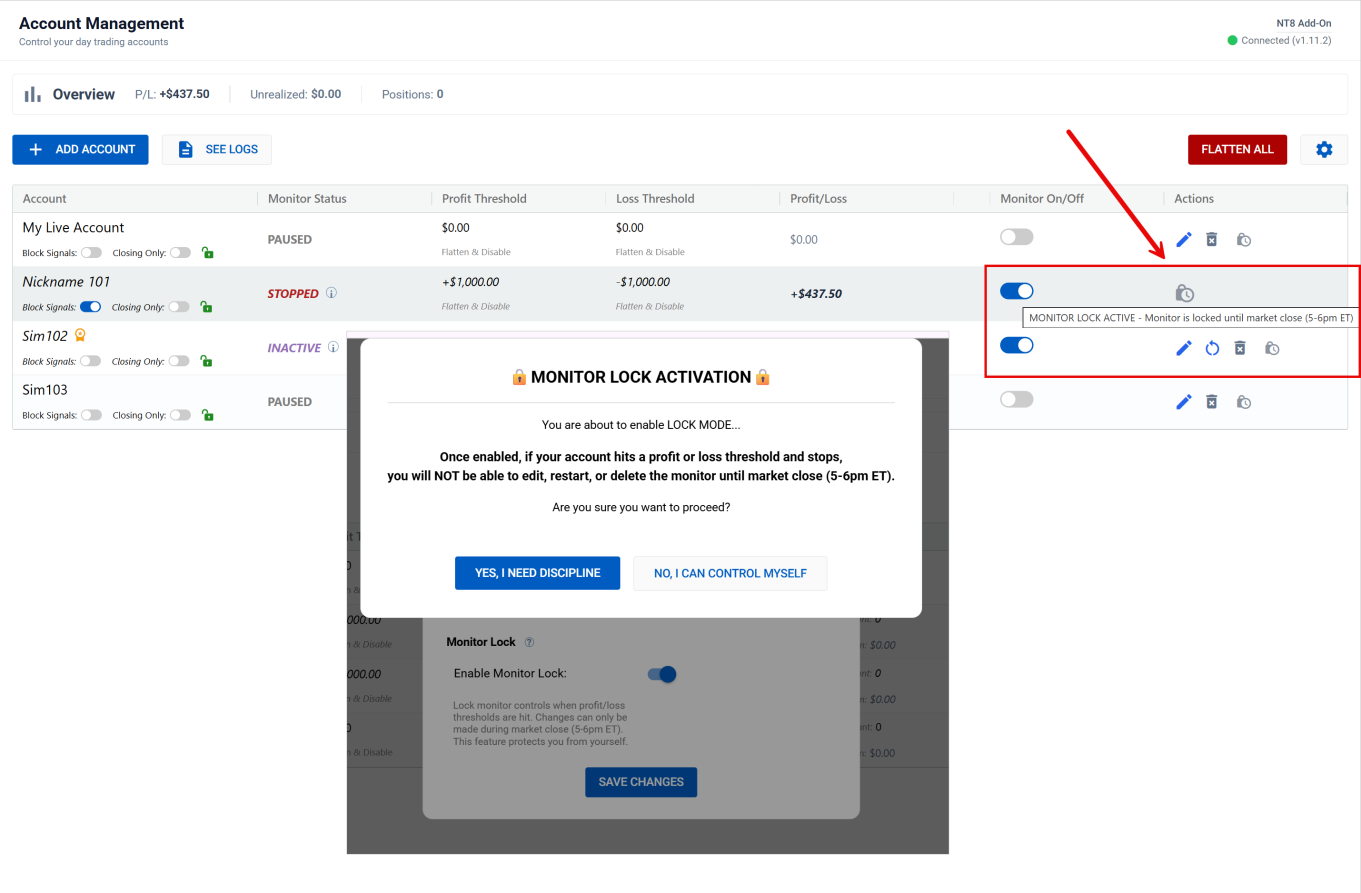
How to Use
- Go to Account Management
- Click on the gear icon to open Settings
- Toggle Non-Emotional Colors and/or Monitor Lock as needed
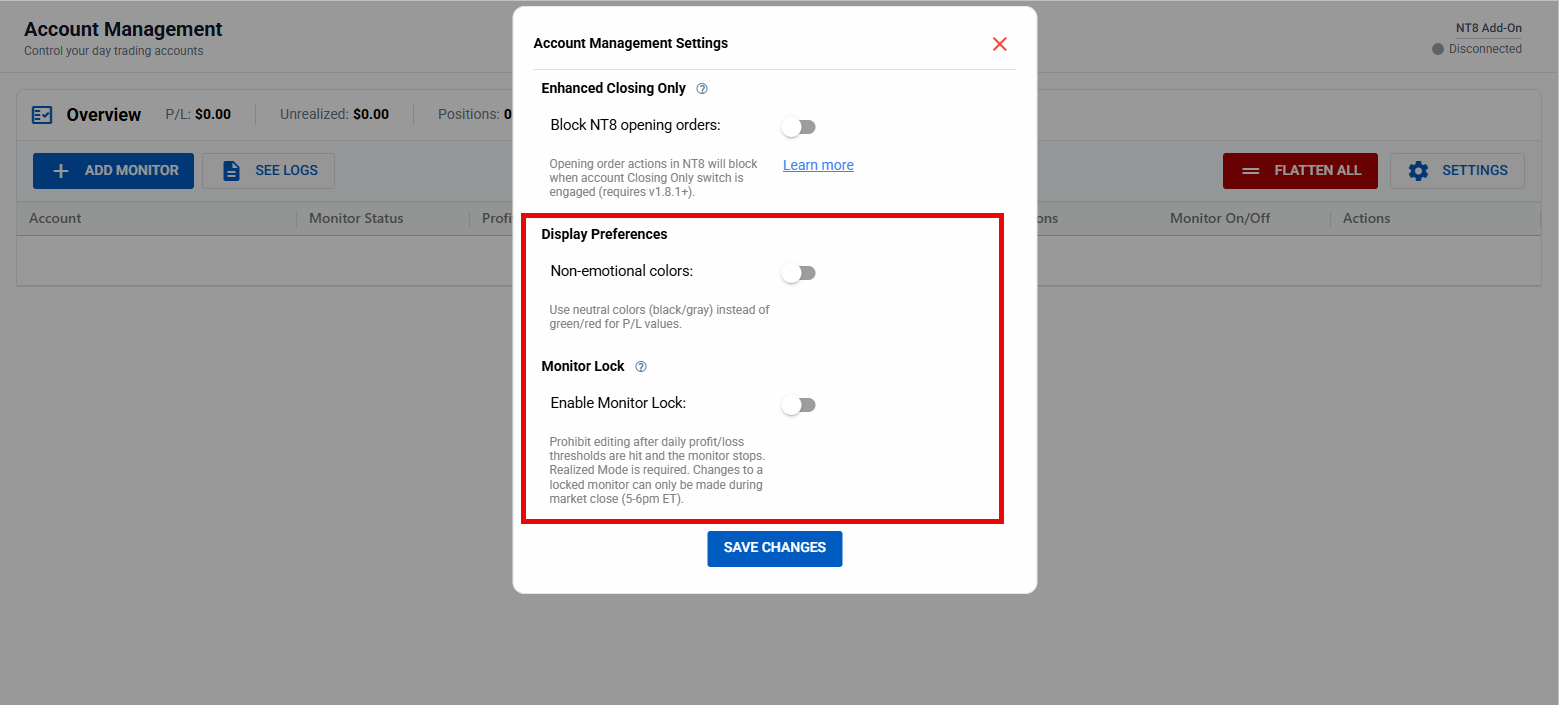
We've deployed a new feature to Strategy Synchronization called strategy_exit_block. This one has been asked for in one form or another for a long time.
What's New
This feature allows you to run a strategy on TradingView that only allows opening orders, so positions can be 100% managed on NT8 with trade brackets, an ATM template, or manually - without fear that TV exits will interfere.
The Use Case
Imagine you open a position from TV with an ATM strategy attached. The ATM closes the position before the TV exit signal fires. Then, once the TV exit executes, you receive a signal for a position that's no longer active. With Strategy Sync + Exit Blocking, that's no longer a possibility.
How to Use
Add strategy_exit_block=true to your alert message:
key=your-secret-key;
                  command=place;
                  account=sim101;
                  instrument=NQ1!;
                  action={{strategy.order.action}};
                  qty={{strategy.order.contracts}};
                  order_type=market;
                  tif=day;
                  sync_strategy=true;
                  market_position={{strategy.market_position}};
                  prev_market_position={{strategy.prev_market_position}};
                  out_of_sync=flatten;
strategy_exit_block=true Note: strategy_exit_block is very aggressive. It only allows opening orders from a flat market position (flat → long/short). It does not support scaling in/out of positions at this time.
The Trade Copier is officially live with the release of NT8 add-on v1.11.2. Copy trades locally on NT8 or with external webhooks from TradingView or your private algos.
What's New
- Copier Features: Dual Copy System: Order or Execution Mode, Account Manager Tandem Block, Trade Inversion, Ratio Position Size, Symbol Replacements, and more!
- Instant Quoting: XT just got a whole lot faster — anyone running v1.11.2 automatically has access to instant quoting
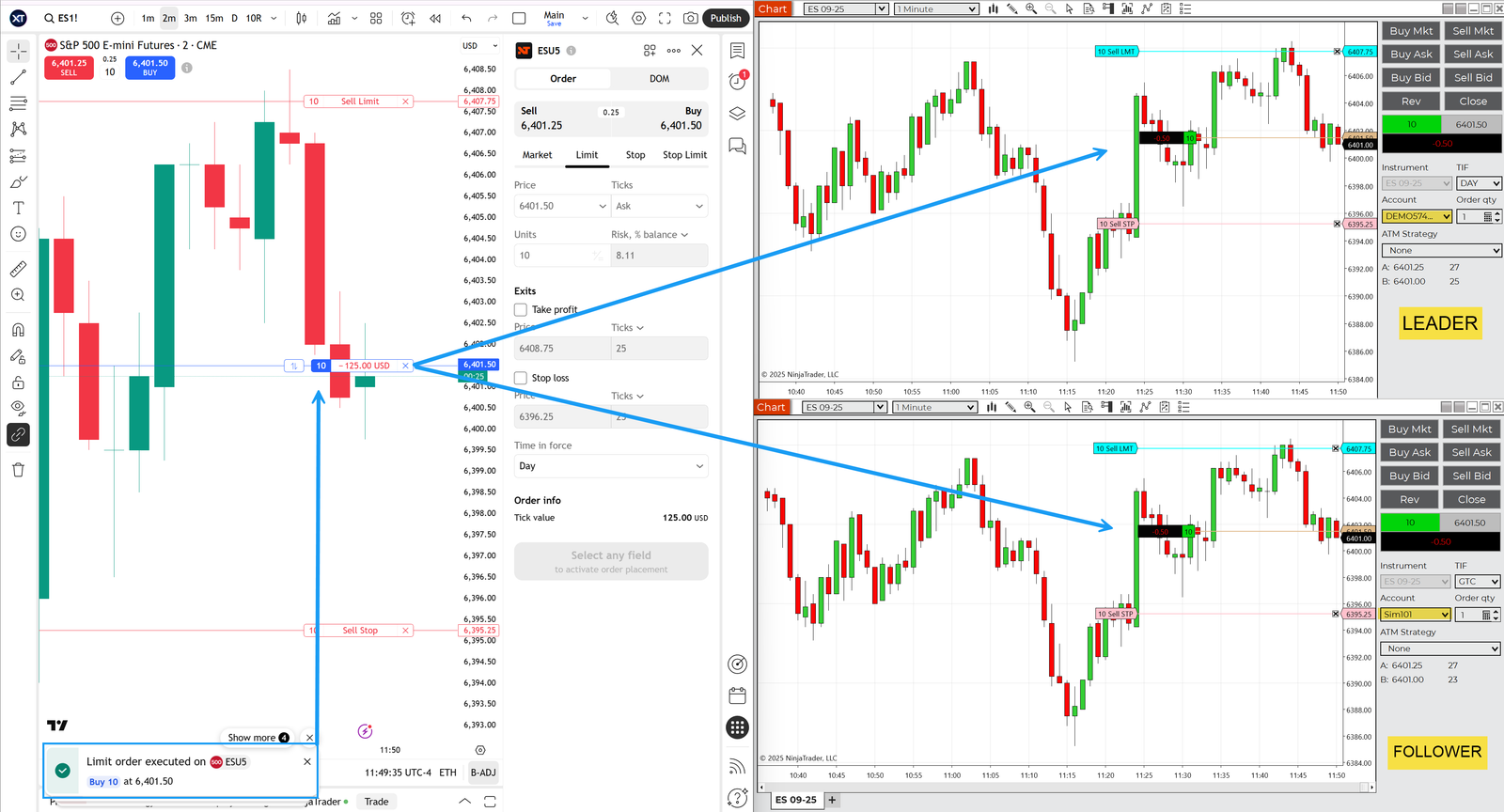
Performance Improvements
Before, if you were using continuous contracts, limit prices, TP/SL in % or ticks, etc., a round-trip communication with the add-on was required to quote the underlying instrument. Not anymore!
We are now streaming quotes directly from the add-on and caching them for instant retrieval. If you were using any order options that required quotes, we just shaved many milliseconds off of each order request.
What's Next?
Now that CrossTrade is a full-fledged product offering automated trading, risk management, and trade copying, our goal is simple: optimize, optimize, optimize. We want everything faster, web interfaces cleaner, and more built-in utility.




