
Tradovate vs NinjaTrader
Two ways to trade futures: a cloud-native broker and a desktop powerhouse. Here is how they actually differ, and how CrossTrade automates both from the same webhook.
You want nothing to install, a browser-and-mobile broker, and execution that keeps running when your computer is off. Great for cloud-first traders and Tradovate-based prop accounts.
You want advanced desktop charting, backtesting, and NinjaScript automation, plus the deepest CrossTrade toolset today: Account Manager risk controls, strategy sync, and fill-driven copying.
Platform comparison
| Feature | Tradovate Recommended | NinjaTrader 8 Recommended |
|---|---|---|
| CrossTrade automation | Available: Route cloud webhooks, REST calls, MCP tools, and account rules | Available: XT Add-On and desktop toolset |
| No desktop install required | Available: Link with OAuth and route orders in the cloud | Unavailable: NT8 desktop must be installed |
| Runs while your PC is off | Available: Keep the broker workflow available without your computer | Unavailable: NT8 must remain running |
| Advanced charting and NinjaScript | Limited or conditional: Use web charts plus API and MCP automation | Available: Desktop charting and NinjaScript |
| CrossTrade risk controls | Available: Enforce daily limits, drawdown controls, and auto-flatten | Available: Account Manager plus Add-On enforcement |
| CrossTrade multi-account workflows | Available: Signal, execution and order (beta) copier modes, in the cloud | Available: Order and execution copier modes |
Which fits which trader
Tradovate is the better fit when:
- You want zero desktop software and execution that runs with your computer off
- You trade from a browser or on mobile and prefer a cloud-native broker
- You are on a Tradovate-based prop firm (Lucid, Tradeify, and others)
- You want server-side OSO brackets that live on the broker and survive a disconnect
- You want native broker-hosted protection plus optional CrossTrade-managed ATM enhancements
NinjaTrader is the better fit when:
- You want advanced desktop charting, custom indicators, and backtesting
- You build automated strategies in NinjaScript or trade with ATM templates
- You want the deepest CrossTrade toolset today: risk controls, strategy sync, fill-driven copying
- You need to copy manual trades, not just webhook-driven ones
- You already run NinjaTrader 8 and want the fastest direct execution (~30ms)
CrossTrade automates both
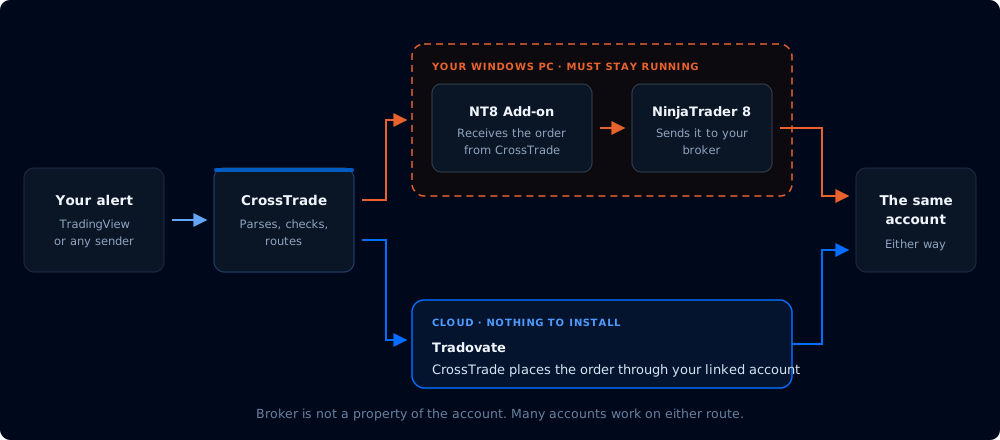
The same webhook command syntax routes to either broker. Add destination=tradovate; to send an order to your linked Tradovate account, or leave it off (the default) to route to NinjaTrader 8. Link one broker or both from My Account, and run whichever fits the trade.
NinjaTrader has the deeper desktop strategy toolset. Tradovate provides generally available cloud routing, REST, MCP, Strategy Sync, risk controls, signal and execution copying (order-mode copying is in beta), managed ATM breakeven, consensus-triggered trail activation, and durable trigger replay. Learn more on the Tradovate and NinjaTrader pages.
Frequently asked questions
Is Tradovate better than NinjaTrader?
Neither is strictly better; they suit different workflows. Tradovate is a cloud-native futures broker with nothing to install and execution that runs even when your computer is off. NinjaTrader 8 is a desktop platform with deeper charting, backtesting, and NinjaScript automation. Pick based on how you actually trade.
Can CrossTrade automate both Tradovate and NinjaTrader?
Yes. CrossTrade uses the same webhook command syntax for both. Add destination=tradovate; to route an order to your linked Tradovate account, or leave it off (the default) to route to NinjaTrader 8. You can link either or both from My Account.
Do I need NinjaTrader installed to trade Tradovate through CrossTrade?
No. The Tradovate path is cloud-only. Relative webhook prices use CrossTrade Quote Consensus exclusively and fail closed without a fresh trusted quote.
Which platform do prop firms use, Tradovate or NinjaTrader?
Both. Many funded firms (Lucid, Tradeify, and others) run on Tradovate, and many also support NinjaTrader 8. It depends on the firm. Some prop firms restrict third-party automation, so check your firm's rules before connecting CrossTrade. See our Trading Disclaimer.
Is CrossTrade's Tradovate support as complete as its NinjaTrader support?
Tradovate cloud routing, REST, MCP, Strategy Sync, the Account Manager, signal and execution copying, managed ATM breakeven, consensus-triggered trail activation, and durable trigger replay are all generally available, and order-mode copying is in beta. NinjaTrader remains deeper for desktop strategies.
Automate Tradovate, NinjaTrader, or both
Free 7-day trial. Link a broker in minutes and route your first automated order today. No credit card required.
Disclosure
This comparison reflects publicly available information and our own product knowledge as of 2026-06-15. Platform features and pricing change. Verify current details on each company's website before deciding. Tradovate and NinjaTrader are trademarks of their respective owners; CrossTrade is not affiliated with or endorsed by either. Errors or outdated information can be reported to [email protected].




