ELITE FEATURE · MCP

AI trading agents for NinjaTrader 8 and Tradovate.

Point Claude, ChatGPT, Cursor, or any MCP client at NinjaTrader 8 and let it act as a trading agent. Your agent drafts NinjaScript, checks compilation, backtests through NT8's actual Strategy Analyzer engine, sweeps parameters, and can deploy an approved strategy and inspect its live state. Keep the source, test settings and actual results in the conversation.

Follow the full workflow: inspect → write → compile → backtest → review → deploy → verify. Start with the AI strategy builder workflow for NT8 or the Claude and ChatGPT connection guide.

Built for prop traders who want to inspect NinjaTrader state and keep control of each gate before an AI agent takes action. You approve the gates. CrossTrade does not determine your firm's rules or guarantee an evaluation, account status, or outcome.

NT8
Strategy Analyzer engine
Your AI
Supported MCP clients
Inspect
Real NT8 signatures
Verify
Jobs and strategy state

Why CrossTrade for AI trading

AI access to the NT8 setup you already run.

Other ways to trade with AI

  • Self-hosted GitHub projects you install, run and maintain yourself
  • Native broker-account MCP tools with their own access requirements
  • Standalone code generators that leave you to compile and diagnose the draft
  • Separate interfaces for strategy work and automation troubleshooting

CrossTrade

  • Your desktop and workflowInspect your NT8 installation alongside CrossTrade webhook history, journal records and copier diagnostics.
  • NinjaTrader 8 and TradovateOne server, both brokers. The Tradovate tools run in our cloud, so your agent can work while your computer is off.
  • The whole strategy loopWrite NinjaScript, compile it, backtest it in NT8's own Strategy Analyzer, sweep parameters, deploy, and verify, in one conversation.
  • Hosted MCP connectionAdd one URL to a supported AI client and authorize it. NT8 operations use the CrossTrade NT8 Add-On running on your computer.
  • Your permissions, your gatesOAuth scopes decide which tools are available. Configure per-action approvals in your AI client and verify the account before acting.

NinjaTrader also documents native MCP and a desktop AI Strategy Builder in beta. Read the dated comparison of native MCP, Nina and CrossTrade.

You shouldn't have to learn C# to backtest a hypothesis

NinjaScript is a great execution environment for live trading. It is a terrible place to iterate on ideas by hand. You have to compile, attach to a chart, configure Strategy Analyzer, click around for parameters, wait, read a results panel that's locked inside the desktop app, then translate everything back into a hypothesis you can adjust. An AI trading agent on the MCP Trading API collapses that loop into a chat session.

YOU (in Claude, ChatGPT, or Cursor)

Write a simple ATR-trailing-stop strategy on MES that goes long when the 9-EMA crosses above the 21-EMA. Backtest April 2026, 5-minute bars. Sweep ATR from 1.5 to 3.0 in 0.25 steps. Tell me the best parameters by NetProfit, then run a full backtest with those and show me every trade.

ILLUSTRATIVE WORKFLOW · NOT A RECORDED RESULT

I'll inspect NT8's actual EMA / ATR signatures first, compile in memory, write the strategy, run the sweep, then drill into the winner.

→ GetNinjaScriptHelp · LookupNinjaScriptSymbol(EMA) · CompileNinjaScript(in_memory:true) · WriteNinjaScriptFile

→ RunStrategyBacktest with optimization.parameters_sweep: [{name:"AtrStop", min:1.5, max:3.0, step:0.25}]

→ Poll each job with GetMcpJob. Read the actual ranking, parameters and metrics returned by your install.

→ Re-run the selected parameter set as a full single backtest, then evaluate a separate period. Report the result even if it loses money.

What your trading agent can do

Every tool here is exposed through the Model Context Protocol. Any MCP-compatible AI client (Claude, ChatGPT, Cursor, Continue, Cline) can call them with the user's permission.

Both brokers are covered, but not identically. The NinjaTrader tools do strategy work as well as trading, because NinjaTrader is where NinjaScript and the Strategy Analyzer live. Tradovate gets a parallel set of Tv_ tools for accounts, positions, orders, fills, margin and contract lookup, running server-side with nothing open on your machine. An agent can read and trade a Tradovate account while your computer is asleep; it cannot write or backtest a strategy there.

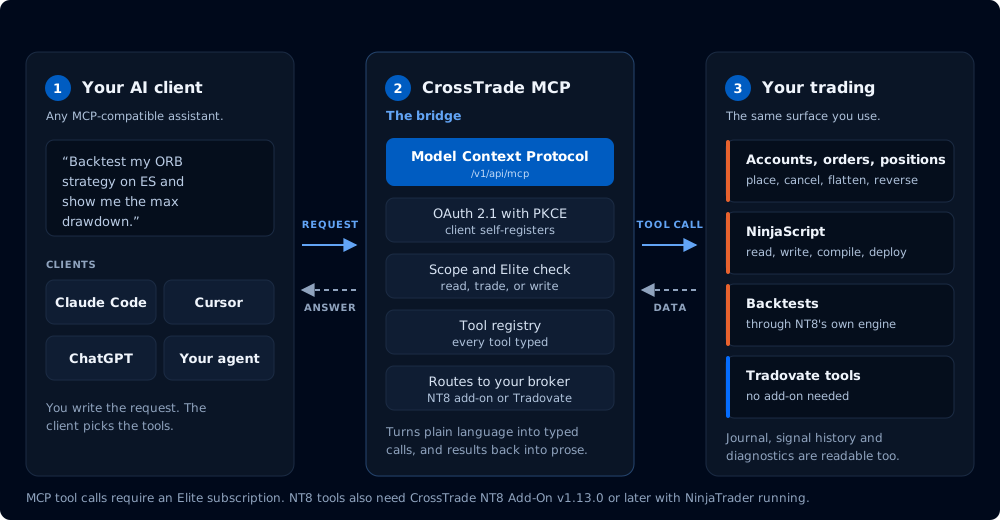
An MCP client sends a plain-language request. The CrossTrade MCP server authorizes it with OAuth, checks scope and the Elite gate, picks the right typed tool, and calls through to your NinjaTrader add-on or your linked Tradovate account. Results come back as a plain-language answer.
Where an agent request goes, and what it is allowed to reach.
code

Write NinjaScript with AI

Your agent pulls the real signatures from your NT8 install (not stale training data) and uses compiler diagnostics to repair the draft. A successful sandbox compile comes before the approved source-file write and NT8 rebuild.

AGENTIC
science

Backtest 1:1 with NT8

RunStrategyBacktest drives Strategy.RunBacktest() through NT8's actual Strategy Analyzer engine for supported configurations. Match your data, dates, trading hours, inputs and fill settings against the UI, then compare the returned trades and metrics.

CORE
tune

AI parameter sweeps

Pass an optimization.parameters_sweep argument and your agent cartesian-enumerates every combination. Read the returned ranking block for the requested fitness or its fallback, then inspect the selected parameters in a full single run.

OPTIMIZE
rocket_launch

Deploy + monitor

The same parameters your agent backtested with go straight into DeployStrategy. The MCP deployment registry tracks every strategy your agent has launched, and GetDeployedStrategyState returns the live NT8 state (trading? active orders? bar count?) on demand.

LIFECYCLE
visibility

See your real risk

Account balances, open positions, working orders, executions, daily watermarks, and quote snapshots are all available as MCP tools. Build prompts that refuse to deploy if drawdown is too deep or the position would breach a prop-firm limit.

SAFETY
notifications_active

Alert through your channels

EmitMcpAlert routes agent-generated alerts through your in-app notifications, email, Discord, or Telegram. Build prompts that ping you when a backtest finishes, a sweep identifies a winner, or a deployed strategy reaches a threshold.

CORE

The full idea → live agent loop

Every step is one MCP tool call. The AI sequences them. You approve the gates.

01

Inspect

GetMcpCapabilities, LookupNinjaScriptSymbol, SearchNinjaScriptSymbols, GetNinjaScriptHelp. Your agent reads the actual NinjaTrader surface available in your install.

02

Write

The agent encodes your hypothesis as NinjaScript. Idiomatic C#, sized for the NT8 version it just inspected. No copy-pasted templates from training data.

03

Compile

CompileNinjaScript(in_memory:true) validates syntax against the running NT8 AppDomain. Fully isolated until you approve writing the file.

04

Backtest

RunStrategyBacktest runs the strategy through NT8's Strategy Analyzer engine. Use matching supported settings and retain the returned job evidence.

05

Optimize

Pass optimization.parameters_sweep to enumerate every parameter combination. Read the ranking metadata for the actual fitness used.

06

Deploy

DeployStrategy launches the compiled strategy headlessly or attaches it to a chart. GetDeployedStrategyState verifies it actually reached active state.

Make the result reproducible

Save the strategy source, exact inputs and returned job result. Compare the same supported configuration in the desktop Strategy Analyzer when you need to verify the execution path.

Checkpoint
Record
Verify
Strategy
Versioned source and class name
Same compiled class
Data
Contract, dates, bars and trading hours
Same historical inputs
Execution assumptions
Fill resolution, slippage and commission
Same supported settings
Result
Completed job, metrics and trade list
Actual returned evidence
Forward simulation
Confirmed simulation account and deployment
Live state, bars, positions and orders

Historical jobs use NT8’s isolated Backtest account. Sim101 is for a separately approved forward-simulation deployment. Follow the complete walkthrough.

What the wire actually looks like

You probably won't write these by hand. Your trading agent does. But here's what your agent is sending.

MCP tools/call · single backtest
{
  "method": "tools/call",
  "params": {
    "name": "RunStrategyBacktest",
    "arguments": {
      "strategy_class": "MyEma20Reversal",
      "instrument":     "MES 06-26",
      "bars_period":    {"period_type": "Minute", "value": 5},
      "from":           "2026-04-01T00:00:00Z",
      "to":             "2026-04-30T00:00:00Z",
      "parameters":     {"Quantity": 1, "StopAtrMultiplier": 2.25},
      "fill":           {"slippage_ticks": 0}
    }
  }
}
MCP tools/call · parameter sweep
{
  "method": "tools/call",
  "params": {
    "name": "RunStrategyBacktest",
    "arguments": {
      "strategy_class": "MyEma20Reversal",
      "instrument":     "MES 06-26",
      "bars_period":    {"period_type": "Minute", "value": 5},
      "from":           "2026-04-01T00:00:00Z",
      "to":             "2026-04-30T00:00:00Z",
      "optimization": {
        "fitness": "MaxNetProfit",
        "parameters_sweep": [
          {"name": "StopAtrMultiplier", "min": 1.5, "max": 3.0, "step": 0.25},
          {"name": "TargetRatio",       "min": 1.0, "max": 2.0, "step": 0.25}
        ]
      }
    }
  }
}

A real agent prompt

You don't issue tool calls one at a time. You write one prompt and let the agent sequence dozens of calls inside your guardrails. Drop this into Claude Desktop, Claude Code, Cursor, or any MCP client connected to CrossTrade and watch the full loop run.

Idea-to-simulation agent prompt

Help me test a one-contract MES strategy. Begin with research and a proposed specification. Do not place orders or deploy.

1. Inspect capabilities, available data and existing scripts. Confirm the instrument, bar period and session rules.

2. Restate the entry, exit and sizing rules, then show a versioned NinjaScript draft.

3. After approval, compile in memory and poll the job. Repair diagnostics. Ask before writing; wait for F5 if the response says file_only.

4. Propose exact test dates, costs and fill settings. Run the approved configuration and return the actual trades and metrics.

5. If I approve a bounded sweep, preserve fixed inputs and evaluate the selected parameters on a separate period.

6. Stop for review. Only deploy after I confirm an available simulation account and the final parameters.

7. Read GetDeployedStrategyState and account positions/orders. Distinguish a processing strategy from a filled trade.

See the full prompt library for account-risk agents, market-research agents, NinjaScript authoring agents, and operational shutdown agents.

Honest limitations

Most "AI for trading" marketing pages would skip this section. We won't. Here are the constraints you'll actually run into building trading agents on CrossTrade MCP.

  • Optimization is cartesian. Pass optimization and the agent enumerates every combination. GeneticOptimizer and StrategyGenerator names are accepted but the iteration loop is exhaustive. Requested fitness is used where supported; inspect ranking for the actual fitness or NetProfit fallback.
  • Sweep parameter types. Only int / long / double / float / decimal are sweepable. Boolean and enum strategy inputs can still be fixed via the parameters argument.
  • NT8 must be running, for the NT8 tools. The MCP server is hosted, but the NinjaTrader tools talk to your NT8 desktop over the CrossTrade NT8 add-on. If NT8 is offline, those tools return a clear error instead of inventing fake data. The Tv_* tools are not affected: they run server-side against your linked Tradovate account.
  • Strategy work is NinjaTrader only. Writing NinjaScript, compiling, backtesting through Strategy Analyzer, parameter sweeps and strategy deployment all depend on NinjaTrader itself, and have no Tradovate equivalent. Tradovate agents trade and read account state; they do not author or backtest strategies.
  • Elite + Add-On v1.13.0+. The Elite gate is enforced at token issuance. REST and WebSocket access remain on Pro, but trading agents on MCP need Elite.
  • Async jobs. Backtests and compiles return a job_id and complete asynchronously. Your agent polls GetMcpJob for progress. Jobs auto-expire after 30 minutes.
  • Live trades are real. MCP tools can submit orders and deploy strategies. Use mcp:trade scope only with agents you trust, and always start your prompts with a safety frame that asks the agent to confirm account, instrument, and risk before any write.

Ready to deploy your first trading agent?

MCP Trading is included with the CrossTrade Elite plan. Plug Claude, ChatGPT, Cursor, or any MCP-capable AI client into NinjaTrader 8 and start running real agents against your real install — write, backtest, optimize, deploy, monitor.

Connect an AI client

Begin with a read-only trading assistant

MCP connects an AI client to typed tools. It does not turn a model’s answer into a verified account fact or a successful order. Start with observable account data and expand permissions deliberately.

Connect the supported client

Use CrossTrade’s hosted MCP endpoint and the authentication flow documented for your client. MCP access requires Elite. Client support for remote servers and authorization varies, so follow the setup for Claude, ChatGPT or the client you actually use.

Verify the account route

Ask for the linked accounts and open positions before requesting an action. NT8 tools need your add-on connected. Tradovate tools read linked accounts server-side. Require the assistant to name the account and platform it inspected.

Separate proposals from actions

Start with read permissions and a simulation account. If you later grant trading permissions, specify the permitted account and operations. Have the assistant verify returned order state rather than treating a proposed action or an order identifier as a fill.

