
Now Live
Your Trades, Imported.
Your Edge, Revealed.
Your NinjaTrader 8 trades sync automatically through the CrossTrade NT8 Add-On, and your Tradovate fills are swept from our cloud. Both land in one visual journal with performance analytics, an economic calendar, and a coaching system that tells you exactly what to change and how much it's worth. Included with every plan.
Start Your Free 7-Day Trial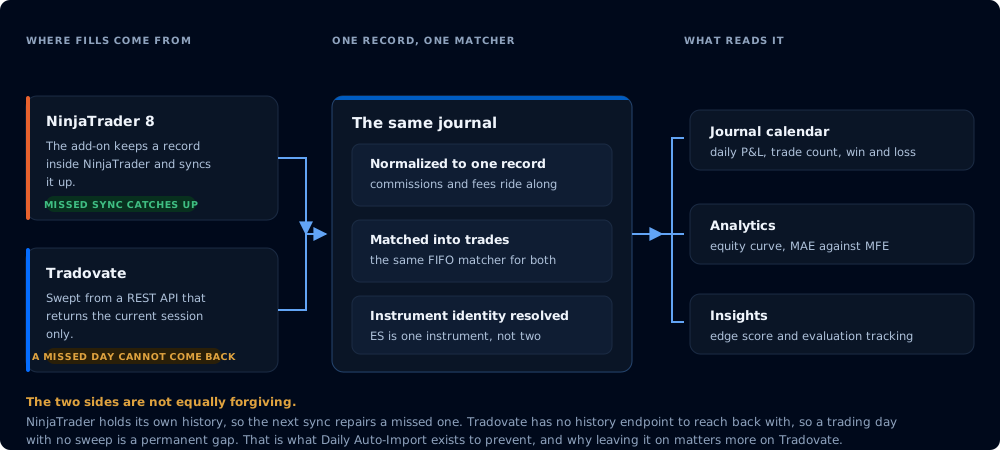
Why CrossTrade over other trading journals
The journal that fills itself in.
Other trading journals
- Export a CSV from your platform, upload it, repeat
- Skip a day and your stats quietly go stale
- Tag every trade by hand
- Another subscription on top of your tools
CrossTrade
- Syncs itself from NinjaTrader 8Turn on auto-import and the CrossTrade NT8 Add-On syncs your trades nightly and whenever you open the journal. NinjaTrader keeps the history, so a missed sync catches up.
- Tradovate fills, swept from our cloudNightly, and near live while your dashboard, copier or monitors are running. No desktop software.
- Strategy tags pulled automaticallyYour NinjaTrader strategy names come across with the trades, so every stat splits by strategy.
- Coaching in dollarsGauges, a what-if simulator, Monte Carlo and a prop eval tracker that say what to change and what it is worth.
- Included with every planNo separate app, no extra subscription. It comes with the automation you already run.
Journal
A visual calendar showing your daily and weekly P&L at a glance. Click any day for the full breakdown.
- Daily P&L tiles with trade count and W/L
- Weekly summary column with aggregated stats
- CME Globex holiday markers (closed & early close)
- Two-column trade detail modals with charts
- Daily notes and strategy tagging per trade
- Multi-account filtering and visibility manager
Analytics
Stat cards, equity curve, P&L distribution, time-of-day analysis, and symbol performance — with date-range filters on everything.
- Equity curve with 7D / 30D / 90D / MTD / YTD / All
- P&L distribution by day, week, or month
- Detailed stats drawer (Sharpe, Sortino, R², Recovery Factor)
- Time of day and symbol performance breakdowns
- Click any chart point to jump to that day in Journal
- Educational modals explaining every metric
Insights
Coaching that tells you what to change, how much it's worth in dollars, and lets you simulate the impact before you do it.
- Edge, Win Quality, Consistency, Risk Control gauges
- Dollar-denominated coaching suggestions
- What-If simulator with four sliders and live output
- Prop eval tracker with firm presets and progress bars
- Projection chart with equity, DD, and target lines
- Monte Carlo simulation (500 runs, 60-day horizon)
Econ Calendar
Scheduled economic releases for the trading week, sitting in the same tool as your trades, so you know what is ahead before you size into it.
- Impact rating, forecast and previous for every release
- Day chips, week picker and impact filtering
- Country flags, so you can spot the USD prints that move index futures
- Current trading week, refreshed as each week rolls over
- Events clear 15 minutes after they fire, keeping the view forward-looking
- Pairs with Account Manager econ lockouts to stand your accounts down
Coaching Insights
Not just numbers. Specific, dollar-denominated advice.
CrossTrade analyzes your actual trading patterns and gives you prescriptive recommendations. Not "improve your win rate" — instead, "your avg loss ($187) wipes out 1.3 winners. Cap it at $141 and your expectancy flips from +$47 to +$79/trade." Click the suggestion and the What-If simulator proves it.
Suggested Improvements
Data-driven suggestions that adapt to your situation — different coaching for negative expectancy, thin edges, and strong performers. Each suggestion calculates the exact dollar impact and snaps the What-If sliders to those values so you can preview it live.
What-If Simulator
Four sliders — win rate, avg winner, avg loser, trades/day. Move them and watch expectancy, profit factor, and daily P&L update in real time. Click a coaching suggestion and the sliders snap to those values. The projection chart below updates simultaneously.
Gauge Scoring
Four gauge cards score your Edge, Win Quality, Consistency, and Risk Control on a 0–100 scale. Each gauge is clickable — opening an educational modal that explains what the metric means, shows your numbers, and gives you a specific action to take.
Execution Efficiency
CrossTrade measures how much of each move you actually capture — entry efficiency, exit efficiency, and total efficiency. The coaching system identifies whether your entries or exits are weaker and tells you exactly how much money you're leaving on the table.
Trade-Level Detail
Every trade, fully broken down.
Click any day on the calendar and get a two-column modal with your full trade list on the left and charts, notes, and strategy breakdowns on the right. Click a trade to drill into its detail card.
MAE / MFE & Efficiency
See Maximum Adverse Excursion, Maximum Favorable Excursion, and entry/exit/total efficiency for every trade. Know how much heat you took and how much of the move you captured.
Daily & Trade Notes
Save text notes on any day or week. Tag trades with setup types, session tags, mistake labels, and discipline markers. Strategy breakdown shows P&L grouped by entry signal.
Cumulative P&L Charts
Each day modal includes a cumulative equity curve and per-trade P&L bar chart. Weekly modals aggregate daily P&L into a weekly equity curve with day-by-day bars.
Monte Carlo Simulation
What are the odds you pass your eval?
CrossTrade runs 500 simulated evaluations using your actual trade P&L distribution. Each simulation samples from your real trades, runs forward day by day, and checks whether you hit the profit target or blow the drawdown limit. Adjust the What-If sliders and the simulation re-runs with your modified parameters.
500
Simulations
60
Day Horizon
Real
Trade Distribution
Live
Slider Integration
Prop Eval Tracker
Track your evaluation in real time.
Set your firm's rules — profit target, max drawdown, daily loss limit, consistency rule, and drawdown type (trailing, EOD, or static) — and CrossTrade tracks your progress with live progress bars. Pre-loaded presets for the firms that matter.
Apex (EOD & Intraday) Take Profit Trader Tradeify MyFundedFutures BluSky Lucid Trader Custom
Zero Manual Entry
Connect the CrossTrade NT8 Add-On, or link your Tradovate account, and CrossTrade imports your fills automatically. Executions, orders, balances, commissions and fees, all of it. Syncs daily after market close, or manually any time with one click.
1
Connect the NT8 Add-On or link Tradovate
2
Click Import
3
Auto-sync daily
One difference worth knowing. NinjaTrader keeps its own execution history, so a missed
sync catches up on the next one. Tradovate's API returns only the current session, so CrossTrade has to
capture each day while it is still visible. Leave Daily Auto-Import on and nothing is missed. If a
Tradovate day does slip through, you can drop in a CSV exported from Tradovate to fill the gap.
How importing works
Free for all CrossTrade subscribers.
No separate app. No extra subscription. No upsell.
Start Your Free 7-Day Trial No credit card required.




