
The Next Generation
of Trading Automation.
CrossTrade gives you two execution paths: NinjaTrader 8 through the desktop Add-On, or a linked Tradovate account through cloud routing. Automate signals, copy trades, manage risk, and build custom integrations through one platform.
Choose your path: desktop NT8 or cloud Tradovate
NinjaTrader features run through the CrossTrade NT8 Add-On, which maintains a persistent WebSocket connection between NT8 and the cloud. Linked Tradovate accounts execute server-side and keep working while NinjaTrader is closed.
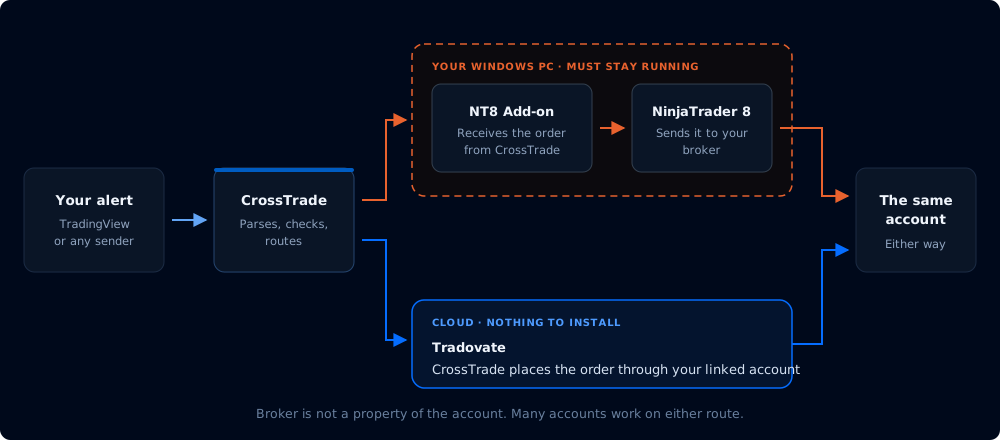
NinjaTrader 8 + Add-On
Receives orders from webhooks, REST, MCP, and the Trade Copier through the connected desktop Add-On. Supports NT8 order handling, ATM strategies, live account data, Auto-Reconnect, and Data Watchdog.
Linked Tradovate
Uses a secure OAuth link for cloud webhooks, REST, MCP, Account Manager, Strategy Sync, and signal-mode copying. No NinjaTrader installation or desktop Add-On is required.
Tradovate Order Management
Native order types, OCO, multibrackets, scale-outs, and triggerless continuous trailing all run at the broker. CrossTrade adds target-fill breakeven, profit-triggered trail activation, and durable trigger replay on top, which Tradovate brackets have no equivalent for.
CLOUD EXECUTIONThe platform
CrossTrade combines shared automation tools with platform-specific execution. Use NinjaTrader through the Add-On, link Tradovate for cloud execution, or use both.
Trade Copier
On Tradovate the copier runs server-side with three modes: signal mode replays your CrossTrade commands and preserves order types, execution mode mirrors every broker fill including manual trades, and order mode mirrors the leader's working orders. On NinjaTrader the add-on backs two modes, order and execution, inside your running NT8.
Learn more →Account Manager
Apply per-account profit/loss thresholds, trading windows, kill switches, trailing drawdown controls, and EOD flattening to NinjaTrader or linked Tradovate accounts.
Learn more →REST API & WebSocket
Control NinjaTrader through the connected Add-On or use the Tradovate REST and MCP surfaces directly in the cloud. Tradovate calls continue with NT8 closed; real-time WebSocket streaming remains NT8-specific.
Learn more →CrossTrade VPS
Chicago-based AMD EPYC and Ryzen servers with NinjaTrader 8 and the CrossTrade NT8 Add-On pre-installed. Same city as CME Group. Connect your accounts and trade in minutes.
Learn more →Webhook automation
Use TradingView or any webhook source to send orders through CrossTrade. NinjaTrader is the default destination; add destination=tradovate; to route directly to a linked Tradovate account.
What you need to start
Execution Path
For NinjaTrader, install NT8 and connect the CrossTrade NT8 Add-On to a data feed. For direct Tradovate, link a Live or Demo identity through OAuth. No desktop software is required for Tradovate.
CrossTrade Account
Sign up for a free 7-day trial. No credit card required to start. Standard and Pro plans available after trial.
TradingView
Any paid plan with 2FA enabled. Only required if you're using webhook alerts. Not needed for the Copier, API, Account Manager, or VPS.
From first alert to first fill in under 10 minutes.
Try everything free for 7 days.