
Your trades. Every NinjaTrader you run.
Same execution window.
NinjaTrader 8 allows one Rithmic connection per instance, so several Rithmic logins means several NT8 installations, often on different machines or VPSs. Signal Share copies your own trades from one of your installations to your others in real time, through our colocated relay with priority signal handling. One CrossTrade login broadcasts, your other logins receive.
Signal Share is a NinjaTrader 8 feature. Your broadcasting installation and every receiving installation need NinjaTrader 8 with the CrossTrade NT8 Add-On. It is not available on Tradovate. If you trade Tradovate, the Trade Copier covers copying between your own Tradovate accounts.
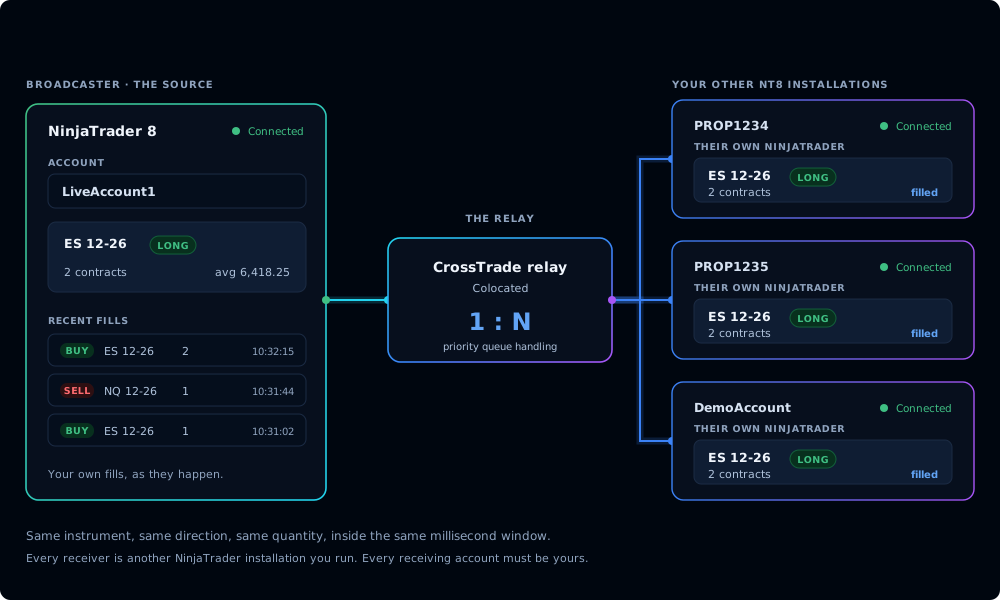
NinjaTrader runs one Rithmic login per instance
If you trade several Rithmic accounts, for example a few prop firm evaluations and a personal account, NinjaTrader 8 makes you run a separate instance for each login, often on separate machines or VPSs. The native options are: run the strategy on every machine (sync drift, reconnect drift, settings drift), or write your own webhook fan-out and hope your VPS doesn't bottleneck. Signal Share solves it at the protocol layer. The installation you trade from becomes the source of truth, and each of your other installations receives the trade through a priority-handled colocated relay: same instrument, same direction, same quantity, in the same execution window.
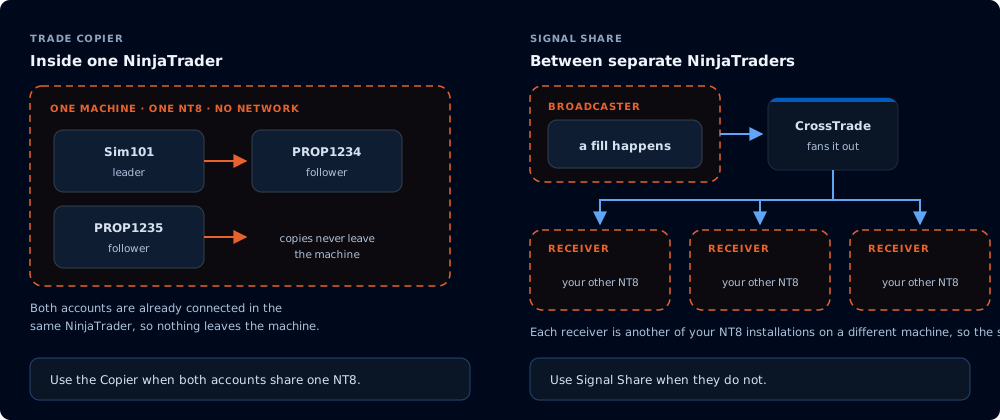
What Signal Share actually does
Six things that matter when your trades have to cross from one NinjaTrader to another.
Colocated broadcast relay
We pin our broadcast workers to the same datacenter as our brokerage egress, so the hop from your broadcasting installation to the relay stays inside our own network rather than fighting the public internet.
SPEEDPriority signal handling
Elite signals jump the queue. When the platform is under load, Signal Share traffic is dispatched ahead of standard webhook traffic. It is the difference between landing on the bar you wanted and arriving two ticks late.
ELITEEvery installation you run
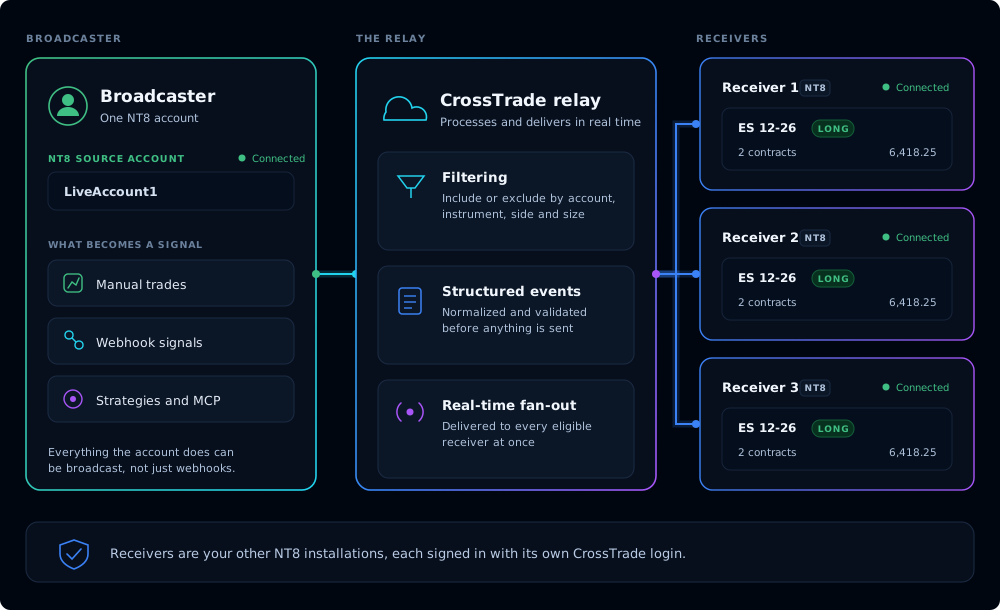
Home rig, office machine, VPSs. Each of your installations runs the CrossTrade NT8 Add-On with its own CrossTrade login and its own broker connection. Add or remove a receiving installation without restarting anything, and your broadcasting installation keeps working when a receiver goes offline.
SCALEBroadcast filters
Choose what gets copied: which account, which instruments, and whether manual fills, automated fills, or both become signals. Leave the instruments blank and everything on that account is copied.
CONTROLTwo-sided audit logs
Your broadcasting installation logs every signal it sends. Each receiving installation logs every signal it gets, with the outcome once NinjaTrader confirms it. When something doesn't match, both ends have the receipt.
VISIBILITYYour accounts only
Every receiving account must be yours, owned and controlled by you. There is no public discovery and no way to subscribe to someone else's trades. Each receiving login accepts the link from inside its own CrossTrade dashboard before anything arrives.
OWNERSHIPHow Signal Share works
Six steps. No webhook fan-out to configure, no leader-follower locked accounts.
Enable on Elite
Turn on Signal Share from the CrossTrade login your main installation uses. Broadcasting requires the Elite plan.
Link your other logins
Send an invite to the CrossTrade login on each of your other installations. Receiving works on every plan.
Accept and map
Accept from each receiving login's dashboard and pick the NT8 account on that installation that should take the trades.
You trade
Your TradingView strategy, webhook, or manual entry triggers as it normally would.
Broadcast relays
Signal Share fans the trade out through the relay. Each of your receiving installations gets the same order, in the same window.
Audit both sides
Every send and every receive is logged with timestamp, payload, and outcome. Open the log any time.
Built for the people who actually need it
Signal Share isn't trying to be everything. It exists for three very specific use cases, in this order.
Several Rithmic logins, several NinjaTraders
NinjaTrader 8 takes one Rithmic connection per instance. Hold a prop evaluation on one login, a funded account on another, and a personal account on a third, and you are running three NT8 instances. Trade from one and Signal Share places the same orders on the others.
You, on every machine you own
Run a strategy on one rig. Mirror it to your home machine, your office machine, or a VPS. Same trade, same window, no manual replication and no state drift between machines.
Your accounts at different brokers
Your broadcasting installation sends once. Each of your other installations has its own CrossTrade NT8 Add-On connected to its own broker, so a trade you place through one connection lands on your accounts held at another.
What Signal Share is not
It is not a way to send trades to other people. Every receiving account must be yours, owned and controlled by you. Signal Share is not for following other traders or running a signal service, and no payments may pass between users. There is no public discovery, no follower count, no ratings, and no monetization.
CrossTrade does not provide trade signals or recommend traders. Placing trades into accounts that belong to other people is regulated activity in many jurisdictions (for example, commodity trading advisor rules in the United States), and it is not what Signal Share is for. CrossTrade does not provide legal advice. Read the Signal Share section of our Trading Disclaimer for the details.
Honest limitations
The constraints you'll actually run into.
- Each receiving installation owns its execution. Signal Share guarantees timely delivery of the signal. It cannot guarantee identical fills on a receiving installation: broker latency, that machine's network quality, NT8 connection state, and account-specific constraints (margin, position limits, instrument mappings) all live outside the broadcast layer.
- Both ends need NinjaTrader 8 + the CrossTrade NT8 Add-On. Your broadcasting installation and every receiving installation run the CrossTrade NT8 Add-On against NinjaTrader 8, each signed in with its own CrossTrade login. If a receiving installation is offline or disconnected, its copy of the trade won't fill.
- Broadcasting requires Elite. Receiving works on every plan. The colocated relay and delivery to several receiving installations are part of Elite. Your receiving logins can be on any CrossTrade plan.
- Prop firm rules apply. Prop firms prohibit copying trades between different people, and many restrict copied or externally routed trades even between your own accounts. Check your firm's copy-trading rules before connecting Signal Share to a prop account. See our Trading Disclaimer for the full breakdown.
- Signals are not advice. CrossTrade is a transmission tool. We do not provide trade signals, review the trades you send, or recommend traders. You are responsible for every order that lands on your receiving accounts.
Ready to connect your installations?
Signal Share broadcasting is included with the CrossTrade Elite plan at $99 per month ($949 per year). Receiving works on every plan. Add Elite to the login you trade from and you can link your other installations in minutes.
Signal Share questions
Straight answers about copying your trades between your own installations




