PRO FEATURE · RUNS IN THE CLOUD

Tradovate Trade Copier
that runs in the cloud.

CrossTrade's Tradovate trade copier copies one leader account to every follower account you link, from our servers and straight through Tradovate's API, so your computer can be off. It runs three copy modes, chosen per copier: Signal sends every follower its order in parallel the moment Tradovate accepts the leader's, Execution copies every fill including trades placed by hand, and Order (beta) mirrors the leader's working orders, stops and targets included.

No PC
Nothing To Install Or Keep Open
3 Modes
Signal, Execution, Order (Beta)
∞
Followers, One Flat Price

Updated

Simultaneous execution vs leader-follower

"Simultaneous execution"? That's our simplest mode.

Some copiers sell simultaneous execution as the cure for leader-follower copying: instead of waiting for a leader account to fill and then chasing it, every account gets the order at once. It's a good idea. It's also what CrossTrade's Signal mode does, with one safety check added: followers go out in parallel the moment Tradovate accepts the leader's order, so if Tradovate rejects the leader order at placement, nothing is copied. And Signal is the simplest of the three copy modes we run.

The catch with any alert-only copier is what it can't see. It copies what passes through the alert and nothing else. Place a trade by hand in Tradovate, from TradingView's trading panel or from your phone, drag a stop, or cancel a working order, and an alert router never finds out. Your accounts drift apart and nothing tells you. Execution and Order modes exist for exactly those trades.

What happens on the leaderAlert-only copier ("simultaneous execution")Fill-following copier ("leader-follower")CrossTrade: Signal, Execution, Order
A TradingView alert or API order Sent to every account at once Copied after the leader fills Signal: every follower in parallel, the moment Tradovate accepts the leader order. No leader wanted? Multi-account webhooks send one alert to several accounts at once.
A trade placed by hand in Tradovate, on web, desktop or mobile Never seen Copied after the fill, at market Execution copies the fill. Order (beta) copies the order itself, so resting orders are mirrored before they fill.
A trade from TradingView's Tradovate panel Never seen Copied after the fill, at market Execution and Order (beta) both copy it
A stop or target moved by hand, or an order canceled Never seen Nothing to copy until something fills Order (beta) modifies or cancels each follower's twin order
Take-profit and stop-loss on followers Only if the alert carries them Not from fills alone Signal: the same server-side OSO. Order (beta): linked orders, so one leg's fill cancels the other.
Tradovate refuses the leader order Each account trades on its own No fill, so nothing to copy Signal: if it is rejected at placement, no follower order is sent
A follower drifts after a missed copy No leader to compare against Depends on the copier With Auto-Sync on, Execution corrects it after each copy and on reconnect, and Order on reconnect. Signal flags it in the copy log.

A copy that lands a few milliseconds later won't fail an evaluation. A trade your copier never saw will. So instead of arguing for one copy method, we built three and let you pick per copier.

Want no leader at all? Multi-account webhooks send one alert to several linked Tradovate accounts with account=A,B,C;, and each account executes on its own.

Tradovate Group Trade vs a trade copier

Tradovate's built-in answer is Group Trade: free, and genuinely useful within its limits. It places one order across a group of accounts you pick, from Tradovate's own order entry. A trade copier works the other way around. It watches a leader account and copies whatever it does to your followers, automatically, with rules for each one.

Tradovate Group TradeCrossTrade Tradovate trade copier
How a trade starts You select the group and place the order in Tradovate Whatever the leader does: a TradingView alert, an API call, or a manual trade in Tradovate (depending on mode)
Which accounts Accounts under one Tradovate login, with the same brokerage provider Any Tradovate accounts you link, across logins (cross-login pairs are still being validated, so test on Demo first)
Sizing Order quantity must be a multiple of the group's total quantity Ratio or fixed quantity per follower, plus a max position cap
TradingView Orders from TradingView go to one account at a time Alerts copy to every follower, and trades from TradingView's Tradovate panel copy in Execution and Order modes
Cost Free Included with Pro, $49 per month

Group Trade details from Tradovate's help center and community forum, checked September 27, 2026. Tradovate may change Group Trade at any time.

Why CrossTrade over other Tradovate copiers

A Tradovate copier, without the compromises.

Other copiers

  • One copy method, whether it fits your trading or not
  • Blind to trades placed outside the alert
  • Followers wait for the leader to fill, then chase the price
  • Brackets dropped, so followers sit unprotected
  • A desktop app or VPS that has to stay running
  • Priced per account or per connection
  • Risk limits bolted on, or missing entirely

CrossTrade

  • Three copy modes, one copierSignal for alerts and code, Execution for every fill, Order (beta) for every working order. Pick per copier.
  • Followers fire with the leaderSignal mode sends every follower order in parallel as soon as Tradovate accepts the leader order, not after it fills.
  • Sees trades placed by handExecution and Order modes watch the leader at the broker, so manual, mobile and TradingView-panel trades copy too.
  • Nothing on your machineCopying runs server-side against Tradovate's API. No desktop app, no add-on, no VPS to rent.
  • Brackets stay attachedSignal mode carries take-profit and stop-loss to followers as the same server-side OSO. Order mode places them as linked orders.
  • Unlimited accounts, one flat priceNo per-account fees, no follower caps, no connection tiers.
  • Account Manager built inTandem Mode stops copying to any account the moment its own rules say stop.
  • Every copy on the recordThe copy log records copies, broker rejections, skips and drift corrections, with leader and follower order IDs.

Tradovate Order mode is in beta. See how each copy mode works.

Leader-follower is the slow way to copy.

A fill-following copier waits for the leader to fill, then sends the followers after it at whatever price is left. CrossTrade copies the order itself, so every account works the same entry at the same time.

Fill-following copier
  1. Alert
  2. Leader order
  3. Wait for fill
  4. Followers sent at market

Followers enter after the move has already started.

CrossTrade Signal mode on Tradovate
Alert
  • Leader
  • Follower 1
  • Follower 2
  • Follower N

Same order type, same bracket, sent to every account together.

Prefer to copy fills? Execution mode copies every leader fill, manual trades included. The point is that you choose, per copier, instead of living with the one method a copier happened to be built on.

Three copy modes, chosen per copier

Each copier runs in one mode, picked when you create it. The difference is what the copier listens to: your CrossTrade signals, the leader's fills, or the leader's working orders.

bolt

Signal

Replays the CrossTrade commands you send (webhooks and API) to every follower. Order types are preserved: limits copy as limits, and brackets ride along as the same server-side OSO. It does not see manual clicks inside Tradovate.

Best for: TradingView alerts and code, when order structure matters.

ORDER FIDELITY
sync_alt

Execution

Watches the leader at the broker, so every fill copies, including manual trades, TradingView panel trades and ATM legs. Followers enter and exit at market.

Best for: trading the leader by hand, anywhere.

EVERY FILL
list_alt

Order (Beta)

Also watches the leader at the broker, but mirrors its working orders rather than its fills: entries, stops, limits, changes and cancels. Followers hold the same resting orders, with brackets and OCO pairs linked.

Best for: manual trading when followers need the same resting stops and targets.

BETA
One thing to know about Execution mode. It copies fills, not order structure, so followers enter at market with no resting bracket of their own. They exit when the leader's take-profit or stop-loss fills and that exit is copied across. If you need each follower protected independently at the broker, use Signal or Order mode, or pair the followers with Account Manager monitors.

Set up the Tradovate trade copier in four steps

Everything happens in your browser. There is nothing to download, and nothing to leave running when you are done.

  1. Start a Pro trial

    Create a CrossTrade account. Every new account starts with a free 7-day trial, and the copier is part of Pro.

  2. Link your Tradovate logins

    Under My Account, Brokers, link each Tradovate login that holds a leader or a follower. Prop firm accounts link as Demo, and you can link several logins. Linking uses Tradovate's own sign-in, so CrossTrade never sees your password.

  3. Add a copier

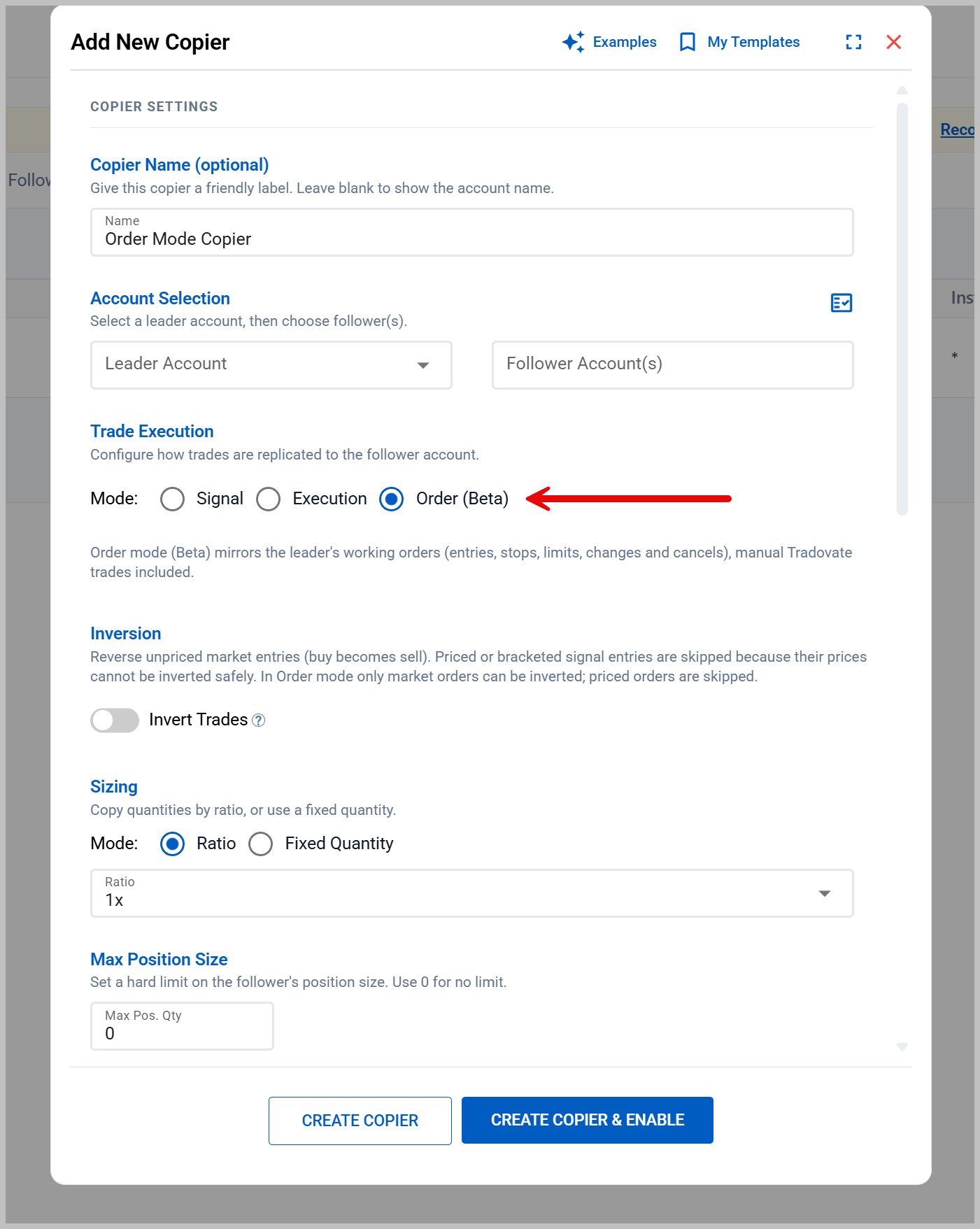
    Open Tradovate Copier and click Add Copier. Pick the leader, one follower or a group of followers, the copy mode, and each follower's sizing and max position.

  4. Test on Demo, then go live

    Trade the leader on Demo with an alert or by hand. Check the copy log and every follower through a full entry, exit and reconnect before you point the copier at live or funded accounts.

The Add New Copier editor for the CrossTrade Tradovate trade copier: leader and follower account pickers, a Mode selector with Signal, Execution and Order (Beta), inversion, ratio or fixed-quantity sizing, and a max position size.
The copier editor: leader, followers, mode and sizing on one screen.

Every follower, on its own terms

Settings live on each copier relationship, so a 150K leader can feed a stack of 50K evals at the right size, each with its own ceiling.

bar_chart

Ratio or fixed sizing

Half size, double size, or a fixed quantity for each follower. Signal and Order modes round to whole contracts, and Execution mode carries fractions forward so scaled entries and exits still end flat.

SIZING
vertical_align_top

Max position size

A ceiling on each follower's net position. An entry that would push past it is trimmed or skipped, and the log says which. Exits always pass.

CONTROL
filter_alt

Instrument filters and swaps

Choose which contracts each copier handles, or trade ES on the leader and MES on the follower. Symbol swaps apply to market orders; priced orders on a swapped symbol are skipped rather than mispriced.

CONFIG
groups

Copier groups

Apply one configuration to many followers at once. The copy log tags every entry with the group name, so a group's activity reads as one unit.

SCALE
sync

Auto-Sync drift correction

Execution mode corrects follower drift after each copy and on reconnect. Order mode corrects on reconnect after downtime. Signal mode flags any drift in the copy log.

AUTOMATION
link

Tandem Mode

Copying to a follower runs only while its Account Manager monitor is active. When a daily loss limit stops the monitor, copies to that account stop with it.

CONTROL

Built for Tradovate prop firm accounts

Many futures prop firms run their evaluation and funded accounts on Tradovate, which is exactly where a cloud copier earns its keep: one leader, a stack of accounts, and nothing to babysit. Size each follower to its drawdown, cap its position, and let Tandem Mode stop copying to an account when its daily limit is hit.

Firm rules on copying differ, and they change. Apex allows copying only when you place each order by hand in the master account. Take Profit Trader permits only approved copiers, and CrossTrade is not currently on its list. Earn2Trade does not allow copiers at all. CrossTrade does not decide what a firm permits, so read the guide for your firm and its current rules before you enable a copier.

Start it with a TradingView alert

Point your alert at the leader account with destination=tradovate; and Signal mode copies each order to every follower, brackets included. Nothing about the alert changes because followers exist. Prefer TradingView's own Tradovate trading panel? Execution and Order modes watch the leader at the broker, so those trades copy too.

Set up the alert side with Tradovate webhook automation, or follow the TradingView to Tradovate setup guide.

Comparing Tradovate copiers?

Read the best Tradovate trade copier buyer's guide, which compares every major option, including the ones that beat us on platform coverage. Or go head to head with TradeSyncer, PickMyTrade or Tradecopia. Moving from another copier? Use the migration checklist.

Why both beat everything else

A copier and an account manager that talk to each other.

Most traders pair a copier from one vendor with risk rules from another and hope the two agree. CrossTrade Pro includes both, wired together. When an account's rules say stop, copying to that account stops with it.

UnlimitedAccounts, copiers and monitors
2 BrokersNinjaTrader 8 and Tradovate
1 PriceBoth tools included with Pro

Tradovate Trade Copier FAQ

What is a Tradovate trade copier?

A Tradovate trade copier watches one Tradovate account, the leader, and repeats its trades on other accounts, the followers, with each follower's own sizing and limits. It is how traders run one strategy across several evaluation or funded accounts without placing every order by hand. CrossTrade's copier runs in the cloud, so nothing has to stay open on your computer.

Does Tradovate have a built-in trade copier?

Not a copier in the usual sense. Tradovate's Group Trade places one order across a group of accounts from Tradovate's own order entry. A group only holds accounts under one Tradovate login with the same brokerage provider, and the order quantity has to be a multiple of the group's total. Orders sent from TradingView go to one account at a time. A trade copier instead watches a leader account and copies its activity to followers automatically.

Is simultaneous execution better than leader-follower copying?

Each fixes a different problem. Simultaneous execution sends an alert to every account at once, so nobody waits for a leader to fill, but it can only copy trades that come through the alert. Leader-follower copying sees everything the leader does, manual trades included, but a fill-following copier sends followers after the leader fills. CrossTrade does both, per copier: Signal mode sends every follower in parallel as soon as Tradovate accepts the leader order, Execution mode copies every fill, and Order mode (beta) mirrors the leader's working orders, including trades placed by hand.

Does the Tradovate copier copy trades I place by hand?

Yes, in Execution and Order modes. Both watch the leader account at the broker, so trades you place by hand in Tradovate's web, desktop or mobile app, or from TradingView's Tradovate panel, are copied to your followers. Order mode (beta) also mirrors stop and target moves and cancels. Signal mode copies only what CrossTrade sends, which is what lets it send every follower in parallel the moment Tradovate accepts the leader order.

Can I send one alert to several Tradovate accounts without a leader?

Yes. List the accounts in the alert (account=A,B,C;) with destination=tradovate and CrossTrade sends the same order to each linked account at once, with each one executing and recorded on its own. Use this when there is no natural leader. Use the copier when you want per-follower sizing, symbol swaps, max position caps and drift correction.

What is the best trade copier for Tradovate?

The one that fits where your trades start and which platforms you need. If your accounts are on Tradovate and your trades come from TradingView alerts, your own code or manual trading, CrossTrade copies them from the cloud with no desktop software, at a flat price with no per-account fees. If you also need Rithmic, ProjectX or another platform, a multi-platform copier may suit you better. Our buyer's guide compares the main options side by side.

How do I set up a trade copier on Tradovate?

Start a CrossTrade Pro trial, then link your Tradovate login under My Account, Brokers. Prop firm accounts link as Demo. Open Tradovate Copier, click Add Copier, and pick the leader, the followers or a follower group, a copy mode and each follower's sizing. Run a full entry and exit on Demo accounts before copying to live or funded accounts.

Can I use a Tradovate trade copier with TradingView?

Yes, two ways. Send TradingView alerts to your leader account with a CrossTrade webhook (destination=tradovate) and Signal mode copies each order to every follower with its brackets attached. Or keep trading from TradingView's own Tradovate panel: Execution and Order modes watch the leader at the broker, so those trades are copied too.

Do I need to keep my computer, Tradovate or a VPS running?

No. The Tradovate trade copier runs on CrossTrade's servers and talks to Tradovate's API directly, so it keeps copying with your computer off, your browser closed and no VPS. You only need a browser to set it up and to review the copy log.

Are stop loss and take profit orders copied to follower accounts?

In Signal mode, brackets ride along as the same server-side OSO on every follower. In Order mode (beta), brackets and OCO pairs are placed on followers as linked orders. Execution mode copies fills only, so followers enter at market with no resting bracket of their own and exit when the leader's stop or target fills. If each follower needs its own protection at the broker, use Signal or Order mode.

How many Tradovate accounts can I copy to?

There is no follower limit and no per-account fee. One leader can copy to as many followers as you link, one by one or as a copier group. Large fan-outs are paced by CrossTrade's per-login request management so every follower stays within Tradovate's limits.

Can I copy trades between different prop firms or Tradovate logins?

You can link several Tradovate logins and pair accounts across them, including accounts at different prop firms. Demo to Demo and Live to Live under one login is the validated setup, and cross-login pairs are still being validated, so confirm the behavior on demo accounts first. Each firm sets its own copy-trading rules, so check them before you connect.

Does the copier work with the Tradovate mobile app?

Yes, on the leader side. Execution and Order modes watch the leader account at the broker, so a trade you place on the leader from any Tradovate app, mobile included, is copied to your followers. The copier itself runs in the cloud, so nothing has to stay open on your phone.

Do prop firms allow trade copying?

Policies differ by firm, account type and program stage, and they change. CrossTrade does not decide whether a firm permits copying and does not override firm terms. Check your firm's current rules and your specific account agreement before enabling a copier.

How much does the Tradovate trade copier cost? Is there a free option?

The copier is included with CrossTrade Pro at $49 per month, or $39 per month billed yearly, with unlimited followers and no per-account fees. Every new account starts with a free 7-day trial. Tradovate's own Group Trade is free, but it only groups accounts under one login and places orders only when you trade the group.

The Tradovate trade copier is included with every CrossTrade Pro subscription.
Unlimited followers, one flat price, and a free 7-day trial.