
What's New at CrossTrade
Product updates, new features, and everything we're building to make automated futures trading better.
Start Your Free 7-Day TrialTradovate Enters Alpha: Cloud Broker Support & Webhook Destinations
CrossTrade connects to a second broker for the first time. Link a Tradovate account in the cloud (no desktop add-on) and route webhook orders to it with a single destination line. This early alpha covers core webhook automation, with prop-firm accounts supported via Link Demo.
📡 Signal Share
Broadcast your trades as a named source or subscribe to one. Per-source instrument allowlists, the same per-account guardrails as the Trade Copier, and full audit logs. Learn more about Signal Share →
🤖 AI Agent Trading
Native MCP server with OAuth consent. Connect any MCP-aware client, approve scopes one at a time, see every connected agent on the AI Clients tab, and revoke with one click. Learn more about AI Agent Trading →
🖥️ Manual Trading
TradingView charts, right-click order entry, working orders you can drag on the chart, ATM strategies from your NT8, and live positions, orders, and accounts panels.
⚡ Add-On v1.13
The backbone behind Signal Share, AI Agent Trading, and the new reconnect actions. Also required for NinjaTrader 8.1.7.0. Download v1.13 →
API Playground
- REST mode: Pick an endpoint from the OpenAPI spec, fill the body, watch the URL preview update as you swap accounts. Runs in your browser so you see exactly what your code will see.
- WS / RPC mode: Edit the
{api, args}envelope and send it through your add-on over the streaming wire format. - Add-on aware: The Send button gates on your NinjaTrader connection so you never fire a request into a void.
Built for AI Agents, Not Just Humans
- Full OpenAPI 3.x spec published at docs/api/overview. Drop the JSON or YAML into any code-gen tool and you have a typed client in seconds.
- llms.txt + llms-full.txt agent-readable docs so models pick up the platform context without a hand-written prompt.
Alert History
- Active filter chips above the table for status, sort direction, and your auto-hide selection. Clear one at a time or all at once.
- Auto-hide multi-select for the high-frequency noise: NT8 closed, account not connected, no positions on close alerts, trade-window rejections, missing market position. Saves to your account.
New Outbound Channels (Pro)
- Telegram: Plain-text messages through your own bot. Bring the token and chat ID, we deliver instantly.
- Discord: Rich embed formatting via a server webhook. Drop the URL in once.
- Email: Formatted HTML to your account address. Great as a backup channel or paper trail.
- HTTP Webhook: JSON POST to any URL you control. Wire alerts into your own automations.
Configure everything from My Account → Alerts. Each destination requires a successful Send Test before it can be enabled, so an alert never quietly fails to a misconfigured endpoint.
TradingView Tools
Clearer per-tier sections and an automated access management system. More indicators and strategy scripts are landing over the next few weeks.
In-App Notifications
- Bell icon tray with red unread count in the platform header. Click to open and review recent alerts.
- Home page feed shows your most recent notifications the moment you log in.
- Configurable from My Account → Alerts. Critical alerts (security, payments, account locks) are always on by design.
Shareable Performance Cards
Generate branded snapshots and share to X or Reddit in one click, or download the image for anywhere else. Every shared card includes your personal affiliate link, so the traffic your wins drive comes back to you.
- Calendar View from the Journal page. Your monthly P&L calendar with daily results.
- Daily Snapshot from the Account Manager. Today's aggregate P&L from your account monitors.
- Performance Chart from the Analytics page. Equity curve and core stats.
Set your Share Handle in My Account → General → Social Profile to add @handle to every card you generate.
Analytics Upgrades
- MFE/MAE Scatter Plot: Spot patterns in how much heat you take on winners vs. losers, and how close to the peak you're exiting.
- Symbol Aggregation Chart: See which instruments are carrying your P&L and which are dragging it down.
Dark Mode
- Every page, card, grid, chart, and dialog respects your theme preference.
- Toggle from My Account → General. Saves to your account and follows you across devices.
- Docs sync automatically with whichever theme you pick.
Manual Trade Editing in the Journal
- Add missing trades that didn't auto-import. Instrument, side, quantity, prices, timestamps.
- Edit existing trades to correct any field that doesn't match your real execution.
- Journal Settings to disable auto-importing or delete journal data.
CrossTrade Docs, 100% In-House
Our entire help documentation now lives on our own platform. No third-party doc hosts, no external dependencies. Loads inside the app, theme-aware, with a full Knowledge Base of 75 articles covering trading education from indicators to market structure to money management.
Journal — Daily & Weekly Calendar
- Each day shows P&L, trade count, and win/loss record. CME holidays are marked automatically.
- Click any day for a full trade-by-trade breakdown with entry/exit, MAE/MFE, and efficiency scores.
- Weekly summary column replaces Saturday with aggregated weekly stats.
- Multi-account filtering, daily notes, and an Account Visibility Manager.
Analytics — Performance Dashboard
- Equity curve, P&L distribution, metrics over time, time-of-day analysis, symbol performance.
- Sharpe, Sortino, R-squared, recovery factor, streaks, execution efficiency.
- Click any chart data point to jump straight to that day in the Journal calendar.
Insights — Coaching & Eval Survival
- Four gauge cards score your Edge, Win Quality, Consistency, and Risk Control.
- Coaching Insights give dollar-denominated, specific recommendations. Click one and the What-If simulator updates instantly.
- Prop Eval Tracker with presets for Apex, Take Profit Trader, Tradeify, MyFundedFutures, BluSky, and Lucid Trader.
- Monte Carlo Simulation runs 500 simulated evals using your actual trade distribution. "You have a 34% chance of passing."
Requires NT8 Add-On v1.12+. Learn more about the Trading Journal →
Strategy Sync
- target_quantity: Set your intended position size directly instead of adding/removing contracts.
- out_of_sync=resync: Automatically fix mismatched positions and realign with your remote strategy.
Pro API Expansion
- 8 new REST endpoints: Market data, orders, positions, executions, and watermarks.
- WebSocket streaming: Real-time quotes, P&L, and orders via
/ws/stream.
Affiliate Program
- Rebuilt from scratch: Three tiers (10%/15%/20%), progression-based, with dashboard analytics. Open to everyone.
Webhooks
- CancelAndBracket: Cancel all pending orders and re-bracket a position in one step.
- Limit order brackets now wait for fill before applying TP/SL.
App
- New Home Page: Live positions, account summaries, NT8 Health Monitor, and quick links.
- Automation Wizard: Step-by-step tool for building webhook commands without memorizing syntax.
- My Account upgrades: Auto-Reconnect, Data Watchdog, and Opposing Position Protection configurable from the web.
What's New
- Use dollar based offsets instead of tick, percentage, points, or numerical
- Any $ representation is valid (e.g., $1; $1.00; $ 1; -$1;)
key=your-secret-key;
command=place;
account=sim101;
instrument=NQ1!;
action=buy;
qty=1;
order_type=market;
tif=day;
take_profit=$1000;
stop_loss=$500;
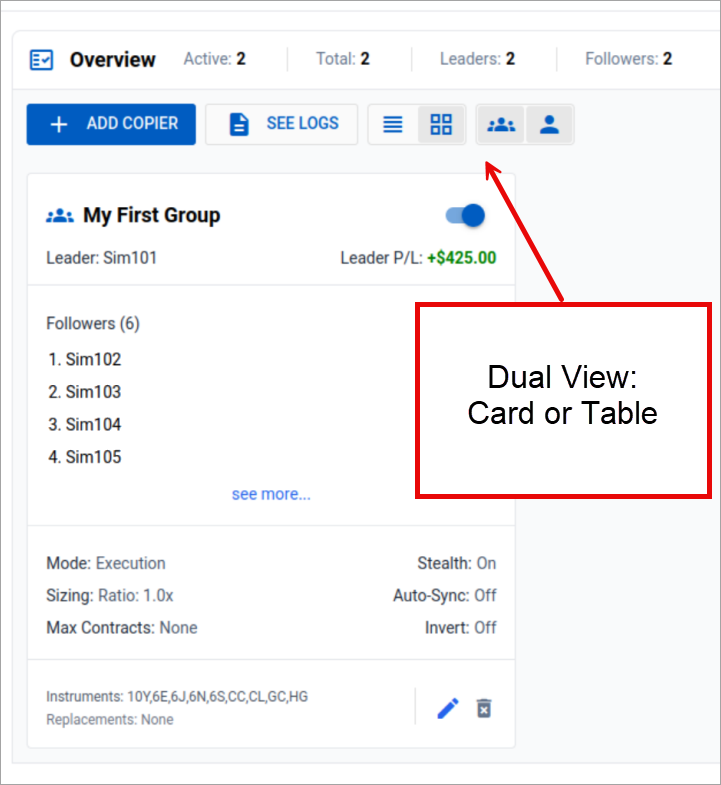
- Create custom groups to organize your copiers
- Enable or disable entire groups with a single click
- Apply settings to the entire group at once
- Standard Mode: Monitor stops the session if Account P/L targets are hit
- Unrealized Mode: Monitor never stops; flattens based on floating P/L
- Hybrid Mode (New): Hard stops for account safety + continuous position management

- New UI layout with overview bar and double header on Account Manager & Trade Copier
- Flatten button added to Trade Copier
- Click the visibility icon to hide/unhide any accounts

- Non-Emotional Colors: Removes green/red scheme that can trigger emotional responses
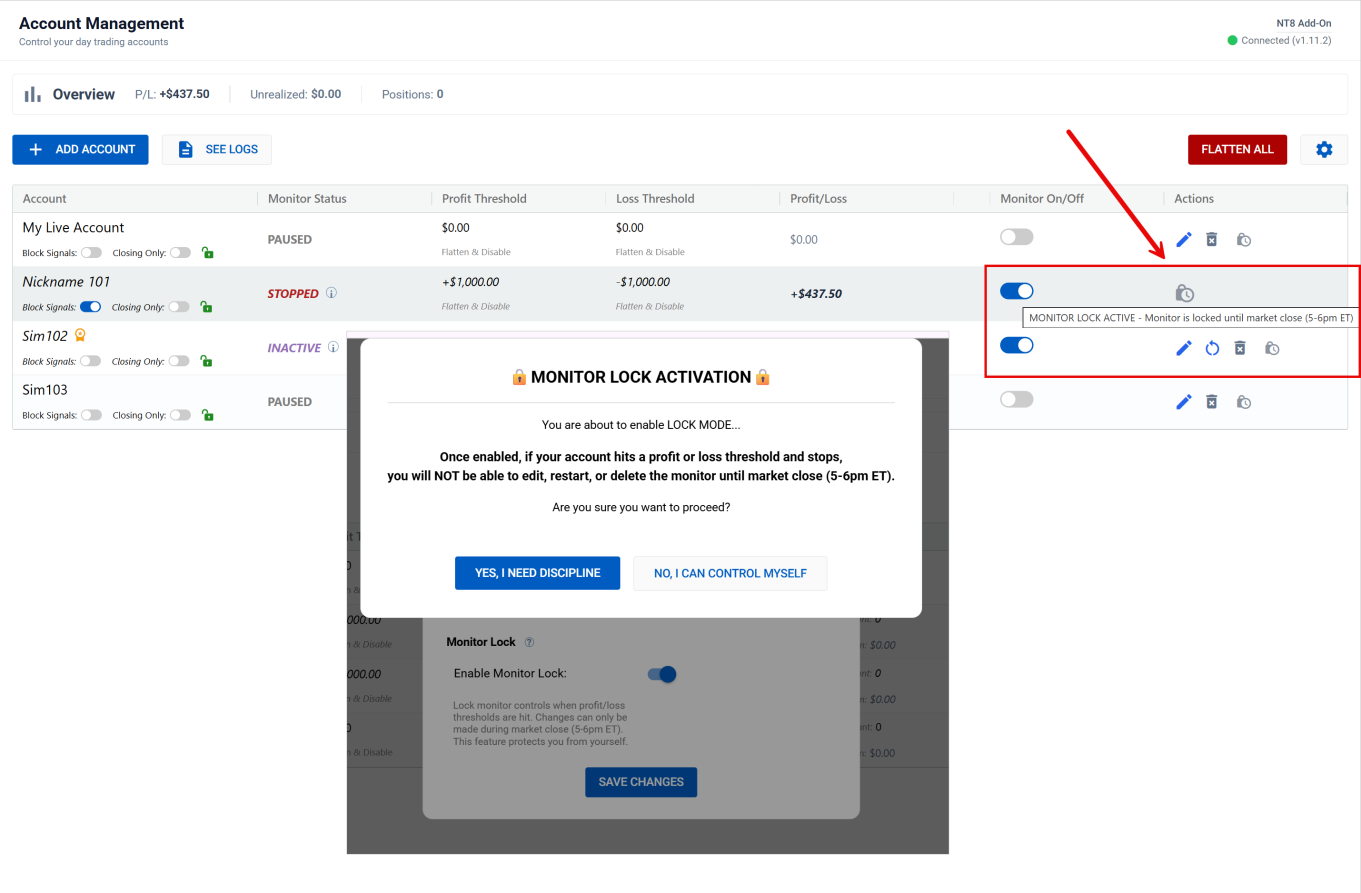
- Monitor Lock: When the monitor says you're done for the day, you're done
Add strategy_exit_block=true to your alert message to block exit signals from your TV strategy. Positions are managed entirely by your CrossTrade brackets/monitors.
- Copier Features: Dual Copy System, Tandem Block, Trade Inversion, Ratio Position Size, Symbol Replacements
- Instant Quoting: Streaming quotes from the add-on for instant retrieval





