How do I copy trades between NinjaTrader 8 accounts?
Install and connect the CrossTrade NT8 Add-On, then open Trade Copier in the CrossTrade dashboard. Add a copier, choose the leader and followers, select Order or Execution mode, and configure each follower’s sizing. Test entries, changes, cancels and exits in simulation. NinjaTrader must stay open and connected while copying.
Do I need TradingView to use the NinjaTrader trade copier?
No. You can trade the leader manually in NinjaTrader or use an automated order source. Order mode follows the leader’s orders and their supported changes; Execution mode copies its fills. TradingView webhook automation is available when you want it, but it is not required for copying.
Can I copy one TradingView alert to multiple accounts?
Yes, on either broker. The alert routes the trade into your leader account, and CrossTrade copies it out to every follower you mapped, applying that relationship's sizing, instrument and direction rules. There is no limit on the number of followers. Set sizing and controls per relationship, and test a full entry and exit flow in simulation or Demo before live use.
Does the copier keep running when my computer sleeps?
That depends on the broker. NinjaTrader 8 copying runs inside NinjaTrader on your machine, so it stops if the computer sleeps or NT8 closes, and a Windows VPS is the usual way to keep that desktop session online. Tradovate copying runs server-side in CrossTrade's cloud against Tradovate's API, so it keeps running with your computer off and needs no VPS.
Which order types can the copier place?
On NinjaTrader 8, Order Mode mirrors market, limit, stop, bracket and OCO management including changes and cancellations, while Execution Mode sends a market order to each follower on every leader fill. On Tradovate, Signal mode preserves order types and carries brackets as the same server-side OSO, Execution mode copies fills as market orders, and Order mode (beta) mirrors the leader's working orders. Test the order lifecycle you plan to use before enabling a live copier.
What happens when a connection drops mid-copy?
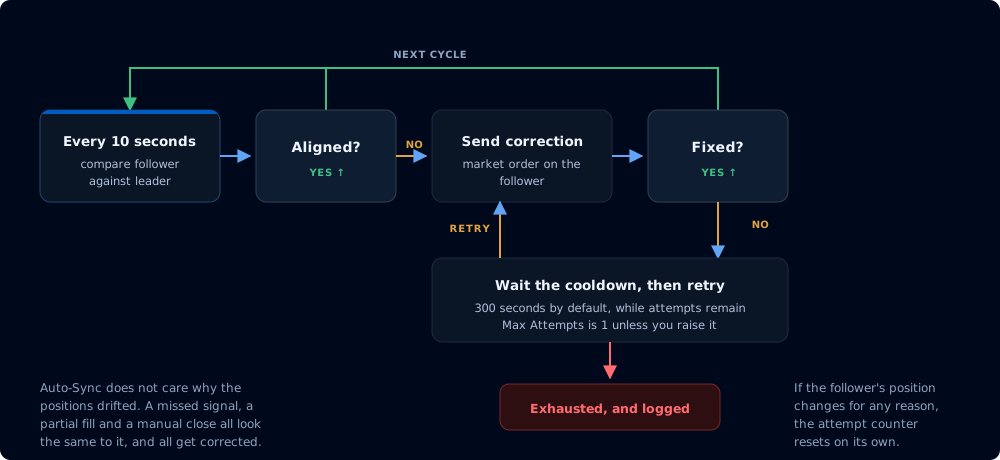
Reconnect Delay suppresses the burst of stale events that NT8 can emit after a broker connection returns. Auto-Sync then compares configured follower positions and can correct supported discrepancies. Review the copier log and each account after any disconnect because broker fills and reconnect timing can differ.
Can I set different risk limits per account?
Yes. Each copier relationship can use its own quantity ratio, fixed quantity, maximum position, instrument filter, and direction settings. CrossTrade Account Manager can add per-account monitoring controls. Verify every follower configuration in simulation before using live funds.
Do prop firms allow trade copying?
Policies differ by firm, account type, and program stage, and they can change. CrossTrade does not decide whether a firm permits copying and does not override firm terms. Check your firm's current rules and your specific account agreement before enabling a copier.

 NinjaTrader 8
 Tradovate trade copier